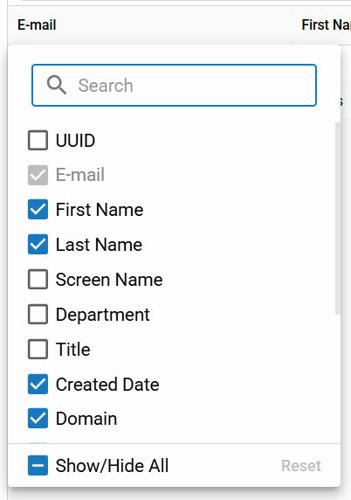
Additional column header options are available by clicking the three dots in any header.
blox nxt
Multi-Site Contact Search (BETA)
⚠️ BETA. Please pardon our dust, this area is under construction. ⚠️
Overview
The Multi-Site Contact Search feature makes it easy to find user information across all your sites and domains from one central location. Access it directly from theCommunity > Contactsapplication to quickly locate the details you need without switching between tools.
This overview describes the Search Form, Search Results and Search Results Headers.
📝 Please note, this feature is only activated for BLOX Audience+ partners.
Search Form
Find your users the following ways:
Email Address (supports exact and partial queries)
First Name (supports partial queries)
Last Name (supports partial queries)
Domain selection
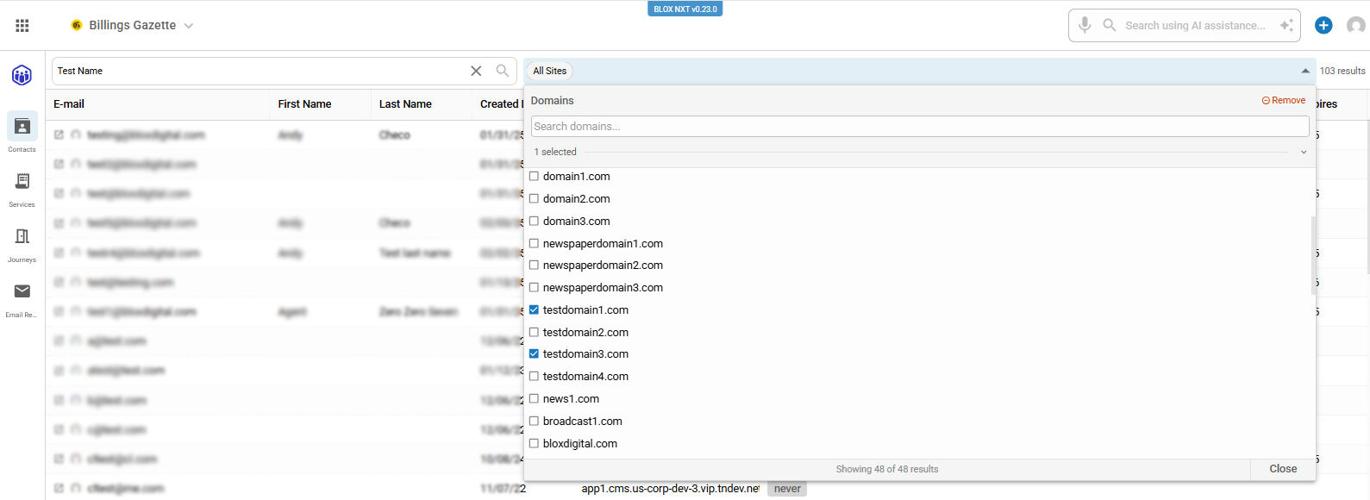
The "All Sites" option is on by default. Click the All Sites button to bring up a list of all accessible domains to filter.
The Multi-Site Search bar including site filter.
Search Results
Click on an individual Contact in the Search Results to open that Contact in the Single Customer View.
Search Results Headers
Sorting Columns
Results can be sorted in ascending/descending order by clicking the arrow within applicable field.
The page displays all results for one domain before moving on to the next. Broad search terms, such as “John,” may return hundreds or even thousands of results. For best results, search by email address.
Adjust Columns
Click the three dots on the right side of any column to bring up a menu of adjustments, including Pin Columns, Manage Columns and Hide column. Manage Columns will bring up a menu to include further filtering options.
Additional column header options are available by clicking the three dots in any header.