In the Campaign Manager in BLOX NXT Email Reach, you can choose to send to a segment or a list. Lists are groups of recipients who have opted to receive that newsletter. Segments help you to narrow lists based on combinations of engagement, lists they are on, or any personal information or custom data you have on your recipients.
Using segments can help you to keep your lists clean and help to keep volume levels under control. It also helps to keep your KPIs in healthy rage by not sending messages to users who are no longer interested in receiving your content.
Segments are all created in Constant Contact, and will populate as an option when creating a campaign in BLOX NXT Email Reach.
Creating a Segment
Log into your Constant Contact account and navigate to Audience>Lists and Segments. This page shows all lists or segments built in your Constant Contact account. Click Create New and choose Segment.
Name your segment, and you can add criteria that will define who the messages will send to.
Important Note: To send to a segment of your opt-in lists, you will need to ensure that you have a list included in your criteria so that opt-in and opt-outs will function correctly.
Suggested Segments and Criteria:
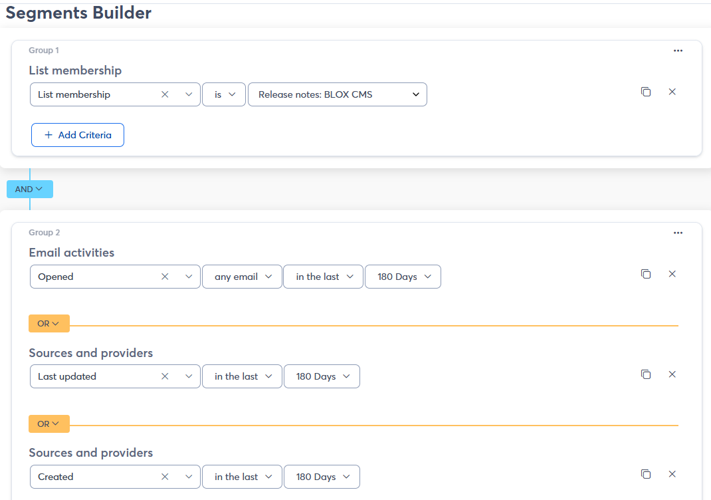
180-day active users on particular list: This segment will only send your newsletters to users who have interacted in some way with your emails in the past 180 days. This time frame can be adjusted to any time frame that you need. You will need to create a new segment for each active list that you want to segment
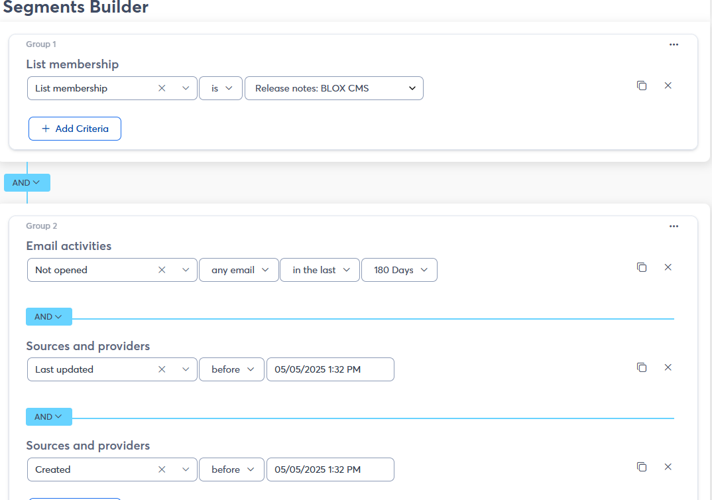
Re-activation of users on a particular list: This segment would target users who have fallen off of your active users on a particular list, and allows you to target them for re-activation. If a user opens or interacts with this email it will put them back into your active email users list.