Overview
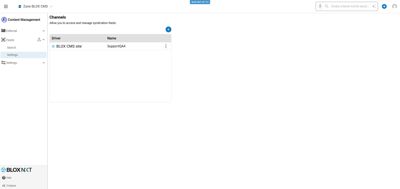
Channels provide administrators a centralized location to setup and manage feeds such as the BLOX Content Exchange, RSS, WordPress, AP, YouTube, etc., for a site. The following is meant to provide an overview of the Channels Settings.
⚠️ BETA. Please pardon our dust, this area is under construction. ⚠️
Channels
The Channels settings allows a user to Create a Channel, Delete a Channel, and to Create a Category Map for a Channel.
Create a Channel
To create a Channel, follow the directions below.
Click the ‘+’
Select the Channel Driver
Enter the Channel configuration options.
📝 Each channel features a unique set of configuration options. For additional information see Review of available Syndication Channels.
Click Add
Delete a Channel
To delete a Channel, follow the directions below.
⚠️ There is currently no delete prompt. Once you select Delete, the selected channel and any importers attached to the selected channel will also be deleted. ⚠️
Click the three dot menu next to the Channel you wish to delete
Select Delete
Create a Category Map for a Channel
To create a Category Map for Channel, follow the directions below.
Click the three dot menu on the Channel for which you wish to create a Category Map
Select ‘Category Map’
Click the ‘+’
Select one or more channel categories
Select one or more site sections
Click ‘Add rules’