

Status
The Apple News Integration is in a closed beta, meaning it is currently available only to a limited group of participating partners as we refine functionality, monitor performance, and gather feedback. This phase allows us to ensure the highest quality experience before releasing it more broadly. If your organization is interested in participating in the Apple News closed beta, please reach out to Customer Support and Solutions Support team. While we cannot guarantee immediate inclusion, we’re actively evaluating sites for the next wave of beta testing based on content type, publishing cadence, and audience reach.
Introduction
Introducing the Apple News Integration feature in BLOX CMS—a powerful tool designed to broaden your content's reach by seamlessly pushing articles to Apple News. This feature offers the opportunity to engage a wider audience, enhance brand visibility, and drive more traffic to your site. In this document, we'll provide comprehensive Setup Instructions, outline the necessary Prerequisites, and address common questions in the FAQ section to ensure a smooth integration experience.
Prerequisites
For BLOX CMS: To access this feature and set it up within BLOX, an admin account with access to Site Settings is necessary. You will need the following information from your Apple News Publisher account:
Channel ID (Apple)
API Key (Apple)
API Secret (Apple)
For Apple News:
Apple Developer Account: The publisher needs an active Apple Developer account, as this is required for using Apple News Publisher. Enrollment in the Apple Developer Program may involve a membership fee.
Sign Up for Apple News Publisher: After setting up an Apple Developer account, sign up for Apple News Publisher via the News Publisher website. Provide your publication's details, including its name, logo, and description.
Content Review and Approval: Apple reviews the publisher's content to ensure it meets their guidelines for quality and appropriateness. Publishers may be asked to make adjustments if needed.
Set Up Content Feeds: Publishers must configure content feeds that Apple News will use to pull articles. Instructions are provided in the How To section.
Legal and Payment Information: Publishers must provide legal and payment details, including tax and bank account information, for receiving revenue from ads displayed alongside their content.
Compliance with Apple News Guidelines: Publishers must adhere to Apple News guidelines related to content quality, ad policies, and other publication standards.
Use Cases
Automating Content Delivery to Apple News:
Use Case: A publisher wants to automate the process of pushing articles to Apple News.
Solution: Configure Apple News integration in BLOX CMS, apply the required Apple credentials, and define the sections and keywords that trigger automatic publication. The background task will push content to Apple News that meets the criteria, ensuring a seamless and efficient workflow.
Archiving Unpublished or Deleted Articles in Apple News:
Use Case: A news organization wants to archive unpublished or deleted articles rather than remove them entirely.
Solution: Use the Archive Section Mapping in the Apple News settings to map BLOX sections to archive sections in Apple News, ensuring that unpublished or deleted content is archived rather than deleted.
Managing Paywalled Content:
Use Case: A publisher needs to control which content is paywalled on Apple News.
Solution: In the Settings tab, use the Assets Criteria to exclude certain sections from the paywall by listing them as comma-separated values. This gives you control over what content is free and what remains behind a paywall.

How To
1. Configure Apple News in BLOX CMS
Apply Apple Credentials
From the Site Settings panel, select the Apple News option.
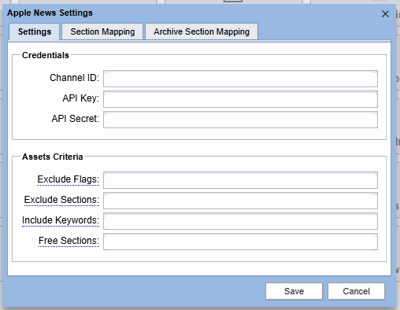
In the Settings tab under the Credentials section, enter your Channel ID, API Key, and API Secret.
Enter Asset Criteria
In the Assets Criteria section, specify the desired inclusions or exclusions (Flags, Sections, Keywords) as comma-separated values.
Override sections from being paywalled by entering them in a comma-separated list if your Apple News account has a paywall set up.
Map Apple News Sections to BLOX Sections
In the Section Mapping tab, enter the BLOX sections and corresponding Apple News Section IDs.
Each section should be added row by row.
2. Override the Default Apple News Template and Customization
By default, our Apple News integration uses a standard template for content presentation. However, there are a few key points to consider when customizing fonts, colors, and other design elements for your Apple News articles.
Fonts and Colors Customization:
The default template does not automatically apply custom fonts or colors. If your Apple News content requires specific fonts or color schemes that differ from the default template, these customizations need to be configured directly in the templates.
Action Required: If you need these customizations, submit a ticket to the Customer Support and Solutions Support team. You should only request customization changes after you have added the necessary settings in BLOX and your Apple News account.
The ticket should detail the specific font and color requirements so the support team can incorporate them into the template design.
Logo Handling:
Logos used in your Apple News articles will automatically inherit from the logo set in your Apple News Publisher account. There is no need to manually adjust the logo settings within BLOX CMS.
Customization Workflow:
Step 1: Ensure that you have added all necessary settings in BLOX CMS and your Apple News Publisher account, including any logos or branding elements.
Step 2: If you require additional customizations (fonts, colors, etc.), submit a ticket to the Customer Support and Solutions Support team.
Step 3: Once the ticket is submitted, the team will adjust the templates to match your customization requests.
3. Archive or Delete Assets from Apple News
Archiving Assets:
Use the Archive Section Mapping to specify where unpublished or deleted assets should be archived in Apple News.
Deleting Assets:
If you prefer not to archive content, the default behavior will delete unpublished or removed assets from Apple News. This can be adjusted in the configuration settings.
Apple News Background Task Overview
How the Background Task Works:
The pushAppleNewsAsset background task automatically pushes content matching your criteria to Apple News.
It loads the asset using a JSON template (<asset_url>.json?format=anf), parses the content, and submits it using Apple’s API credentials.
The task handles archiving or deletion based on whether the asset is unpublished or flagged for deletion.
Apple News Logging (Internal Use Only)
All stories pushed to Apple News via BLOX CMS are logged internally for monitoring and troubleshooting purposes. These logs include payload details, response codes from Apple, and any errors encountered during submission.
Default Template for Apple News Articles
BLOX CMS comes with a default template for publishing articles to Apple News. This template ensures that your articles meet Apple News Format (ANF) requirements, including proper formatting for text, media embeds, and layouts.
Overriding the Default Template
Sites that wish to customize the default template can override it. Newsroom designers can modify the template to suit their brand’s specific needs, such as adjusting layouts for titles, media, or embedded content. This allows for greater flexibility and personalization of the Apple News articles while leveraging the existing template structure for ease of use. Contact our Customer Support and Solutions Support team for assistance with this.
Supported Embedded and Inline Content
Apple News supports a limited set of embedded and inline content types. The default BLOX CMS template includes logic to handle these types appropriately. Below is a breakdown of what is supported and what is not:
Supported Inline & Embedded Assets:
Maps – If an asset contains valid latitude/longitude values and the site is properly configured with a HERE or Google Maps API key, a map will appear at the bottom of the Apple News article.
Audio Assets – Supported as inline audio playback.
Images – Individual images and image collections (galleries) are supported.
Social Media Embeds – Only supported if they are Facebook, Instagram, TikTok, or Twitter posts and are embedded using their official HTML snippets.
YouTube Videos:
Embedded as HTML assets
Or included as standard BLOX video assets
Link Assets – Will appear as clickable links.
Not Supported:
Generic HTML Content – Custom HTML (outside of approved social embeds) is not supported due to Apple News Format limitations. See Apple’s Unsupported HTML Tags for details.
Inline Articles – Currently not supported. Possible alternatives under consideration:
Displaying a URL link to the online article
Including metadata links (complex)
Linking to the Apple News version of the article (manual effort required)
Collections of Non-Image Assets – These are not currently supported and would require custom logic to detect and render appropriately.
Tables – Although a table object exists in ANF, implementing support is not planned at this time.
Files (e.g., PDFs, Docs) – Not supported and not recommended.
Best Practices
Consistent Section Mapping: Ensure that your sections in BLOX CMS are properly mapped to the appropriate sections in Apple News to avoid confusion and maintain content organization.
Monitor Content Criteria Regularly: Regularly review your Asset Criteria to ensure that the right content is being pushed to Apple News and that settings align with your content strategy.
FAQ
What do I need to integrate my BLOX CMS with Apple News? You need access to the Site Settings in BLOX CMS, along with your Apple Channel ID, API Key, and API Secret.
How do I configure which content gets pushed to Apple News? Define the sections, keywords, and flags in the Assets Criteria section of the Apple News settings panel.
Can I customize the template used for publishing articles to Apple News? Yes, you can override the default template and create a custom version to meet your specific design and content requirements.
- Can I embed custom HTML in Apple News articles?
Apple News does not support generic or arbitrary HTML embeds. Only a limited set of pre-approved HTML snippets—such as social posts from Facebook, TikTok, Instagram, and Twitter—are supported. Most custom HTML (e.g., charts, widgets, iframes, or styled divs) will be stripped or rendered incorrectly. We recommend converting content into supported BLOX asset types whenever possible. For more details, refer to Apple’s list of unsupported HTML tags. What happens if I don’t configure the archive sections in Apple News? If no archive section is configured, the system will delete unpublished or removed content by default.
How can I manage paywalled content in Apple News? Use the Assets Criteria section to specify which sections should bypass the paywall.
How can I test if my integration is working correctly? Test by creating or updating an asset in BLOX CMS and verifying its appearance in Apple News Publisher. Also, test archiving or deletion by unpublishing an asset.