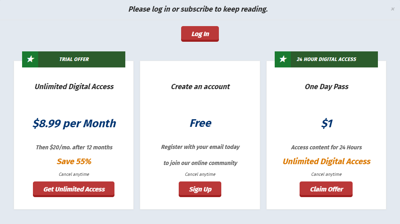
If you’re interested in running short-term subscriptions that do not auto-renew, BLOX Audience+ can support paid Day Passes.
As a best practice to grow monthly recurring revenue, we recommend running low-cost, paid introductory offers that automatically transition to higher monthly rates. Please be advised that micropayments, microtransactions and per-article payments have not been proven to increase subscription revenue over time.
Set up a Day Pass
- In the Subscriptions admin, create a new Subscription type service to run your Day Pass.
- Make sure you set up a notification email and add a description with bullet points on what users get with their day pass.
- On the Configure tab, make sure sure to:
- Select the right payment handler.
- Set Recurring payments and Force recurring payments both to NO.
- Fill out comment 1 and 2 fields for reporting/billing.
- Fill out the email notifications tab and complete the rest of the setup.
- On the Purchase Rates tab, create the rate(s) for your day pass.
- You can do a single day or multiple days.
- No need to set up transitions as this transaction will not auto-renew.
NOTE: Any time you create new Service, you need to add it to all of your Method Groups in Access Control. This tells Audience+ that your new trial service is one Method a user can be part of to get past each wall.
Add a Day Pass offer in Audience+
In Audience+, you can personalize your paywall and landing pages by targeting different audience groups with different offers.
Since non-renewing subscriptions do not generate as much revenue as auto-renewing ones, we recommend offering a day pass to one audience group for testing, to reduce the risk of long-term revenue loss.
For example, you may wish to offer a Day Pass only to users running Ad Blockers:
- Begin by navigating to Access Control in BLOX CMS.
- Locate your Ad Blocker rule in the list, and double click it.
- In the rules panel that comes up, look for the access offer group, and click the Edit button.
- If you’d like to make changes to messaging, edit the Paywall Headline field on the general tab. Otherwise, click the Offers tab.
- Click New, then click Start with a Rate.
- Select the Day Pass service you just created, click the rate, then click Select.
- Fill out the fields in the offer builder window, then click Create.
- Save and close.