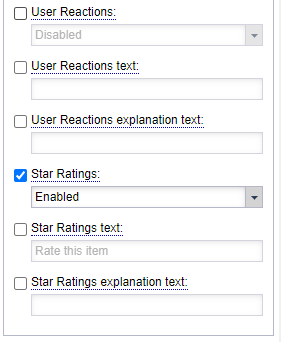
Star Ratings options are available within the Page Customizations, within the Social Tools panel.
Star Reactions: This property enables the Star Reactions toolbar at the bottom of article assets. It can be used to gather ratings data from users, which can then be seen in data analysis or can be used as sorting criteria in blocks. Option include:
Inherit from user settings: This setting is not presently working but will be updated as we improve the feature to allow disabling Star Ratings per article in the future!
Disabled: This setting will disable Star Ratings for the URL.
Enabled: This setting will enable Star Ratings for the URL.
Star Ratings Text: This property creates a title above the Star Ratings toolbar. By default, it is blank.
Star Ratings Explanations Text: This property creates a bit of smaller explanatory text below the Star Ratings heading. It can be useful for details about Star Ratings to end users. By default, it is blank.