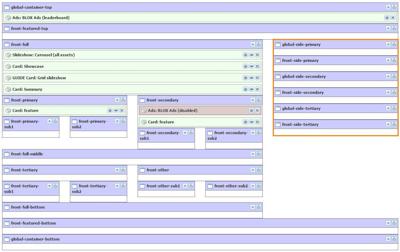
There are three Regions you can use (Global, Front, and Index) that are part of the Flex Templates that allow you to place specific content on the right rail of a Front Page or an Index Page without having to use the Global Region that applies to the entire site.
The following Regions available are:
| Global Region | Front Region | Index Region |
|---|
| global-side-primary | front-side-primary | index-side-primary |
| global-side-secondary | front-side-secondary | index-side-secondary |
| global-side-tertiary | front-side-tertiary | index-side-tertiary |
NOTE: The Front-side-tertiary and index-side-tertiary regions have a select amount of layout grids to work with and will not inherit down into the Article Asset level. Those are done using Utility Regions (see Utility Regions).
NOTE: The frontpage Regions will only exist under Front Pages and index would only exist under Index Pages.
NOTE: If you enable Infinity Scrolling, this content will show up if you use the Story Summaries with Side Rail option set. For more information, Click Here.
NOTE: The Simple Wireframe Grid choice does not include the tertiary, Global, Front, or Index regions.
NOTE: All can be turned on/off using the Sidebar Setting under the URL Page Customizations.