As explained in the Content Blocks document, each block displays results based on set Query Rules and the block Appearance options allows you to further refine the display of those assets in a holistic manner.
In the event you’d like to manipulate the Headline or Summary for a particular asset on an individual block, the Display Override feature allows you to do this.
How to use Display Override
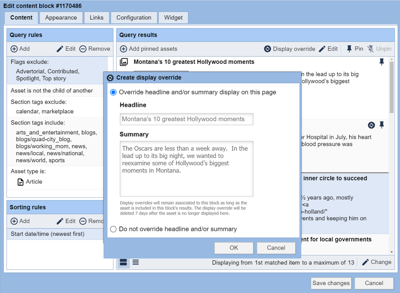
To use the Display Override feature, first select an asset from the list of Query results.
Next, select the asset with which you’d like to alter the display of the Headline or Summary. Click the “Display override” button from the toolbar.
By default, nothing is overridden and the “Override headline and/or summary display on this page” option will not be selected.
Selecting the “Override headline and/or summary display on this page” option will permit you access to then update the Headline and Summary fields for that individual asset, for that particular block. These fields will be populated with either the asset’s Headline and Summary or their pre-existing override, if already set.
How to remove a Display Overrides
Updates made to an asset will remain associated to that particular block as long as the asset is included in that block’s results. The display override will be deleted seven days after the asset is no longer displayed in the block.
To remove an override for an existing asset/block manually, simply select the “Do not override headline and/or summary” option per asset and the asset will revert back to its default Headline/Summary.
Best Practices
The Display Override feature is available for all editorial assets types including articles, collections, videos & more. This feature is presently exclusive to Editorial block types.
The Headline/Summary fields are pre-populated with their inherited entries, allowing easier access to:
- Change one character or word without having to retype everything.
- Localize evergreen story from another site, when Syndicated (i.e. remove city names).
- Shorten headlines that have otherwise been lengthened for SEO or legal purposes.
- Remove repetitive words that may appear in multiple top stories.
These fields do not currently support HTML, just plain text.