Story: Badgers men’s basketball: Game-by-game capsules of the Big Ten season
BLOX Now analytics documentation
The BLOX Now app is currently a hybrid app. A hybrid application (hybrid app) is one that combines elements of both native and Web applications. Native applications are developed for a specific platform and installed on a personal device, often times through app stores such as Apple Connect and Google Play. Web applications are generalized for multiple platforms and not installed locally but made available over the Internet through a browser.
The hybrid nature of the NOW app differentiates this app from almost all other local media technology vendors. The reason for this design is the advantages customers gain from connecting to BLOX article designer. The NOW APP template is specifically designed to talk to the BLOX CMS while removing necessary pieces from the article pages to ensure a quick load time of content. The BLOX template admin tool also handles multiple customizations such as colors for backgrounds, headers, breaking news, pinned content as well as allowing for control of text colors. The dynamic approach for changing these customizations reduces expensive and time consuming app releases for trivial enhancements. The main difference in the NOW app today is all article pages are controlled by the BLOX CMS and viewed in a WebKit browser in the app.
The app is designed for an optimal user experience and provides a common environment often used in social media. For example, the Home Asset feeds as well as the Topic feeds mirror social media’s endless scroll behavior. Also, the app provides the customers the latest information with the fewest amount of clicks. Other apps are built using the “kitchen sink” mentality where the app regurgitates all web site content and repurposes it in an app environment. This design tends to benefit the local media company but not necessarily its customers. Simple navigation that guides users to content with less clicks provides a more successful environment for users to connect with your content. The social media like experience ensures your users will not have to “learn” to use your app; instead, the can immediately begin engaging with your content. Less clicks might result in fewer screen views but this design gives you the opportunity to increase the usage and revenue and retain the customer over a longer period of time. If the user experience is good, users tend to keep coming back time after time.
Unnecessary navigation for the customers to reach desired content while it may increase screen views, is extremely frustrating for users, especially on mobile devices. Studies have shown forced user navigation will not provide the long-term results expected to meet your KPIs and goals.
So the BLOX Now app is targeted at marrying these two very different experiences. The BLOX Now app design purpose is to combine the business and user model into an app experience that works for everyone. Below is additional information to help educate your staff and also assist you with preparing messaging as you market and sell the BLOX Now app:
There is no forcing the customer to click to see content. Scrolling is a measurement that should be considered in the story you tell your advertisers.
Headlines do not get a screen view in the asset feed as a user is scrolling
The viewability of our BLOX Now app ads is extremely high due to the app workflow and our ability to lazy load. This should be very attractive to any advertiser as it optimizes sight of those ads..
All vendors differ slightly in metric collection in apps. It is important to thoroughly read the analytic documentation to understand what is being tracked and where. For example, some vendors track “home screen” as an event. This is already being tracked when the app is launched under “launch”. The home screen cannot be bypassed and it is not necessary to track as a separate metric.
There is a percentage (%) of decrease in app analytics that should be expected when changing vendors. This can happen for various reasons, such as:
15-30% decrease in users is to be expected when the app changes because users must re-sign up/in. However with good promotions this should be made up over the course of a couple of months. Note: It’s highly important to the growth of the user base to have marketing and promotional campaigns targeting your BLOX Now app. This will help transition current users as well as attract new users.
Inactive users will not switch over
These users will still be reflected in the old app version download numbers giving you an inaccurate representation of your user base so be sure to factor this in when comparing the two app stats by using app version as a filter.
Manual app updates is a personal setting on a user’s device that we do not have control over. This sometimes causes several weeks of a delay for a user to update the app even if they are an active user because users have to go to the App Store to force an update on their device.
Furthermore, users, in general, take their time to update apps on their personal devices. Below are some different scenarios that might delay a user to update their app:
Users have to open the app in order for the automatic update to respond. This again might take several weeks. Don’t assume all users open the app every day. It might not be until there is a breaking story in your area they are interested in viewing that they launch the app again.
Some people don’t like change and will stay on the old app for as long as possible.
Success Metrics
Screen Views are a common metric used to determine the success of an app. What screen views are being tracked can vary from vendor to vendor. We have provided screen view tracking in this documentation so it is clear what is being tracked.
Usage of the app will likely remain flat initially and increase over time. Monitor it closely, make sure you have promotions and other marketing activities in place to influence readers to download/use the app. For example, you can promote the notification alerts.
App Advertising Revenue likely will start flat and increase, especially as users and time on app increase. The design of the apps in the asset and topic feeds is to treat the ads as native ads. This works with the content and not against it and allows for your ads to be served/viewed as much as your content in the feeds. Again ads have high viewability which should aid in achieving optimal CPMs. Remember to take the viewability into consideration when selling local ads as this gives you an opportunity to charge a higher rate.
Native Application Tracking in Google Analytics: (i.e. iOS and Android Apps)
Screen Views for Native App Events:
Home
Favorites
Notifications
Topic
More
About us
Privacy Policy
Terms of Use
Settings
“Weather”
“Favorites”
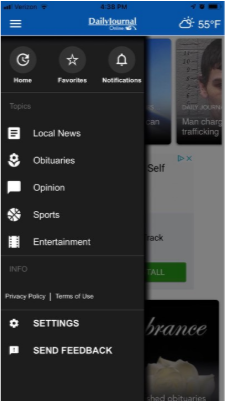
Visual of Menu:
“Link:” + the asset title – this when the viewer clicks on a card and is taken to the article view
“Link:” + the asset title – when a viewer swipes from article to article (this is added in version 2.3)
“Link” + the asset title of any link contained within the article
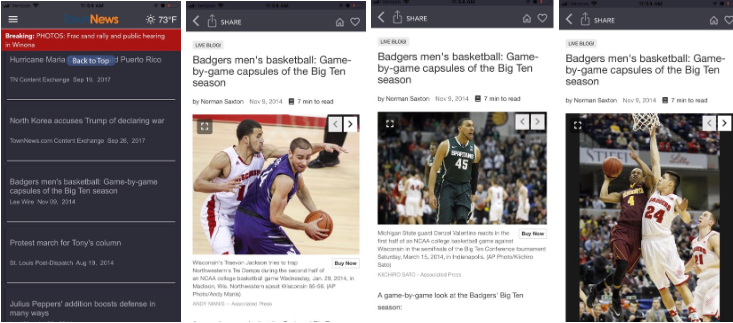
Photos and Photo Galleries contained in an article
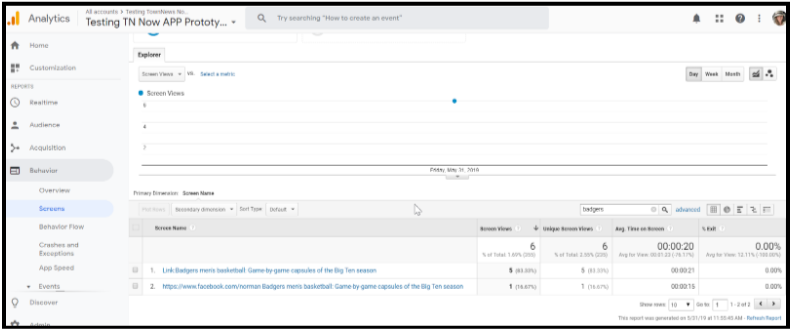
Photos in an gallery are all captured under the same Title in GA on the same line
Example of Photo Gallery Tracking:
Story: Badgers men’s basketball: Game-by-game capsules of the Big Ten season
Additional Events:
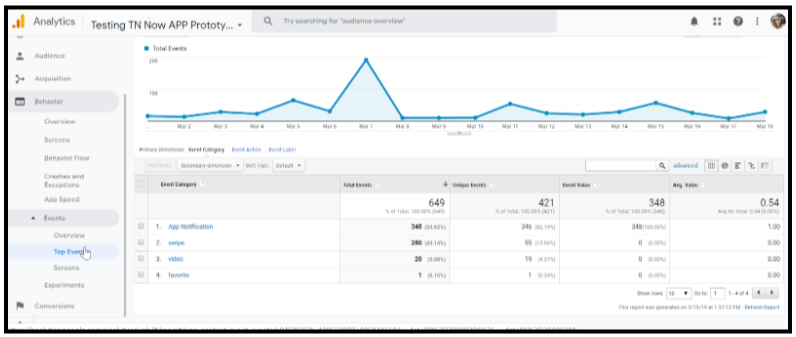
The following are calculating in the “swipes” events:
Swipe left
Swipe right
Video and Audio Player native app state events:
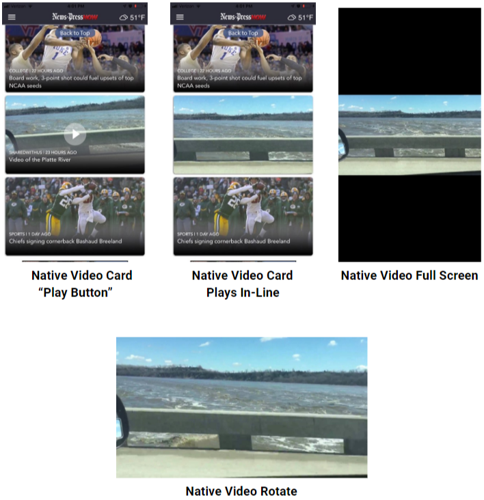
Native app videos are any videos that the app does not view as 3rd-party videos. YouTube and CNN for example are 3rd-party or remote videos. These videos are handled as the articles are in the app. They play on the same video player that your website utilizes and open in a WebKit page.
Native videos are any videos that have been uploaded to BLOX or a VMS that has been approved and developed for native app use such as Field 59. They utilize players from Android and Apple for native app activity.
Native videos are indicated with a play button on the video asset card in the home asset feed. See screenshot below” Native Video Card “Play Button”
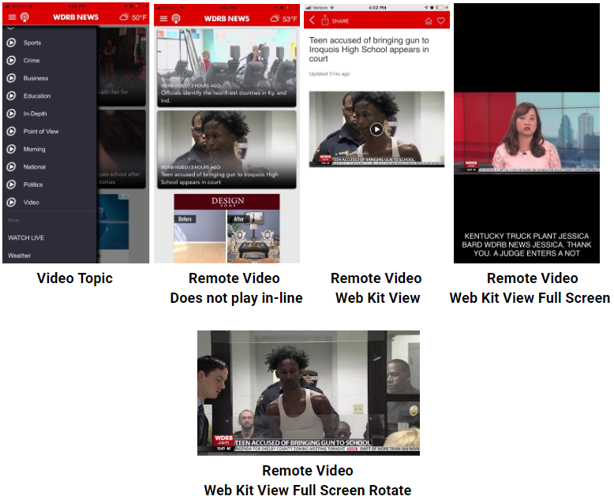
Remote videos or 3rd-party videos will not have a play button over the thumbnail. When you click on the asset card, the video will be exposed in a web view in the web player utilized on your site.
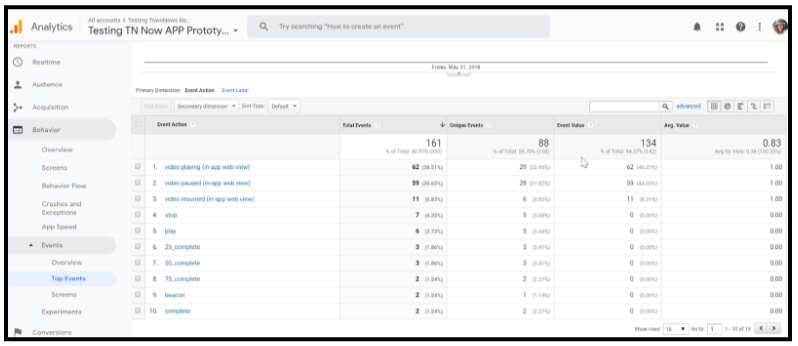
Below are the metrics for NATIVE app videos. (Native is any video that is uploaded through the BLOX CMS or Field 59. The raw mp4 videos are exposed to the native platform players for Google Play and Apple.
Play
Pause
Resume
25% content played
50% content played
75% content played
Stop
Complete
Beacon
Below are the metrics for Remote Video appearing in an article view. Remote videoS in Webkit view EW any video that appears in a webkit view; most commonly in articles.
video playing (in-app web view)
video paused (in-app web view)
video resumed (in-app web view)
Video ended (in-app web view)
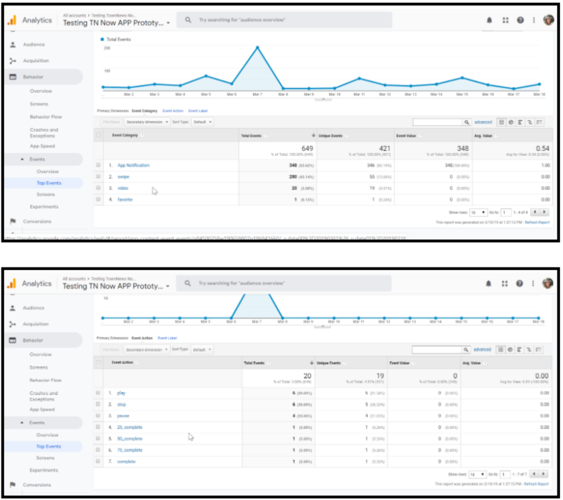
In your BLOX Now app analytics, follow the steps below to see metrics:
Select Behavior
Select Events
Select Top Event
Select Video
Push Notifications:
We originate our push notification from the “Notifier” in the BLOX CMS. This is connected to Firebase and Firebase pushes notifications on Apple and Google platforms. Due to the origination of the message being in BLOX, Firebase does not pick up individual messages and track performance see below for how GA tracks this information. Firebase gives you overall numbers but keep in mind due to Firebase working out bugs in the reporting, there are discrepancies for IOS. Apple and Google continue to work on better reporting for Firebase for IOS.
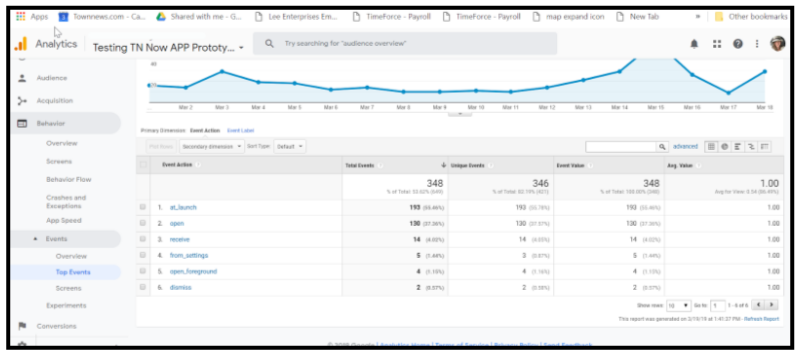
To provide better analytics, we are pushing the following GA Events through our GTM container and pushing them to your UA-ID associate with the BLOX Now app.
We are tracking:
Event name
Category
Action
Label
Value
tn_notification
App Notification
open
event title
1
tn_notification
App Notification
dismiss
event title
1
tn_notification
App Notification
open_foreground
event title
1
tn_notification
App Notification
receive
event title
1
tn_notification_opt_in
App Notification
at_launch
topic
1
tn_notification_opt_out
App Notification
at_launch
topic
1
tn_notification_opt_in
App Notification
from_settings
topic
1
tn_notification_opt_out
App Notification
from_settings
topic
1
To view your push analytics, follow the below steps.