
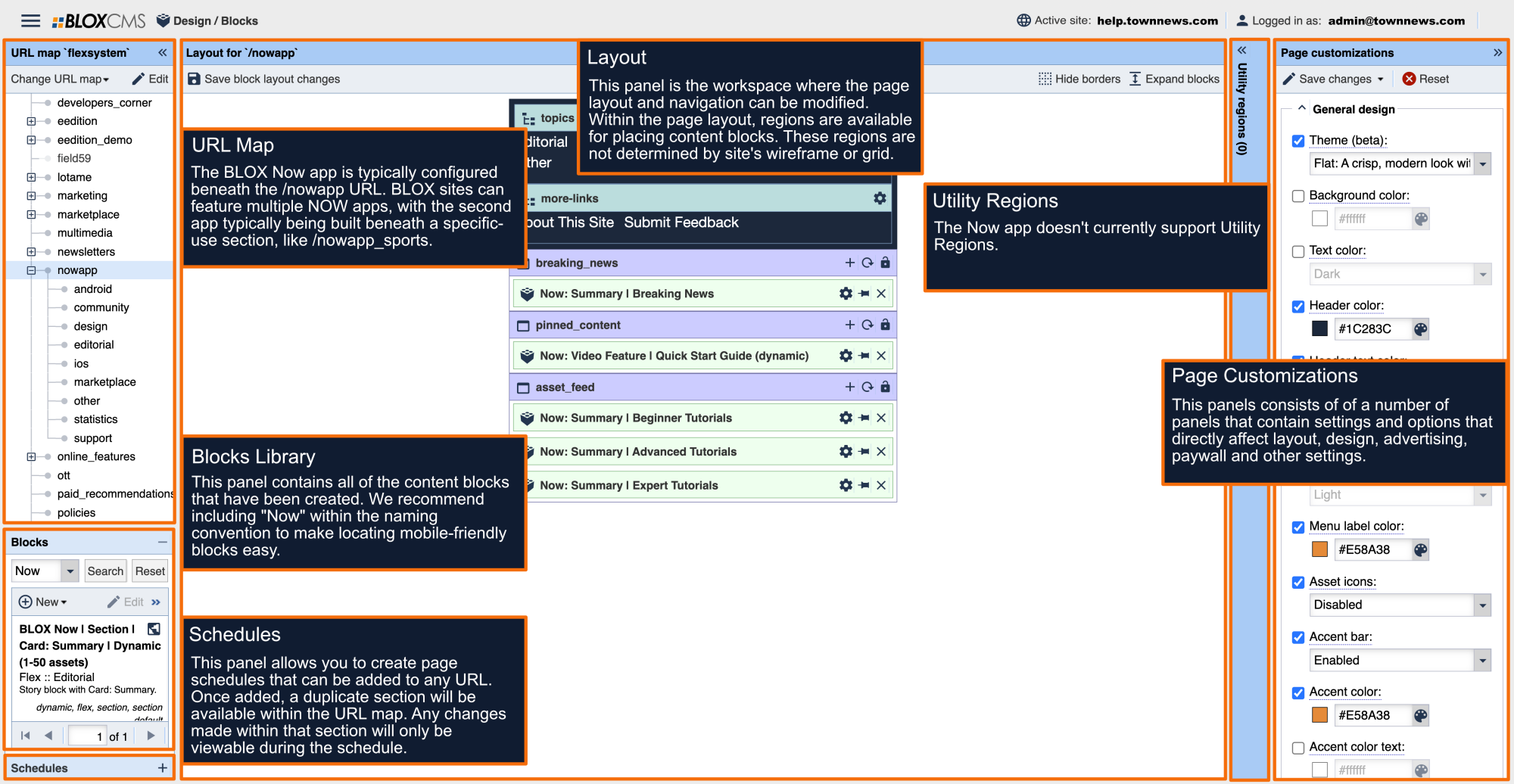



The Page Customizations panel consists of a set of configuration options that define the Now app user-experience.
General design
Theme: Defines the theme of the app. Options include Flat and Rounded.
Background color: Sets the app background color.
Text color: Sets the app color over the background color. Options include Light or Dark.
Header color: Sets the app header background color.
Header text color: Sets the app header text color. Options include Light or Dark.
Menu background color: Sets the background color of the slide-in menu.
Menu link color: Sets the text color over the slide-in menu.
Menu label color: Sets the text color of the menu labels within the slide-in menu.
Asset icons: Sets the display of asset icons on all blocks that offer that feature.
Accent bar: Sets the display of asset bar on all blocks that offer that feature.
Accent color: Sets the color used against the background color on buttons and highlighted text.
Accent color text: Sets the accent color for text on items using the accent color.
App launch behavior: Specifies a page to displays when a user first launches the app.
Date format: Sets the display of asset dates.
Asset source: Enables or disables the asset source display.
Navigation
Section icon: Set an icon to be displayed within this URL.
Login navigation display: Enable or disable the navigation display.
"Topics" menu label: This property customizes the label of the Topic menu.
"More" menu label: This property customizes the label of the More menu.
"Info" menu label: This property customizes the label of the Info menu.
About text: Set the "About Us" link text.
About URL: Full URL to the About Us page.
Privacy text: Text displayed as the Privacy Policy link text.
Privacy URL: Full URL to the Privacy Policy page.
Terms text: Text displayed as the Terms of Use link text.
Terms URL: Full URL to the Terms of Use page.
Feedback email: Email address for feedback submission.
Advertising
GAM banner ad unit: Google Ad Manager banner ad unit.
GAM banner ad interval: Google Ad Manager banner ad interval.
GAM banner ad interval display: Google Ad Manager ad interval display. Options include Blocks, Assets and Manual placement.
- Blocks: Ads will serve between content blocks based on the set ad interval.
- Assets: Ads will serve between assets based on the set ad interval.
- Manuel placement: Ads will be served within ad blocks that have been manually placed throughout the layout.
GAM video ad unit: Google Ad Manager video ad unit.
GAM video ad interval: Google Ad Manager video ad interval.
GAM video ad custom keyword: Google Ad Manager video ad keyword.
GAM launch ad unit: Google Ad Manager launch ad unit. (Displays when the app first launches.)
GAM interstitial ad unit: Google Ad Manager interstitial ad unit. (Displays between article views.)
GAM Interstitial ad interval: Determines the number of stories that will be swiped through before an interstitial ad is displayed.
GAM asset ad unit (override): The ad unit in this field will be used to serve GAM ads in all available ad positions on asset pages, allowing you to target ads specifically to the Now app.
GAM home/topic sticky ad unit: Defines the ad that will be used for sticky ads (displayed on home and topic pages).
The follow ad sizes are supported:
- 300 x 50 px
- 300 x 100 px
- 320 x 50 px
- 320 x 100 px
GAM webkit/asset sticky ad unit: Defines the ad that will be used for sticky ads (displayed on asset pages).
- 300 x 50 px
- 300 x 100 px
- 320 x 50 px
- 320 x 100 px
Splash screen overlay: Displays a sponsor image on the app splash screen. (Max 596 px x 390 px)
Live stream banner
Schedule: The Field59 XML schedule feed.
URL: The page that user will go to after banner as been clicked.
Banner background color: Background of the banner strip.
Banner text color: The text color of the banner strip.
Banner description: The headline text to the right of the "live" label.
Video player: Enable the live stream video player. Options include Enable or Disable.
Video player thumbnail: Image size: 720 x 480 px
Play button color: Background color of the "live" label.
Play button text color: Text color of the "live" label.
Play button title: The wording for the "live" label.
Inactive alert background color: Background color of the "live" label when no shows are active.
Inactive alert text color: Text color of the "live" label when no shows are active.
Inactive alert title: The wording of the "live" label when no shows are active.
Weather
Weather icon display: Enable/disable the weather icon.
Weather zip: This property override's the site's zip code (as defined within Settings > Site) for use in the weather blocks.
Custom weather URL: Full URL to a custom weather page.
Weather settings display: Enable/disable the in app weather configurations options.
Paywall
Web paywall restrictions:Enabling paywall will implement existing paywall settings which come from the editorial section of each article. Options include Enabled or Disabled.
Native paywall: Enable native app paywall.
Promo title: Sets the title for the native paywall.
Promo subheading: Sets the text for the promo subheading.
Promo description: Sets the description on the native paywall.
Promo text color: Sets the color for the native paywall text. Options include Light or Dark.
Background color: Sets the native paywall background color. Options include Light or Dark.
Offer button color: Sets the button color in the native paywall.
Offer button text color: Sets the color of the native paywall button color text. Options include Light or Dark.
Default Image upload
Default image upload large (2048 x 1152): Image replaces the default image used in the app when no image is associated with the article.
Default image upload medium (380 x 422): Image replaces the default image used in the app when no image is associated with the article.
Default image upload small (750 x 422): Image replaces the default image used in the app when no image is associated with the article.
PWA (experimental)
Header logo: This property defines a logo to be used as the header on PWA UI.
Name: The name manifest property is used on the app install prompt.
Short name: The short name manifest property is used on the user's home screen, launcher or places where space may be limited.
Background color: The background color manifest property is used on splash screen when application is first launched.
Theme color: The theme color manifest property sets the color of the toolbar.
Home screen icon: Icon used when a user adds your site to their home screen. Requires a PNG image type that is exactly 192 x 192 px in size.
Splash screen icon: Icon used when the application is launched. Requires a PNG image type that is exactly 512 x 512 px in size.
Twitter site username: Used for social sharing this property defines the @username the site's Twitter account.
Messages
Log in headline: Adds a promotional headline above the login box.
Log in details: Creates small informational text below the login form.
Sign up headline: Adds a promotional headline above the sign up button.
Sign up subhead: Creates a subheadline below the main headline.
First talking point: Creates a talking point on the promotional page.
First talking point image: Creates a talking point image to be displayed on the promotional page.
Second talking point: Creates a talking point on the promotional page.
Second talking point image: Creates a talking point image to be displayed on the promotional page.
Third talking point: Creates a talking point on the promotional page.
Third talking point image: Creates a talking point image to be displayed on the promotional page.
Sign up details: Creates small informational text below the promotional talking points.