Overview
The Sticky Anchor ad is a Utility Region that 'sticks' to the bottom of the page in all view port sizes (mobile friendly). Ads work particularly great in this region because the stickiness of the region, places the ad in all view portions of your site, improving Viewability. The Sticky Anchor ad has a toggle (+ / -) on the top/right of the Utility Region so the add can be collapsed. By default, the ad is visible until the user hides it.
Viewability
Viewability is the measurement of an Ad that is actually viewable on a website and not the count of an impression of the Ad when a page loads. There are new initiatives in the Marketing and Advertising industry that are developing ways to target the viewability of ads. BLOX CMS, has developed ad types that help sites meet the viewability standards being set. In addition to the ad types, we are adding in technology that manages how a page loads regarding speed, lazy loading, and the ability to target ads that are actually being viewed whether on desktop or mobile.
Implementation Steps
NOTE: These steps assume the ad has been created and ready for placement.
Enable The Utility Region
- In the upper left corner, navigate to Design / Blocks (application opens).
- In the URL's, double click on the URL to open and lay it out.
- On the far right, next to Page Customizations, expand Utility Regions.
- Expand All Pages and click on Sticky Anchor (this reveals the fields for the utility region).
Select/Create Ad Block Type
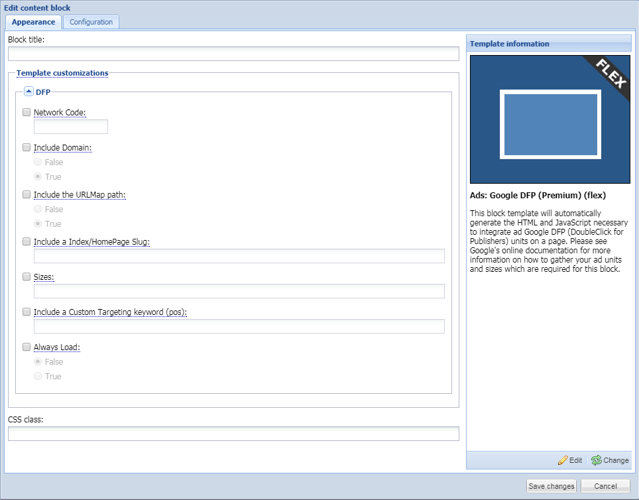
To capture Viewability metrics, you'll need to be using Google Ad Manager. Select the GAM Ad Block you need. To do so:
WARNING: Viewability metrics are only recorded using GAM Premium. While other GAM Ad Blocks can be used for Ads, GAM Premium is the one you need to use for Viewability.
- While in Design / Blocks, on the left, in the Blocks Library, click on New and select Content Block. The Blocks open.
- On the left, click on Static block type.
- Select the Ad Block you need and click on Continue on the lower right corner.
- Under Appearance, fill in the applicable information in the GAM fields.
- Under Configuration, add to the Name something more descriptive about the block.
- Click on Save (block closes and is not available in the Block Library).
Add The Ad Block in Utility Region
- While in Design / Blocks, find the Ad Block you created and select it.
- In the All Assets / Sticky Anchor Utility Region you have enabled, click on the Add button towards the bottom. This positions the ad in the Utility Region. You can also left click on the Ad Block and drag it over to the Utility Region.
Save Layout Changes
- Once you've placed the Ad Block, on the Map Layout toolbar, click on Save Layout Changes.
Resources