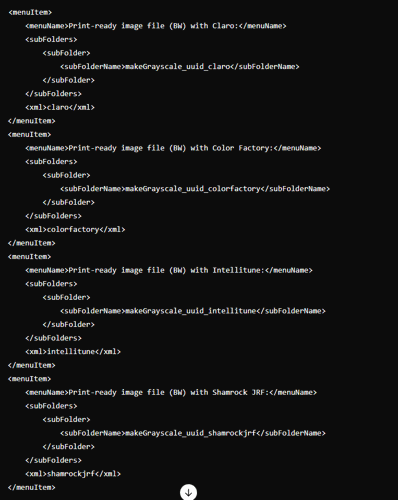
Modify your Image Toning preferences XML file to include new options for the 4 different types of XML export. A sample of those menu items are above.
Ask your site's BLOX Total CMS Template Manager to upload the file to Page Tracker for Distributed Production global use.
Technical documentation for Distributed Production Image Toning via Image Export in BLOX Total CMS
Overview
A new feature for BLOX Total CMS for Adobe InDesign users allows Distributed Production users to perform image toning via Image Export by modifying the image toning preferences XML file. This enhancement supports four types of XML export used by familiar image toning services and vendors, enabling streamlined processing and export of images through various toning engines such as Claro, Color Factory, Intellitune, and Shamrock JRF.
Prerequisites
You will need to modify the Image Toning preferences XML file directly. We recommend your site's BLOX Total CMS Template Manager or IT department handle this change.
Step-by-Step Instructions
1. Check XML Export Options
Ensure that your system supports the XML export feature. This functionality is essential for the distributed image toning process.
2. Modify the Image Toning Preferences XML File
Locate your Image Toning preferences XML file. This file is typically managed within your site's CMS directory.
Open the XML file using a text editor with administrative privileges.
Add the following menu items to the XML file to support the different types of XML exports. These menu items correspond to the four toning engines available:
Modify your Image Toning preferences XML file to include new options for the 4 different types of XML export. A sample of those menu items are above.
3. Save and Close the XML File
Once you have made the necessary changes, save the XML file.
Close the text editor to ensure the changes take effect.
4. Verify the Changes
Ask your site's BLOX Total CMS Template Manager to upload the file to Page Tracker for Distributed Production global use to verify that the new menu options appear as expected from the BLOX Total CMS > Image Statuses menu.
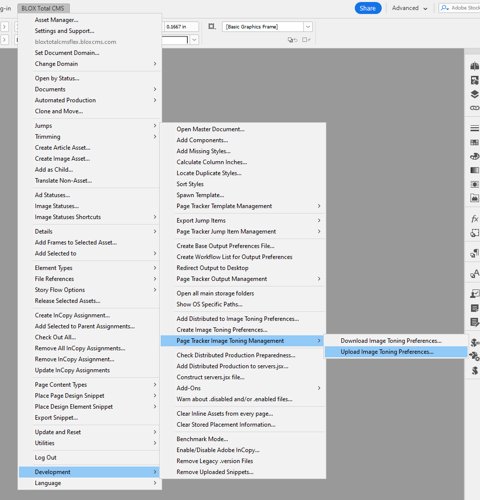
To upload the file to Page Tracker, your site's BLOX Total CMS Template Manager will need to log in to Development Mode > Page Tracker Image Toning Management > Upload Image Toning Preferences...
Ask your site's BLOX Total CMS Template Manager to upload the file to Page Tracker for Distributed Production global use.
Perform a test export to ensure images are correctly toned and processed using the selected XML export option.
Conclusion
This feature allows for enhanced flexibility in processing print-ready image files through various toning engines. Following the steps outlined above, you can configure your BLOX Total CMS to support Distributed Production image toning tailored to your specific workflow needs.