



IMPORTANT NOTICE: THIS VERSION REQUIRES A HOTFIX PATCH TO CORRECT AN ISSUE WITH NOTIFIER. AFTER INSTALLING, CHECK FOR HOTFIXES AND APPLY. THE HOTFIX DOES NOT REQUIRE A RESTART. APPLIANCE 2.25 INCLUDES THIS FIX.
Hotfix download location: https://updates.tn-cloud.net/release/hotfixes/hotfix-post2.24.0-bloxnotifier/
Note #2: Due to a change with how "print only" content is displayed on appliances, you will need to re-save any AP Legacy Feed (webfeeds) importers you have set up in Syndication. To do so, open the importers one at a time and perform the following steps:
- Click the "Set as current search"
- Click "update from current search"
- Click Save
This release of TotalCMS 2.24 includes the UI refresh that came to hosted at the beginning of 2019. This release also includes the changes that were made to address AP Agate changes announced in August. You are encouraged to continue using the latest version of the InDesign client to ensure you have the latest AP Agate changes.
Major Included Packages
- BLOX CMS version 1.43.2 (from 1.42.7)
- BLOX Total CMS Client for Adobe InCopy and Adobe InDesign version 5.36.26-10 (from 5.35)
- AP version 4.16.4 (from 4.15.5)
- Syndicate 1.17.1
BLOX CMS version 1.43.2
Major Changes:

UI Refresh! This version includes the UI refresh that was rolled out to Blox Hosted several months back. (TNCMS-3463)
Improvements:
Notifier is now part of the editorial application now, replacing the "Broadcast" feature. The notifier application provides additional functionality beyond the Facebook/Twitter integration of Broadcast. Read more about this feature here. (TNCMS-6347)
- Switched to a new email framework for improved performance. (TNCM-S6559)
Bug Fixes:
- [TNCMS-6761] - The Post By Email feature will create a new article in BLOX CMS when it receives an email from a specialized address. On TotalCMS, it took up to 15 minutes for the email to be created, and this has now been reduced to only 1 minute.
- [TNCMS-6413] - Facebook user account doesn't support paging
- [TNCMS-6451] - totalcms/SearchAssets webservice ignores Saved Search data
- [TNCMS-6462] - Push notification empty check on custom URL always fails
- [TNCMS-6469] - BLOX Notifier messages sometimes show paragraph tags
- [TNCMS-6476] - Error: Undefined variable: oCache error using Forgot Password
- [TNCMS-6477] - Unable to reauthenticate in the admin under PHP7
- [TNCMS-6480] - JSON decode in admin use to allow empty values
- [TNCMS-6481] - No way to remove 'state' from location on editorial assets
- [TNCMS-6492] - Remove paragraph from public article copy when it only contains inline notes
- [TNCMS-6494] - Undefined index: autotag when expanding semantics settings in editorial
- [TNCMS-6505] - Legacy admin developer error backtrace omits immediate context
- [TNCMS-6512] - Unable to delete URL maps that are a number
- [TNCMS-6523] - Webservice info link should be secure
- [TNCMS-6527] - Query rules for asset type should not allow "blank"
- [TNCMS-6538] - Importing an article asset with children strips inline notes
- [TNCMS-6544] - Scoping issue with blocks
- [TNCMS-6549] - Site tag manager searches with no results produce error
- [TNCMS-6550] - DNP flag not working on post-by-email Importers
- [TNCMS-6558] - Unable to modify inline asset's presentation mode until after save
- [TNCMS-6560] - Facebook API updates
- [TNCMS-6563] - Hourly profiler run aggregator fails under PHP7
- [TNCMS-6578] - Fix XML_Parser Compatibility issues and construct call in rss
- [TNCMS-6580] - Undefined Index: gender exporting csv
Minor changes:
- TNCMS-6094 - There is a new query rule for "photo sales," so a admin can create a block of images and can ensure that all of them are marked as being available for sell. This query rule only works for images. In addition, it is also now possible to do a search on the front end and specify &ps=1 to ensure that all images in the search results are able to be sold with BLOX Photo Sales. Please note that the editorial assets "Search by photo sales" option will not be displayed until the 2.27 release.
- TNCMS-6463 - User permissions for BLOX Notifier
BLOX Total CMS Client for Adobe InCopy and Adobe InDesign version 5.36
Improvements:
- Through the past 8 or so years we occasionally got reports of snippets failing to place because the file itself was in use. The failure messages now list the name of the snippet. [INDESIGN-369]
- You can now locate Windows Shortcuts or MacOS Alias files in snippet folders. This is particularly useful for the Page Content Type snippets. In that case, place the original in the publication code folders and additional ones in the other folders. [INDESIGN-698]
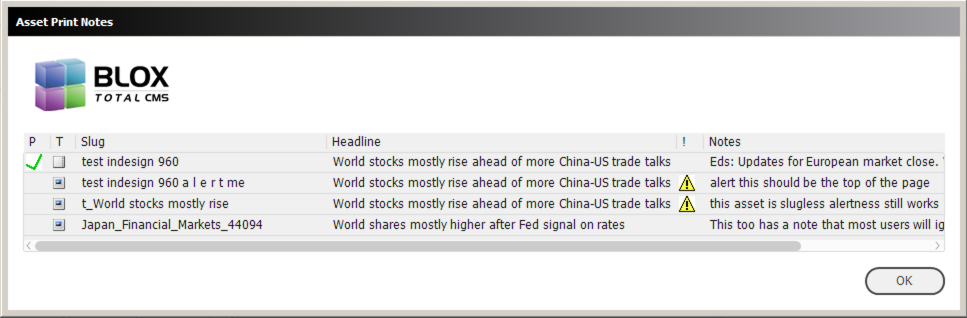
- The Show All Asset Notes option in the Translation Tab of the Settings and Support dialog now causes even the child asset Print Notes to be displayed. In addition, if a child asset uses the alert flag, it will show now. In the past, child notes were ignored. Finally, the print notes in the Select Child Assets to Place dialog now have some additional cleanup done so that more text can appear. [INDESIGN-960]
Performance Enhancement) When closing documents, the process checked the statuses of the document's placed assets more than once. It now checks just a single time to increase the speed at which documents, specifically multi-page documents, close. Users might not notice the change, however.
Bug Fix Affecting Performance) We found several places in the client code where some quick checks of data integrity were failing because they were worded incorrectly. Thus a more complete data check was necessary and this slowed down the individual processes. [INDESIGN-1103]
- Lines 5-7 of the users local Translate.log file will now list the folder on the workstation where the client code exists. This helps with troubleshooting. [INDESIGN-1639]
- Adobe InCopy does not have access to unlock frames. But locked frames triggers internal errors during reflow in Adobe InCopy. So to prevent this, we now automatically unlock all frames in Adobe InDesign that are part of an Adobe InCopy Assignment. All other frames, including those for ads, will remain locked if the system or a user locked them. [INDESIGN-1936]
- The former Development Mode function Show Output Preferences Folder Path has been changed to Show OS Specific Paths. It now shows Operating System specific paths for the browser-based Path Configuration, Image Toning Preferences, as well and the Output Preferences of the legacy system. The displayed preferences can be copied and pasted as needed. [INDESIGN-2325]
- If a MacOS, failed to mount or to provide access to the path for any of the MacOS specific paths to Advertising or Ads, the BLOX Total CMS client for Adobe InDesign would revert to the default paths in the tcms_purged share. But if the advertising files or ads weren't actually located there, the user couldn't place ads or perhaps couldn't build a proper edition. Now, when the users log in, of the users will now be warned if the specified paths are unavailable. They will be allowed to continue to log in or they can choose to fix the problem and then log in. [INDESIGN-2365]
- Regional Design Centers have a tendency to not save their pages often and thus Page Tracker doesn't update the Page PDFs often. This makes it hard for the remote newsrooms to gauge how their pages are coming along. We now support the use of a autoUpdatePageTracker.enabled file that will attempt to update Page Tracker once every 15 minutes. Like other .disabled or .enabled files, the autoUpdatePageTracker.enabled file is a text file that goes placed loose in the same folder as the client code folder (usually the tcms_data share). If however, you add a number to the first line of this file, then the BLOX Total CMS client for Adobe InDesign will use this number as the number of minutes to wait between updates. [INDESIGN-2382]
- The Close All documents feature will no longer prompt when closing documents with more than 3 pages. It will automatically close them without any prompts.[INDESIGN-2390]
- When Page Tracker reaches version 1.12, the Adobe InCopy client will instantly switch to showing the snippets for InCopy that have been exported from that point on. Any prior exports will be ignored. The template Master will need to re-export those snippets – An easy task if they were exported from the Master Document as instructed. In addition, at this same point, the use of the print_notes to force a snippet name is being depreciated and it will now rely upon the point publication placement information. [INDESIGN-2399]
- We have a feature that removes legacy .version files from Appliance based installs of the BLOX Total CMS client for Adobe InDesign and Adobe InCopy. Unfortunately, that feature didn't work once sites switched to the Appliance based installs using the version of the client on the tcms_indesign_client share. [INDESIGN-2410]
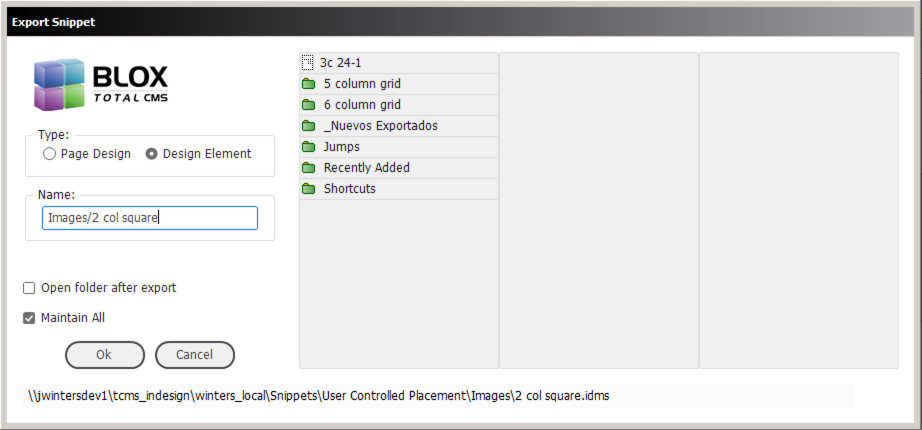
- When Adobe released the Creative Cloud versions, they broke part of the user interface functionality they provided. What broke is the ability to display a directory tree. We kept waiting on Adobe to fix it, but they didn't so we recreated our own, somewhat limited, version of a directory tree. Development Mode users can now see, select, and create sub-folders to export their snippets into. An example is below.[INDESIGN-2415]
- The BLOX Total CMS client for Adobe InDesign has traditionally automatically saved the front or active document whenever the application is activated (when a user leaves Adobe InDesign and returns). Unfortunately, this slows the bouncing back and forth between Adobe InDesign and other applications (particularly on underpowered workstations). To help with this, we have increased both the base time limit that a user must be away from Adobe InDesign as well as the increase the effect that each placed asset has on the total time. Finally, for documents with multiple pages we now only process approximately 5% of these activations instead of all of them. This will further increase the speed of reactivation for document with multiple pages. [INDESIGN-2432]
- Users complained that they couldn't find the Set Pre-placed Asset Policy button in the Translation Options of the Settings and Support dialog. While it is still there, we have added an option to call it from the bottom of the Update and Reset Menu. [INDESIGN-2446]
- Snippets for use with Adobe InCopy are now uploaded to BLOX Total CMS when they are exported. This allows their selection in the Assignment Tool and in the Publication Placement information. Consequently, it allows their automatic placement in Adobe InDesign as the page is being designed. This will be available in TotalCMS v2.25 [INDESIGN-2449]
- Version 5.34.x of the client added a warning when opening single documents whose publish date is before today. But that warning didn't occur to those using the BLOX Total CMS > Documents > Open... dialog. The warning now works when opening documents from that dialog.[INDESIGN-2474]
- We've extended the modernization of the event listeners to Adobe InCopy. Users won't notice any changes to this under the hood change, but it should help increase stability.[INDESIGN-2481]
- We now log the beginning, ending, and total time of responding to an activation event. This is for troubleshooting purposes. Users will not notice any differences. We also do similar for idle events when there are idle tasks to process. Again, the user's won't notice anything. Finally, we stopped logging a message when multi-page documents were opened and no changes were found because those messages were appearing too frequently. [INDESIGN-2482]
- A recent release modified the Design Element Snippet Export to set all of the File References of the frames being exported to be the same. One site complained that they wanted the option to choose to do that or not and so we have added an option in the Export Snippet Dialog allowing the file references to remain as set or match. [INDESIGN-2488]
- While looking at some crash logs for 3 sites we found two cases where an Adobe InDesign crashed shortly after translation. The long file indicated that it had changed the visibility of the Print Trim condition. We modified the client code to now do that function on idle after translation and document activation is complete. We hope this will help prevent crashes related to Adobe InDesign's issue with changing text condition visibility. [INDESIGN-2491]
- Improvement) We have noticed a few sites that have experienced crashes of Adobe InDesign after it has been running for an extended time and the memory usage of Adobe InDesign has ballooned. With this change, we have begun to allow Adobe InDesign to warn the users of this very rare situation. If it happens, they would likely see an Adobe InDesign warning similar to the one below. If the user clicks No, Adobe InDesign will likely keep warning the user every few minutes. If the user clicks Yes, we are allowing the assets to be checked in and the documents safely closed to prevent a crash. [INDESIGN-2495]
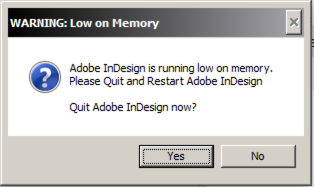
Adobe's Low on Memory warning
- The internal code for locating the active document in Adobe InDesign was throwing an internal error when Adobe InDesign had open documents and layout windows, but no active document. This has been corrected. [INDESIGN-2509]
- When an asset has no default frame (usually because a user deleted an image's caption frame) we were logging the issue as an error. That was generating large numbers of error logs at some sites and slowing down all users due to increased network traffic. The lack of a default frame is now logged as a warning where it is only logged to the local computer until the user's log is copied to the tcms_purged share. This should improve performance slightly. [INDESIGN-2510]
- In an effort to reduce crashes of Adobe InDesign, we pushed the changing of showing/hiding trimmed text to an idle task on multi-page documents in version 5.36.09. Some users have objected so we added a user preference to control this. The user preference will default to the legacy behavior unless the user crashes in which case the new behavior will be enabled. The user can override the behavior with an option in Settings and Support. Click the Translation tab and then uncheck the Delay Trimming Visibility Changes option to return to legacy behavior of auto-hiding. [INDESIGN-2515]
- Our support for driving Ad Layouts via Vision Data produced XML now incorporates the use of the Value property of the <Description> field of each ad. This will produce a text-based label in the placeholder frame looking similar to this: 165431; CRUMBY CHAIR; 22331; Color; 3 x 10. Actual options depend upon the VisionData export as some sites feed us more or less data. [INDESIGN-2516]
- When the Override .adinfo file feature was added, it originally logged to three locations. At some point, the logging stopped showing up in Page Tracker and it was inconstant in the document's log with the propensity for logging on the first page of the edition. We have returned logging to all three locations and, in addition, we now log the ad number that was Added, Relocated, or Removed from pages. This information was only indirectly listed before. [INDESIGN-2520]
- Sometime recently the Dead Jump function broke and exported the Dead Jumps to the wrong folder. This caused them to not be found and thus not placable. This has been fixed. In addition, to aid the troubleshooting of a site's issues with dead jumps, we now log significantly more information. [INDESIGN-2546]
- Support for Newzware Ad Layout Format XML files now truncate the section letter to a single character. Thus if the BookName used NT, the section letter read will become N with the remaining character(s) ignored. [INDESIGN-2548]
New Features:
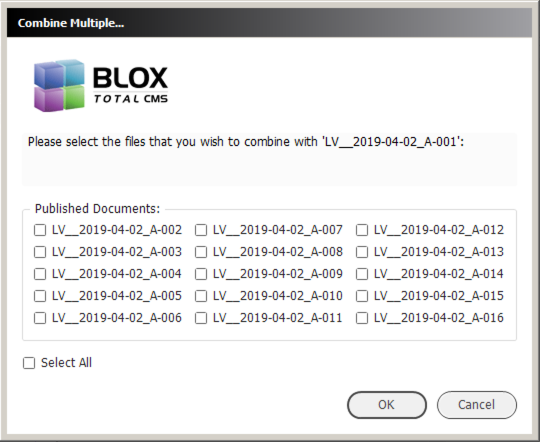
- There is a new feature at BLOX Total CMS > Documents > Combine Multiple... that allows a user to combine multiple pages into a single document. When chosen, a dialog similar to the following will appear:
Simply check the pages to combine and click the OK button. JIRAINDESIGN-197
- Internally, TownNews has used a function to examine Adobe InDesign and Adobe InCopy logs for speed issues. We've now built this feature into both applications. A user can click the Slow Line Finder button in the Support tab of the Settings and Support dialog. Activities that took longer than 3 seconds are considered slow and they will be listed in a new log file. We will be continuing to fine tune this function. There are still cases where it is counting user interaction time which makes things look horrible. [INDESIGN-1838]
- The log in dialog has been modified slightly. The default buttons are now flush right to conform with UI standards. And the bottom left of the dialog will show the OS version when logging into appliances. The client code will also store the appliance OS, when known, in other dialogs and in the user's local log file.
- There is a new keyboard shortcut accessible dialog for placing the first 36 snippets contained in the Shortcuts folder for each type of snippet. The function opens a dialog that supports a single keystroke for selecting the snippet. Following it with a return / enter key will allow the snippet to be placed. To enable this feature, create MacOS aliases or Windows snippets into the Shortcuts folder for each type of snippets. Once configured the entire process works similar to Adobe InDesign's QuickApply function, but for Snippets. The dialog itself can be given a keyboard shortcut or it may be manually reached by choosing BLOX Total CMS > Place Design Element Snippet > Design Element Snippet Shortcuts... OR BLOX Total CMS > Place Page Design Snippet > Page Design Snippet Shortcuts. [INDESIGN-2185]
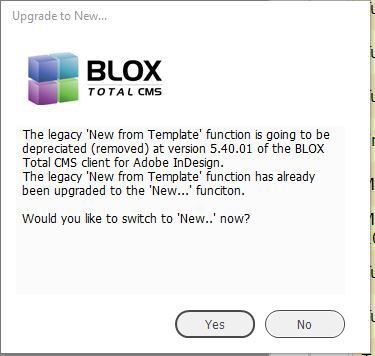
- The Adobe InDesign menu option at BLOX Total CMS > Documents > New from Template > template choice was replaced over a year ago, but New from Template still remains in the Documents Menu. Starting with this release, any user selecting it will be shown a dialog asking the user to switch to the upgraded replacement version. The dialog looks similar to the following:
[INDESIGN-2425]
- Continuing with the ability to edit an asset in a snippet in Adobe InCopy, if that has happened, the snippet will now be placed in Adobe InDesign as the asset is placed. In this current version, the selected frames are replaced with the snippet frames, unless it is the snippet itself that is selected (from a prior placement). A future feature will the user to choose to replace the snippet or not, use a different snippet and to scale the snippet to the page area. This is the first step to all those new features. [INDESIGN-2440]
- When Snippets are exported using Adobe InDesign Creative Cloud version's BLOX Total CMS > Export Snippet..., we now generate previews of the snippets. These previews will be available in the Asset Manager, Snippet Shortcuts, and in the browser's Assignment Tool (when that update is released). [INDESIGN-2448]
- Our PCAB export for Layout 8000 sites now supports tracking paid obits when they are properly configured. Configuration involves slugging using
obtin the slug, placing the ad number at the end of the slug, and placing the name of the deceased in the first paragraph of the default frame as a result of translation. [INDESIGN-2540]
Bug Fixes:
- The Ad Statuses dialog could be displayed larger than a user's monitor. While the default button selected in the browser-based preferences would be still the default (and selectable with the enter/return keys) and the escape key would click cancel, functionality was reduced by the enlarged size. This has been corrected. [INDESIGN-1140]
- If a user tried to merge an asset into a locked frame (via Object > Lock) it would throw an error. It now unlocks the frame first. [INDESIGN-1757]
- We had reports that the menu option at BLOX Total CMS > Page Content Types > Clear Page Content Type Snippet Tracking wasn't working. We have made some logging and logic changes and are happy to report that if you have a Page Content Type change on a page, you can use this feature to get the correct snippet to apply. Without using this function snippets won't automatically place with Page Content Type changes because the client doesn't want to place more than one Page Design Snippet on a page. [INDESIGN-1759]
- While testing the BLOX Total CMS client for Adobe InDesign, we noticed it can throw internal errors without warning the user when they try to place an asset and/or create an assignment when the document is either not named correctly or not stored correctly. The user will now see a warning and translation will be halted. [INDESIGN-2103]
- When creating a new document with BLOX Total CMS > Documents > New..., a user could not unselect a Page Content Type once one was selected. This has been fixed and there is now an empty menu item at the end of the Page Content Type menu. Keep in mind that Page Content Types can be used to automatically apply Page Design Snippets. [INDESIGN-2150]
- When Exporting Jump Items returns were not correctly being turned into the markers. This prevented the items exported with returns from being able to be read and used for jump items. This has been fixed. Both Returns and Line Breaks are supported for all three jump items. (INDESIGN-2287)
- An Adobe InDesign user who threads frames on the same page and then eventually jumps the story to a different page was finding that the Turnline appeared at the end of the first frame as opposed to the last frame on the Turnline's page. This has been corrected. [INDESIGN-2327]
- When the BLOX Total CMS client for Adobe InDesign or Adobe InCopy logged all the advanced searches, it listed them with character encoding that made it hard to read. This has been changed. [INDESIGN-2336]
- Fixed a minor logging bug that is encountered when trying to update an Assignment's revision file when the lock on the file wasn't cleared by another user. Nobody will notice any differences in operation. [INDESIGN-2351]
- The Development Menu function for Template Masters to Enable or Disable Adobe InCopy failed to recreate the local user's menu and also failed to set the local user's preference to match the enabled / disabled status of Adobe InCopy support. [INDESIGN-2368]
- Adobe InCopy users could not control if the Development Mode menu appears in Adobe InCopy. Previously the ability to show/hide that option was limited to Adobe InDesign users. Now, both applications have access to show/hide the menu option used by a site's Template Master. [INDESIGN-2404]
- There was a bug in the log information triggered from a failure to process a mailto: hyperlink. The log information had been corrected. This didn't affect anyone other than TownNews' troubleshooters. [INDESIGN-2422]
- Some mailto hyperlinks were not exporting correctly. [INDESIGN-2423]
- While rare, we discovered that a user who logs out of the BLOX Total CMS client for Adobe InDesign or Adobe InCopy and then logs in again, will have extra event listeners. This means that a single user action could cause multiple responses and could lead to crashes. The client now deletes all event listeners during log out. [INDESIGN-2426]
- If a user loses network during work on _BU document or on an un-split document, attempting to Create Pages or Split Document displayed a pair of warning dialogs for each and every page in the document. This has been changed. The user will get warned with just one pair of messages. In addition, the warning dialogs will display the missing (dropped) path in a more user-friendly manner. [INDESIGN-2436]
- Since client version 5.12.80 we have been tagging page labels (those informational frames at the top of the page that indicate page content type, page name, and/or page color) with domain tags. This wasn't necessary and provides some odd blobs of information in the logs. This has been corrected and it no longer tags these items. [INDESIGN-2438]
- Exporting a snippet was removing spaces between Adobe InDesign Text Variables within the snippet. This has been corrected. [INDESIGN-2443]
- The function for adding placement information to assets that have an Adobe InCopy assignment was incorrectly logging a path as a warning. This has been corrected and the path is now an information log item. No harm from being a warning, but it was confusing when doing troubleshooting. [INDESIGN-2460]
- We've made additional changes to the event listeners used by the BLOX Total CMS client for Adobe InDesign. The goal is to cut down on crashing, particularly on MacOS and particularly with multi-page documents. [INDESIGN-2464]
- When Related Content was brought inline to an asset's body copy the tagging from both Adobe InCopy and Adobe InDesign wasn't parsed correctly during write-back and the related content was effectively removed as an inline item. This has been corrected. [INDESIGN-2465]
- A Template Master function we use to add style groups for the Add Missing Styles function had an error that prevented it from working in certain situations. This has been corrected. [INDESIGN-2466]
- When certain non-traditional fonts were used with Nested Styles, neither Adobe InCopy nor Adobe InCopy could determine the font family in use. Our function for ignoring during the write-back the nested style formatting then failed. This would usually result in the entire paragraph being formatted online (and in print after a reflow) with the character attributes of the Nested Style. Now, if the font family can't be determined, but the font styles still match we will ignore the Nested Style. [INDESIGN-2467]
- When styles are applied to paragraphs that add write-back tags via the Export ruleset, adding trimming or other formatting at the end of the paragraph could cause the tags to be doubled up. This had the effect, on occasion, of bolding entire paragraphs instead of certain parts. Or it might have causes a single paragraph format to extend to the next paragraph by adding an additional write-back tag. We believe this is fixed. [INDESIGN-2468]
- An earlier change to the handling of preferences caused both Adobe InDesign and Adobe InCopy to occasionally forget the user's setting for both Handle Children Simultaneously and Assign the same Workflow to Children. This has been corrected. [INDESIGN-2469]
- A recent release changed the snippet export feature to automatically tag all Design Element Snippet frames with the same file reference. This makes exporting snippets with Images really easy. But unfortunately, this same feature was unintentionally enabled for Page Design Snippets which made them unusable. This has been corrected. [INDESIGN-2470]
- We had a report of a MacOS site having issues with the capitalization of Volumes in paths and locating jumps, nearby documents, and combine with. We believe this has all be resolved. [INDESIGN-2478]
- Creative Suite Versions of Adobe InCopy) The 5.36.01 version of the BLOX Total CMS client for Adobe InCopy introduced a bug for opening an article in a single frame. This bug has been fixed.[INDESIGN-2479]
- Some recent change caused the Create Assignment dialog and the Check In dialog in Adobe InDesign to fail to have the respective dialogs to have the Edit Details checkbox unchecked when it first opens. This has been corrected and if the assets have been download from the CMS before the dialog opens, the Edit Details checkbox will be automatically chosen. [INDESIGN-2483]
- A long-standing internal bug related to our frequent sweep page items was found and fixed. We haven't determined the special case that triggered the appearance of the bug at one client site, but its fix makes things run faster there. [INDESIGN-2489]
- The client code was throwing an internal error when listing the event listeners. This has been corrected with some simple housekeeping code in the client. The only thing that users might notice is a very slight change in speed for the better. [INDESIGN-2490]
- While looking at some logs from sites that have access to multiple domains, we noticed that occasionally opening a document from a different domain would cause the BLOX Total CMS client for Adobe InDesign to not be able to locate the correct folder for the documents when checking for Document Jump pages. We have modified some of the low-level functions that help direct the location correctly. [INDESIGN-2496]
- We noticed a couple of times when looking at logs from users where the BLOX Total CMS client wasn't able to locate the Error_Logs folder because it got the wrong base folder for the tcms_purged share. This seems to happen most often at sites that don't use our appliances and thus don't have our normal shares configured. We believe the issue is now fixed. [INDESIGN-2498]
- Recent versions of the client software (sometime earlier in 5.36.x series) starting causing reflows of assets and other situations to attempt to log in to a non-existent domain. That then reset the user's path configuration and they were warned that they were not configured to store documents. We believe this is now fixed. [INDESIGN-2503]
- The MacOS version of Image Statuses was configured to use OSX versions of the exportFolderPathOSX and tonedImageFolderOSX folders. Unfortunately, both were ignored and the default exportFolderPath and tonedImageFolder versions were used instead. This has been corrected so that MacOS sites can use either version of the tags with the OSX version taking precedence and the Window uses only using the default versions. [INDESIGN-2504]
- Sites using fileServerDetails.jsx files to relocate the paths to files weren't getting the Crash_Logs, Error_Logs, nor User_Logs placed in the correct location. Instead, they were frequently filed by domain leaving the raw locations (created before the fSD file is used) empty. To help identify the issue, we now log the three folders. [INDESIGN-2514]
- When an applied Nested Style is written back from Adobe InDesign or Adobe InCopy it would throw internal errors if the font of the Character Style didn't exist on the local machine. While a user should NEVER work without the fonts their design calls for (as we can't control write-back), we don't want to throw errors because that slows down everybody with the overhead of sending the logs repeatably. So the missing font messages are now Warnings and written only to the local user log. Note, Write-Back will still be flawed because of the missing font. [INDESIGN-2517]
- The prior version of the client (5.36.21) was throwing errors when using Create Pages even though the pages were actually created. This has been fixed and the errors no longer exist. This only affected a few beta test sites before it was corrected. [INDESIGN-2526]
- We have had complaints that on occasion the wrong document would close when clicking the close box in a tab of multiple open documents. I site provided a missing part of the report which allowed us to reproduce and fix this issue. Currently, when multiple documents are open, you can click the close icon on any tab and that document will indeed close. [INDESIGN-2532]
- A recent change to the client for Adobe InCopy caused editing an asset in a single frame to throw multiple errors at the completion of editing. All known errors with this process have now been fixed. [INDESIGN-2544]
- A recent release broke the translation of hyperlinks. Errors with the (3c) code would be thrown. This has been fixed. (INDESIGN-2547)
*********** NOTICE OF END OF LIFE ***********
Effective Jan 8, 2019 TownNews will be ending software development for for our legacy HP class server appliances with model numbers P1-1300, P1-3000, and P2-3000.
TownNews now offers newer Total CMS options such as VMWare, Hosted, and appliance models M2-3000 and P3-11000 which offer superior performance and flexibility.
Total CMS version 2.22.0 will be the final software update available to these platforms. Customers support for BLOX Total CMS will continue to be available for customers using the EOL models until June 3, 2019.
For more information on the Total CMS options available, please contact your TownNews sales person.