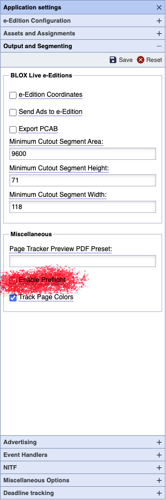
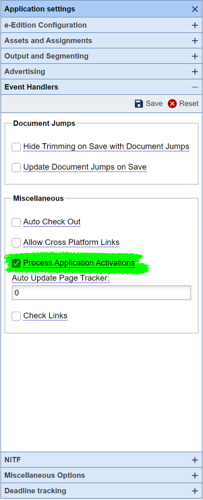
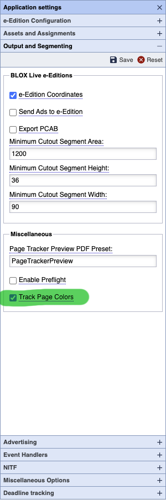
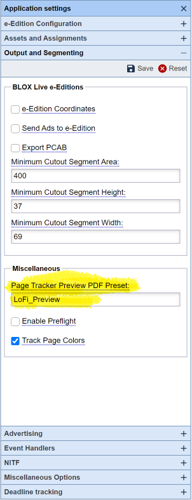
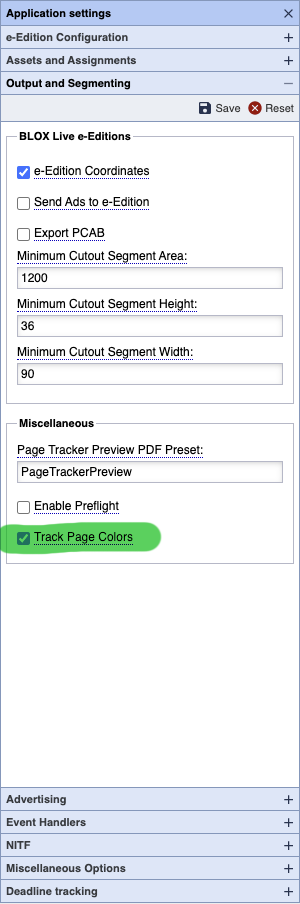
The Track Page Colors option is required if you want to cause the BLOX Total CMS client for Adobe InDesign to auto-export the images for toning based on the page's color mode.
This option will also cause users to get prompted to select each page's color at some point in the production process. But it allows besides the Auto Export for toning, an automatic selection of the toning option if you want to use the slower method. And it can automatically select the output method based on page color.
Client 5.47 Release Notes
Updated
Next Version
The release notes for newer versions of the BLOX Total CMS client can be found here.
5.47.10-3 Approved by Quality Assurance on 2021.08.04
If you would like this version, please request it on a support ticket at support.townnews.com or download from the following link:
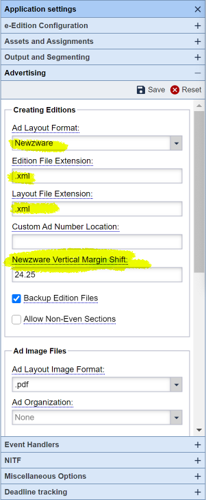
Bug Fix for NewzwareVerticalMarginShift.enabled) A handful of our sites use Newzware .XML files to drive the creation of the Advertising Layout within the BLOX Total CMS client. Some of those sites then use a NewzwareVerticalMarginShift.enabled file to move the ads up or down on the pages to accommodate some odd setting in Newzware. The 5.47.x version of the client software inadvertently disabled this file by forcing its name to NewzWareVerticalMarginShift.enabled. 5.47.x sites can either update to 5.47.10-3 or newer, they can rename the .enabed file, or they can update the value in Page Tracker's Application Settings in the Advertising accordion and remove the .enabled file. JIRA INDESIGN-3165
Jump Bug Fix) A prior bug fix for dead jumps caused a problem with the automatic updating of the jump items - the turnlines, continued from, and/or jump heads. If you are using a 5.47.x version of the client and not getting all the jump items to populate, please update to client 5.47.10-3 JIRA INDESIGN-3170
5.47.10-1 Released 2021.06.25
Password Caching Option Removed) An earlier version of client 5.46.x attempted to add a feature to add the caching of user passwords. But the feature was not consistent and the feature has been removed. The feature is expected to be returned in client 5.53.x. JIRA INDESIGN-3327
5.47.09-1 Released 2021.06.04
MacOS Output Preferences Bug Fix) The 5.47.01 version attempted to fix an output problem when using MacOS paths but a typo prevented it from working correctly and caused the MacOS to go to the user's folder instead of the directed folderPath. This has been corrected. JIRA INDESIGN-3183
5.47.08-1 Released 2021.04.16
Bug Fix For Sites with Pooled Domains) We had a report from a single site with outdated appliances with pooled domains where they weren't able to switch domains. There had been a bug in the client software when logging into CMS versions before 1.51 that has now been fixed. If you are needing to log out and then back in to switch domains, please update the client to this version or newer. JIRA INDESIGN-3237
Log In Bug Fix) There was an internal error created in client version 5.47.01 that could prevent logins from using a cached password and thus it prevented some automatic login. This has been corrected. JIRA INDESIGN-3245
Internal Changes for New Features) Clients 5.47.01 through the current versions used the existence of a BLOX CMS web-service to indicate that certain features have moved from independent files to browser-based settings. Unfortunately, that wasn't an appropriate switch as the web-service has been released to non-appliance-based BLOX CMS sites while the browser-based settings have yet to pass QA testing. So we now specifically test for the new browser-based settings. We were alerted to the mismatched distribution by a site that received an information message about the changes as outlined in various changes in the 5.47.x change logs. JIRA INDESIGN-3248
5.47.07-1 Released 2021.03.25
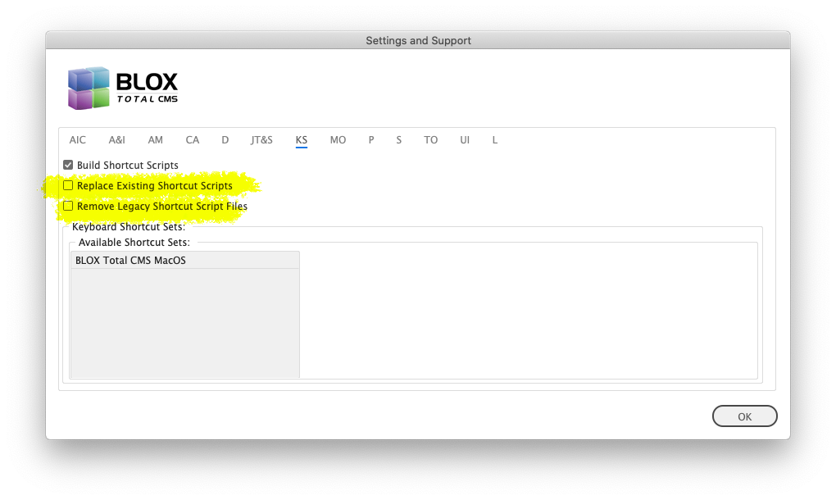
Bug Fix for Windows Keyboard Shortcuts of Utility Scripts organized by folders) The last release fixed one bug that prevented keyboard shortcuts for Utilities scripts organized in folders from working. The fix worked for MacOS users but it failed for Windows users. Now Windows users can use these new scripts too. If you need to use keyboard shortcuts or want to use Adobe InDesign's Scripts panel to run the Utility Scripts you will need to replace the existing scripts by using two options in the Keyboard Shortcuts (KS) tab in the dialog found at BLOX Total CMS > Settings and Support... JIRA INDESIGN-2995
5.47.06-1 Released 2021.03.24
Bug Fix for Opening Protective Shutdown Log Folder) INDESIGN-5.44.05 added a button to the Support tab of Settings and Support to Show ProtectiveShutdownLog Folder. Unfortunately, that button only worked when one of Adobe's Recovery logs existed. The button now opens if the folder exists. And it will only exist if Adobe InDesign or Adobe InCopy had at some point chose to quit to prevent damaging the document database. This itself is rare so the button might provide a dialog that notes that the folder doesn't exist. JIRA INDESIGN-2967
Bug Fix for using Override .adinfo file with Page Color Labels) The 5.44.06 version of the BLOX Total CMS client for Adobe InDesign attempted to fix a bug when page color labels were added to a page manually (like by pasting one on a page or placing one with a snippet) and then using the Override .adinfo file feature. Unfortunately, if the Ad Organization was set to 100 folders there were cases where Override would fail with a silent error. This has been fixed. JIRA INDESIGN-2988
Bug Fix for Keyboard Shortcuts of Utility Scripts) A prior release attempted and failed to fix the scripts that are constructed to apply keyboard shortcuts to Utility Scripts. If you need to use keyboard shortcuts or want to use Adobe InDesign's Scripts panel to run the Utility Scripts you will need to replace the existing scripts by using two options in the Keyboard Shortcuts (KS) tab in the dialog found at BLOX Total CMS > Settings and Support... JIRA INDESIGN-2995
5.47.05-1 Released 2021.03.05
Bug Fix) The support for an odd number of pages in sections to support preferences in the browser that hasn't been released yet, didn't work when the Ad Layout format was set for BLOX Very Simple Ad Layout. This has been fixed. No sites should have experienced this issue. JIRA INDESIGN-3102
5.47.04-1 Released 2021.02.26
Bug Fix for Page Color Labels) The 5.47.01 version of the client had a logic bug in the determination of if page color labels were enabled or disabled. If any site has that version (none did), the logic error would have prevented sites without the new preference options in Page Tracker from using Page Color Labels. The bug has been fixed. JIRA INDESIGN-3166
5.47.03-1 Released 2021.02.18
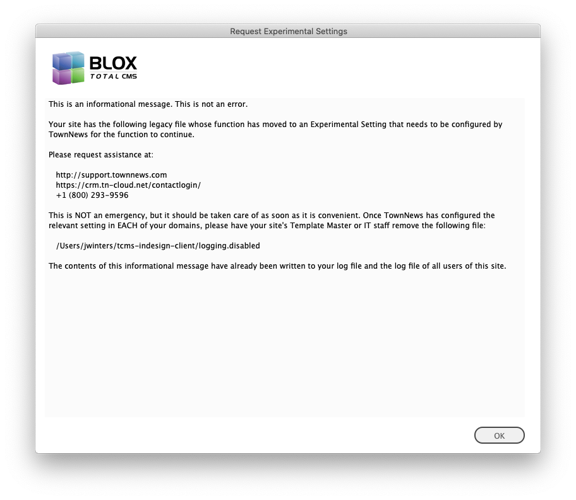
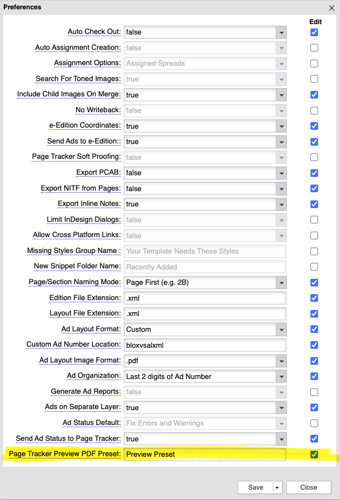
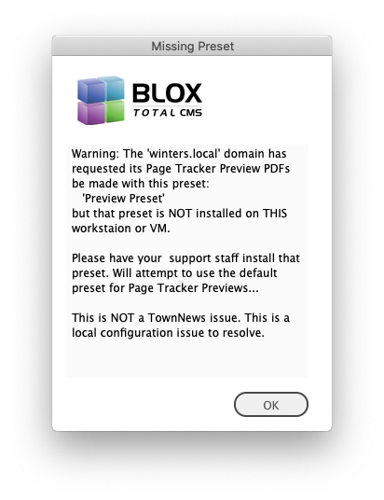
New Ability to Modify the Page Tracker Preset) The legacy preferences for a domain at Desktop > Applications > Settings > InDesign > Preferences has supported an option for specifying a different Adobe PDF Preset to be used for generating previews for Page Tracker. This feature was requested by sites that wanted to use those PDFs for alternate services such as e-tearsheets. The support is now included in the BLOX Total CMS client for Adobe InDesign. Specify the name of the preset that all users have installed in Adobe InDesign and it will automatically be used. If a user doesn't have it installed they will get a dialog similar to this one displayed:
If the users see that, install the preset in Adobe InDesign. Until it is installed the default PageTrackerPreview that the client software includes will be used. JIRA INDESIGN-3174
Esoteric Bug Fix in Selecting an Adobe PDF Preset for Page Tracker) The prior version of the client code could select the wrong Adobe PDF Preset for use with creating a preview for Page Tracker. The client code was configured to search for any Adobe PDF Preset that included the name of the specified preset. That means if the specified site requested PageTrackerPreview and the user's workstation had 'PageTrackerPreviewColor' and 'PageTrackerPreviewBW' they could have been selected instead of the specified 'PageTrackerPreview'. This has been fixed. We've never had any complaints of having the wrong preset being used. JIRA INDESIGN-3174.
5.47.02-1 Released 2021.02.16
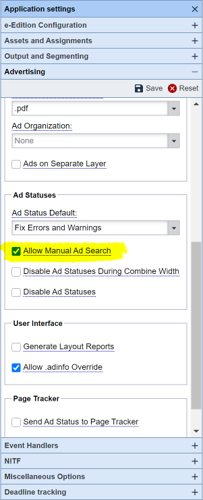
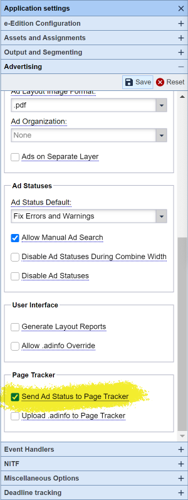
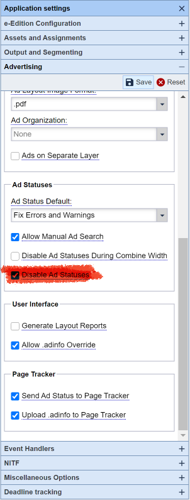
New Feature for Ad Statuses) In the past, the control for causing the Ad Statuses dialog to open automatically was made by the existence of either a file with the domain's Layout File Extension or the existence of a file named static.out in the domain's Advertising folder. If a user, or BLOX Total CMS client feature, removed those files then Ad Statuses would stop automatically opening. Now, rather than the necessity of these files, there is a browser-based preference to Disable Ad Statuses. When the preference is available, Ad Statuses will automatically work even without those files so long a the Disable Ad Statuses checkbox is UNchecked. If your use our Advertising functions (as most sites do), then leave the preference UNchecked. If, however, you use a 3rd party system for advertising functions then check the preference. JIRA INDESIGN-2210
Create Pages Improvement) In the past, if Ad Statues was configured to NOT automatically open it would not place the placeholder ads on the pages. Placeholders are now automatically created upon opening the document providing the idle events on the workstation are enabled. JIRA INDESIGN-2210
Minor Bug Fix) The 5.42 version of the client added an improvement to prevent modifying the print_trim condition's visibility during translation to speed up the process and help increase the stability of Adobe InDesign. Unfortunately, there was a bug with the processing of certain element types including most headlines that prevented this prior change from working for all the intended element types. This has been fixed. JIRA INDESIGN-3046
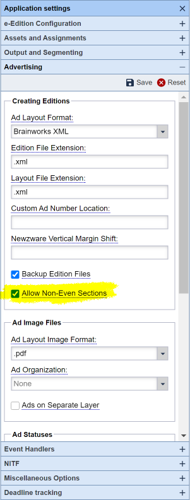
New Preferences For Non-Printing Publications and non-even numbers of pages in a section) There is a new preference in the Advertising accordion of Page Tracker's Application Settings. The option Allow Non-Even Sections has a default value of UNchecked which causes our advertising functions to round up to the next even number when a section is planned to have an odd number of pages for specific Ad Layout Formats. This makes perfect sense for print-based publications, but with the increasing number of e-Edition only publications being produced with BLOX Total CMS, this can be confusing for page builders as there will be extra pages in the edition. Now, however, the site can check the Allow Non-Even Sections option and if the edition file indicates that an odd number of pages are requested, the following formats will no longer force even numbers of pages. All other supported formats provided a fixed number of pages and so we have always used what they provided. JIRA INDESIGN-3102
BLOX Very Simple Ad Layout
Brainworks XML
DTI tearsheets
Newzware XML
PPI Saxo XML
5.47.01-1 Released 2021.02.12
Minor Change to Browser-Based Path Configurations) To prevent issues with sites entering the path with extra leading or trailing spaces, both are now trimmed from all paths entered in the browser-based Path Configuration settings. Since the paths with spaces were previously invalid, this shouldn't produce a noticeable change for any site. JIRA INDESIGN-2887
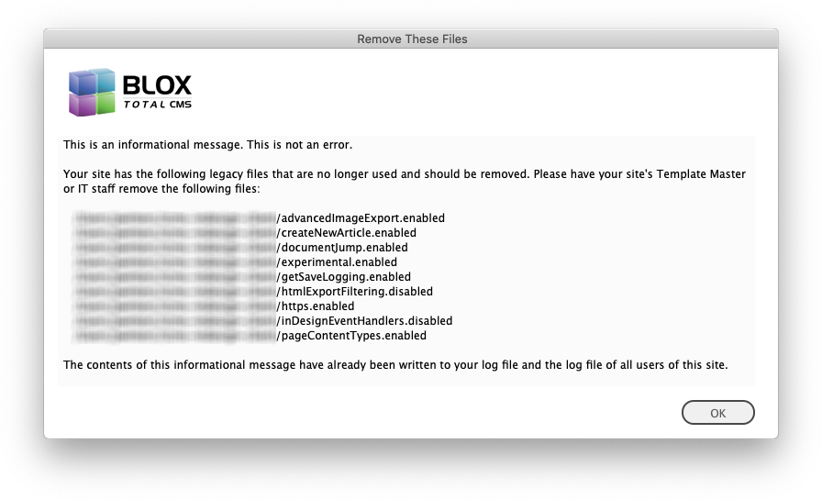
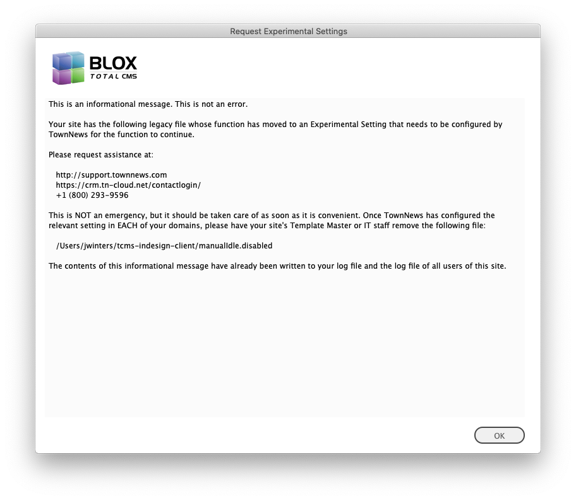
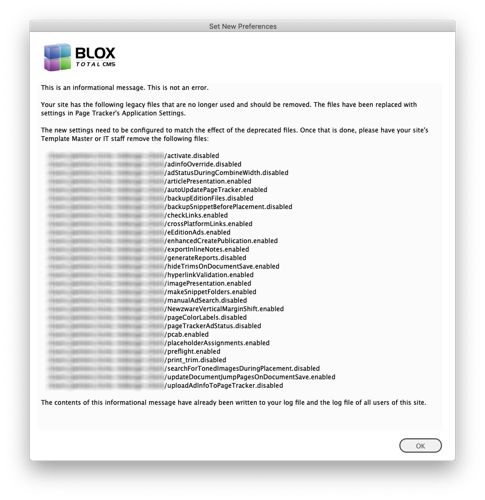
Internal Changes) For many years the BLOX Total CMS client for Adobe InDesign and Adobe InCopy paid attention to some empty files with suffixes of .disabled or .enabled. These files are not conducive to distributed production and they have been replaced by new preferences in Page Tracker's Application Settings or with custom values that TownNews can add to your domains. If your site has any of these settings, your users will be presented with dialogs similar to the following. JIRA INDESIGN-3050
Major Change to Preferences) The browser-based domain-based preferences for the Adobe InDesign and InCopy client have moved from Desktop > Settings > InDesign > Preferences to Page Tracker's Application Settings in various accordions. In addition, there are many new values to replace legacy .disabled and/or .enabled files that have been depreciated. In addition, there a several new features which will be discussed on their own tickets. JIRA INDESIGN-3124
Change for Event Handlers) A few of our Adobe InDesign Creative Suite sites used a manualIdle.disabled file to help prevent crashes and to speed up that legacy application. Most sites have smartly moved to the Creative Cloud version of Adobe InDesign which is more reliable when used with current OS versions. Unfortunately, those old manualIdle.disabled files might still exist unnecessarily. Fortunately, the use of those files has been depreciated. A site with one of those files will eventually get a dialog similar to the one below. Since the use of the file was primarily for Creative Suite users, you can, if you choose, just remove the file rather than requesting the Experimental Setting if you are a Creative Cloud user. By the way, when that dialog appears, you can click on the BLOX Total CMS logo to open the folder where the file exists. JIRA INDESIGN-3126
Experimental Setting to disable Child Section Tags and Child Flags) A long time ago the client software didn't support passing the section tags nor flags of child assets. Some site's rulesets might still not be expecting those even though they have been supported in the client software since 2014. If with this client release, you suddenly notice untranslated section tags or flags in child assets, those can be removed. Just file a support ticket at support.townnews.com and we will add an experimental setting for your domains. JIRA INDESIGN-3134
Image Statuses Moving to Experimental Settings) In the past, if a site wanted to diable the modern Image Statuses function to use the legacy toned image swap they needed a .disabled file. Those files have been depreciated because they are not compatible with distributed production. If a site has a valid reason to not use Image Statuses, TownNews can enable it via an experimental setting. Please file a support ticket at support.townnews.com if that is needed. JIRA INDESIGN-3137
Bug Fixes for Select Child Assets to Place) There was a long-standing bug in the Select Child Assets to Place dialog that threw an internal error when the user has Toned Image Search selected in the Asset Manager. This prevented the accurate display of the number of toned images found. This has been fixed. There was also a bug that could be triggered by double-clicking on a child asset in that dialog. This too has been fixed. JIRA INDESIGN-3138
Important Asset Manager Bug Fix) While reviewing a log from a site, we noticed a case where the user had copied and pasted a slug from somewhere to the Asset Manager's Slug field. Normally, you could not type a return/line break there, but you can paste in one. This likely would have prevented the search from functioning, but also, unfortunately, the routine that we use to cache the user's Asset Manager's settings broke because of the return/line break. Now before performing the search, the search text and the slugs will be cleared of any returns/line breaks. And consequently, the cached settings will no longer attempt to store those characters for the Search Text or Slug. This is not a new issue, but because it hasn't been reported, we don't know how many sites are using the same workflow and might have been affected. We have, however, gotten many reports of the Asset Manager not opening. While we normally recommend BLOX Total CMS > Update and Reset > Reset Asset Manager Position and Size to fix issues with the users moving the Asset Manager or resizing it improperly, if the actual issue was from a pasted return/line break the proper way to clear that problem would be using BLOX Total CMS > Update and Reset > Reset Asset Manager Preferences. JIRA INDESIGN-3140
Internal Preferences Change) By default, when a user leaves Adobe InDesign or Adobe InCopy to go to a different application and then returns to them, certain actions are performed. At sites running with Adobe Creative Suite, underpowered machines, poor networking, and large documents, those actions can be quite slow. In the past, the way to disable those actions upon document activation was with a special .disabled file. But those files have been depreciated as they are not compatible with distributed production. Now there is a domain-based Application Setting in Page Tracker where a Template Manager can uncheck to disable these actions. The default is checked and we recommend it remaining checked unless stability or speed is of great concern at your site. JIRA INDESIGN-3146
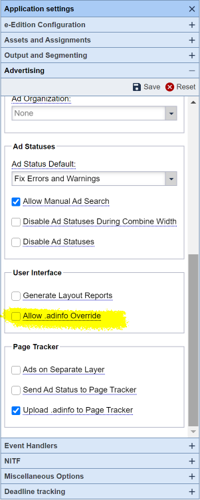
New Preference for Disabling the Override .adinfo file menu option) Prior to this version, if a site wanted to prevent all users from accessing the BLOX Total CMS > Documents > Advertising > Override .adinfo file option they could add a .disabled file. The .disable file support has been depreciated because it is not conducive to distributed production. Thankfully there is now a domain-based preference in Page Tracker's Application Settings that can disable the menu option on a domain by domain basis. JIRA INDESIGN-3147
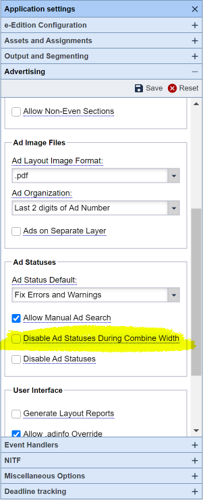
New Preference Support for Disabling Ad Statuses when using Combine With) Prior to this version if a site wanted to disable the use of Ad Statuses after using Combine With they needed to use a .disabled file which would turn it off for all domains. That file has now been depreciated because it isn't easy to work within a distributed production environment. Luckily Page Tracker's Application Settings now has an option that can disable Ad Statuses on a domain by domain basis. Sites that re-combine pages for magazine production frequently like to disable Ad Statuses. JIRA INDESIGN-3148
Bug Fix) During Testing of the above testing, it was determined that the prior .disabled file didn't actually stop Ad Statuses from opening when using Combine With. This has been fixed. JIRA INDESIGN-3148
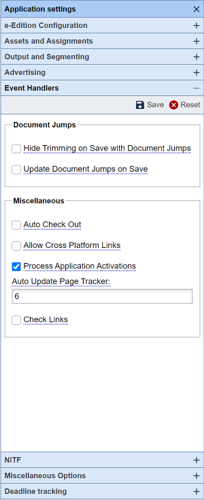
New Method to automate Updating Page Tracker) Prior to this version, if a site wanted to force the Adobe InDesign client for BLOX Total CMS to update Page Tracker regularly they needed to use a .enabled file. Support for those .enabled files has been depreciated as they won't function well in a distributed production environment. Luckily there is a new preference in Page Tracker's Application Settings. Any value higher than 5 minutes will cause Page Tracker to update the pages in an open document when the user is ide. The actual update time might be more as it only happens on certain idle events following the set time. Other limitations for updating Page Tracker also apply. JIRA INDESIGN-3150
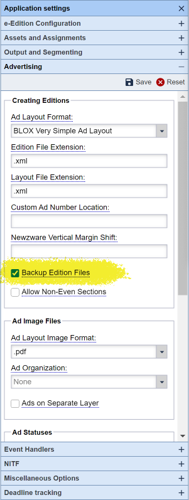
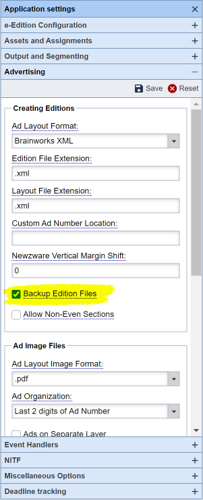
New Preference for disabling the backup of Advertising Edition Files) For many years the BLOX Total CMS client has moved the edition files from their initial folder to a Backups folder. This was done to help keep the Advertising folder cleaned up. We also back up the edition files to the Backups folder for the Adobe InDesign documents so that sites can know what edition file created what Adobe InDesign documents. Unfortunately, some sites didn't like the edition files being moved so we allowed the backup process to be turned off with the use of a .disabled file. Those .disabled files are not compatible with distributed production so they have been depreciated. The feature can now be turned off on a domain by domain basis using a new preference in the Advertising accordion in Page Tracker's Application Settings. JIRA INDESIGN-3151
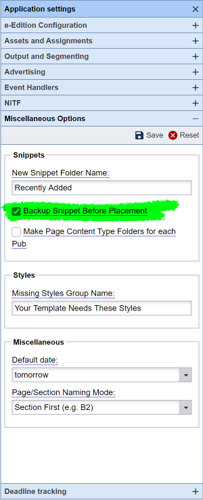
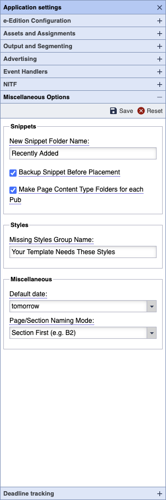
Internal Preferences Change for Backing Up Snippets) For several years we have backed up snippet files to the document's Backups folder before placing them on the Adobe InDesign pages. Besides providing forensics information, this also prevents the snippets from becoming locked when more than one user attempts to place a snippet near the same time. Some sites didn't like this behavior and so a .disabled file could have been installed to prevent the behavior. The .disabled files have been deprecated because they are incompatible with distributed production. For this use, it has been replaced with an option in Page Tracker's Application Settings that allows the behavior to be controlled on a domain by domain basis. JIRA INDESIGN-3157
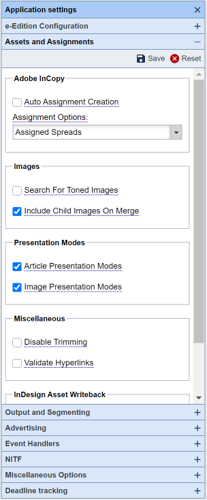
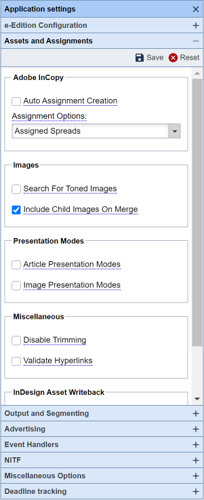
Internal Preferences Change for Validating Hyperlinks) Unfortunately, while hyperlinks in assets are great to have in an asset online, there is a proliferation of malformed links. Many years ago we added testing of hyperlinks to verify that they were at least properly formed (not that they evaluate to a live site). Unfortunately, that validation was slow and some of the links it would remove for being malformed were valid on the actual site because their site broke standard rules for URLs. Thus, we were removing valid links. So the feature was turned off by default. Nonetheless, some sites wanted that validation to work so we allowed the use of an .enabled file to turn it back on. Those .enabled files have been depreciated because they are not compatible with distributed production. Luckily we have added a domain-by-domain preference to enable hyperlink validation in Page Tracker's Application Settings. We recommend that the value remain unchecked as shown below. JIRA INDESIGN-3161
Internal Preferences Change for Asset Presentation Modes) Previously if a site wanted to use the image presentation modes or the article presentation modes to drive translation/design of the pages, the site needed to use .enabled files for those two functions. These .enabled files have been depreciated as they are not conducive to distributed production. Now there are domain-based Application Settings in Page Tracker where the support for the two modes can be enabled on a domain by domain basis. Doing so still requires the site to use rulesets that support them. JIRA INDESIGN-3162
Internal Preferences Change for Ad Statuses Search Button) The Ad Statuses dialog has long had a Search button that allows some users to locate ads manually. Some sites have disabled that with the use of a .disabled file. Those .disabled files have been depreciated because they are not conducive to distributed production use. Page Tracker's Application Settings now has a preference to disable this button on a domain by domain basis. JIRA INDESIGN-3163
Internal Preferences Change Page Design Snippet Publication Code Folder Creation) The client code has long supported the automatic application of Page Design Snippets matching the Page Content Type set by the advertising department and included in the edition files. Thus, for example, the opinion page snippet can automatically be placed on the opinion page. If, however, you build multiple publications with the same Page Content Types then you need folders in your Page Design Snippet folder for each publication to get unique versions of those pages. Those folders can be made automatically by the BLOX Total CMS client for Adobe InDesign. In the past, this has handled by an .enabled file. But those .enabled files have been depreciated because they are not conducive to distributed production. There is now a new Page Tracker Application Setting to create these folders. And they are now controlled on a domain by domain basis instead of the legacy site based .endabed file. JIRA INDESIGN-3164
Internal Preferences Change for NewzWare Vertical Margin Shift) NewzWare sites have had the ability to use an .enabled file to move the ads up or down a consistent amount on the pages. Those .enabled files have been deprecated because they aren't compatible with distributed production. Page Tracker, however, now has a new preference in Application Settings to replicate this feature on a domain by domain basis. The feature only works for NewzWare sites and not all sites need it. Just those that have vertical position discrepancies. JIRA INDESIGN-3165
Internal Preferences Change for Disabling Page Color Labels) Sites wanting to disable the use of Page Color Labels use to have to rely upon adding a .diabled file which turned the feature off for all their domains. Now the feature can be controlled on a domain by domain basis with Page Tracker's new Application Setting Option. The .disable files were depreciated as they don't work well in a distributed production environment. JIRA INDESIGN-3166
The Track Page Colors option is required if you want to cause the BLOX Total CMS client for Adobe InDesign to auto-export the images for toning based on the page's color mode.
This option will also cause users to get prompted to select each page's color at some point in the production process. But it allows besides the Auto Export for toning, an automatic selection of the toning option if you want to use the slower method. And it can automatically select the output method based on page color.
Internal Preferences Change to Enable Preflight) Enabling Adobe InDesign's preflight at a site used to require the use of an .enabled file. All legacy .disabled/.enabled files has been depreciated as they are not conducive to distributed production. Page Tracker has a new Application Settings option to enable Preflight on a domain by domain basis. Note: Preflight in Adobe InDesign is slow and resource hungry. It does not help BLOX Total CMS and can cause Adobe InDesign to crash as it hurts its performance and reliability. If you have issues that you think Adobe InDesign's Preflight would alert you to, your site likely has bigger workflows issues. We do NOT recommend enabled preflight. JIRA INDESIGN-3167
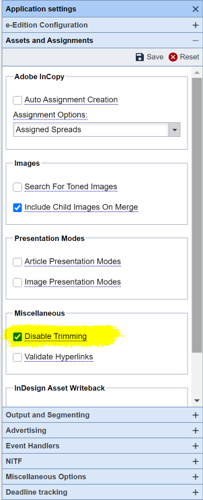
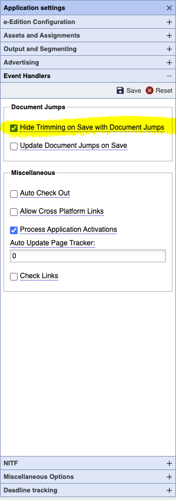
Internal Preferences Change to disable Trimming) The preference to disable print trimming in Adobe InDesign and Adobe InCopy has moved to Page Tracker's Application Settings. While Trimming is a great feature, it does cause instability in Adobe InDesign and Adobe InCopy and some sites opt to turn it off. The new location of the setting is shown below. JIRA INDESIGN-3168
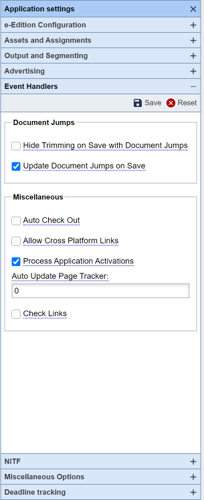
Modified Preference for auto-updating Document Jump Pages) While there is still a user preference for auto-updating Document Jump Pages during document saves, the site based .enabled file has been removed since those are not compatible with Distributed Production. There is, however, a new domain-based setting in Page Tracker's Application Settings to set control setting a new user's preference. JIRA INDESIGN-3170
Internal Preferences Change for Updating Page Tracker with Ad Problems) By default, Page Tracker gets an alert flag (!) on any page that has ad problems. But some sites wanted to disable that feature because they manually move ads. Moving the ads, without using Override .adinfo, will cause those alert flags. In the past, the alerts could be disabled through the use of a .disabled file. Those .disabled files have been removed since they are not conducive to distributed production. Now to disable sending the warnings to Page Tracker there is a domain by domain preference. JIRA INDESIGN-3171
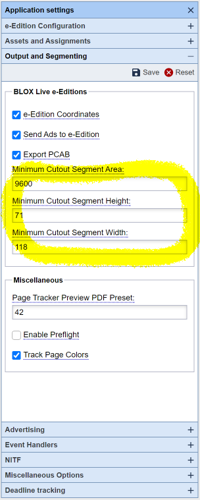
Changed Behavior for PageTracker's Minimum Cutout Preferences) For many years there has been a site configured .XML-based preferences file for establishing the minimum size of a cutout segment. Frames with content, but without an asset, can become cutouts for Live e-Editions. Those settings have been moved to Page Tracker's Application Settings in the Output and Segmentation accordion. Each domain that your site uses will need to have the settings configured to match what you are using in your existing preference file if they have been edited differently from the defaults. If they haven't been edited or edited to match the browser-based settings, the legacy preferences file will automatically be backed up and removed from use. JIRA INDESIGN-3175
Bug Fix For Log In) There were scattered reports where a user changed their BLOX Total CMS password in the browser interface and then was not able to log in to the InDesign client if they had previously cached a password. Client 5.46.01 automatically caches (remembers) passwords if they are 12 characters in length or longer. Now, if the user attempts to type a new password where a cached one has been supplied, the cached password will be cleared automatically and Log In can proceed with the new password. JIRA INDESIGN-3180
Bug Fix for Checking Links) We have gotten a couple of random reports of certain users at certain sites being prompted to update links when opening documents. During the work with updating the preferences to support their move to Page Tracker's Application Settings and the removal of all .disabled and/or .enabled files to support Distributed Production, we were able to replicate these rare reports. It turns out that if a user has reset their Adobe InDesign and then doesn't use our BLOX Total CMS client's options to open documents but instead used Adobe InDesign's File > Open Recent > or File > Open... that the user's can be prompted to update links, which they should not do for the links to BLOX Total CMS content. Now, when the check links option is disabled Adobe InDesign's preference will be set during Log In. JIRA INDESIGN-3182
MacOS Output Preferences Bug Fix) There was a bug with the MacOS output function such that if the output preferences contained a path but not a the MacOS would default to the user's Home folder. This has been corrected. Normally, however, the only way that the output would work at all, because of the difference in paths, is if the path was ~/Desktop. JIRA INDESIGN-3183
Replacement method to disabled Inline Assets) In the past, if a site wanted to disable the use of inline assets in the BLOX Total CMS client they could use a .disabled file. Those .disabled files have been depreciated because they are not compatible with distributed production. There is now a way for TownNews to disable that feature on a domain by domain basis. Generally, the only reason to want to disable them is for sites that don't update the web-site with the version on the Adobe InDesign page. Disabling should speed up translation and write-back slightly (milliseconds per event). If you want the feature disabled, please file a support ticket at support.townnews.com JIRA INDESIGN-3187
New Preference for Hiding Trims on Document Saves) While the user preference still exists, there is now a domain-based preference in Page Tracker's Application Settings to preset the user's preferences if they aren't yet set. The setting is listed in the Document Jumps area, but it controls all trimming when saving documents. JIRA INDESIGN-3193
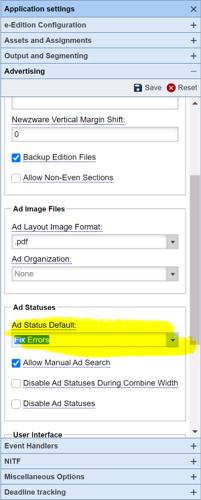
New Location for setting the default button in the Ad Statuses dialog) The location for setting a domain's default button in the Ad Statuses dialog has moved to the Advertising accordion. All related functionality remains the same. JIRA INDESIGN-3194
Bug Fix when Default is set to Fix Errors) There was a long-standing bug associated with the setting of the Fix Errors default for Ad Statuses. Even though the value was read by the client software, it was interpreted wrongly and the default button in the Ad Statuses dialog was converted to Fix Errors and Warnings instead. This has been fixed and the selected default will match in Ad Statuses now. JIRA INDESIGN-3194
Prior Versions:
The release notes for all prior versions can be found at this link: