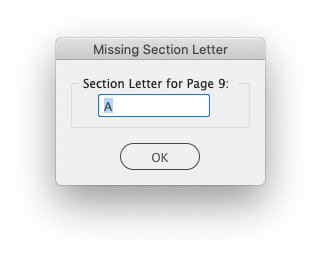
When users manually add pages, or manually renumber pages, and forget to set a section letter, this dialog can appear. Simply provide the correct section letter and click the OK button.
The legacy Asset Details dialog.
Client 5.52 Release Notes
Updated
Next Version
The release notes for client 5.53.x can be found below:
The BLOX Total CMS client for Adobe InDesign version 5.52.08-5 was approved for use by TownNews' Quality Assurance department on 21 October 2021. It is recommended for all sites. It my be downloaded using the adjacent link.
Esoteric Bug Fix for Uploading Output Preferences for Distributed Production) If an output preference file had been uploaded to Page Tracker and the user switched domains, it was was possible to end up in a situation where you couldn't upload output preferences to another domain. This has been corrected. JIRA INDESIGN-3486
5.52.08-4 Released 2021.10.18
Minor Bug Fix) The warning for checking distributed purpose on Image Toning Preferences only warned if it was the default purpose. This has been fixed. JIRA INDESIGN-3251
5.52.08-3 Released 2021.09.28
Minor Change for Show All Asset Notes without an open Document) The intent was for the BLOX Total CMS > Details > Show All Asset Notes... function to not show any dialog when there wasn't an open document. Unfortunately, users were instead warned with a confusing dialog. That dialog has been removed when there is no open dialog. JIRA INDESIGN-2561
5.52.08-2 Released 2021.09.09
Bug Fix for Non-Loaded PageTrackerPreview preset) A prior attempt to fix a case where an alternate Adobe PDF Preset is specified, but not supplied, for Page Tracker previews broke some testing when the BLOX Total CMS supplied default PageTrackerPreview preset isn't supplied. This has been corrected. JIRA INDESIGN-3359
5.52.08-1 Released 2021.08.06
Bug Fix for NewzwareVerticalMarginShift.enabled) A handful of our sites use Newzware .XML files to drive the creation of the Advertising Layout within the BLOX Total CMS client. Some of those sites then use a NewzwareVerticalMarginShift.enabled file to move the ads up or down on the pages to accommodate some odd setting in Newzware. The 5.47.x version of the client software inadvertently disabled this file by forcing its name to NewzWareVerticalMarginShift.enabled. 5.47.x sites can either update to 5.47.10-3 or newer, they can rename the .enabed file, or they can update the value in Page Tracker's Application Settings in the Advertising accordion and remove the .enabled file. JIRA INDESIGN-3165
5.52.07-1 Released 2021.07.30
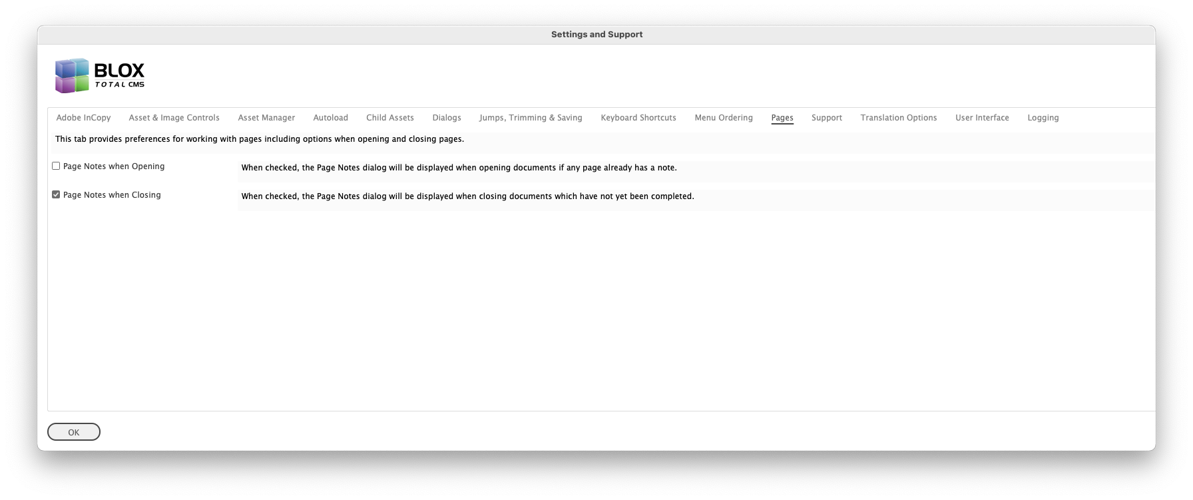
Bug Fix for Page Notes dialog) When opening pages, the Page Notes dialog was opening even though the preference was not set to display it on opening. This has been correct. The Settings and Support options in the dialog shown below allow the dialog to be displayed during document closure but not during the opening. JIRA INDESIGN-3366
5.52.06-1 Released 2021.07.07
Bug Fix for Default Publication New Document) The 5.52.01 version added a feature to allow a user to automatically store the selected publication code when creating a new document. A logic error prevented it from working for all users. This has been fixed. JIRA INDESIGN-2976
Internal Change) The 5.52.x version of the client changed some internal function names. A handful of sites use old methods to export assets to Merlin archives which are incompatible with the new function names. Redirection has been added to allow these outdated methods to continue to work. Merlin using sites should, however, request updated Merlin exports by filing a support ticket at support.townnews.com JIRA INDESIGN-3305
Bug Fix for Legacy Edition Creation) A site encountered a bug with attempting to update the Ad Layout using the Legacy and no longer recommended Update/Create .adinfo from Layout File... The bug was caused by a misassigned function reference that has been fixed. JIRA INDESIGN-3352
5.52.05-1 Released 2021.06.03
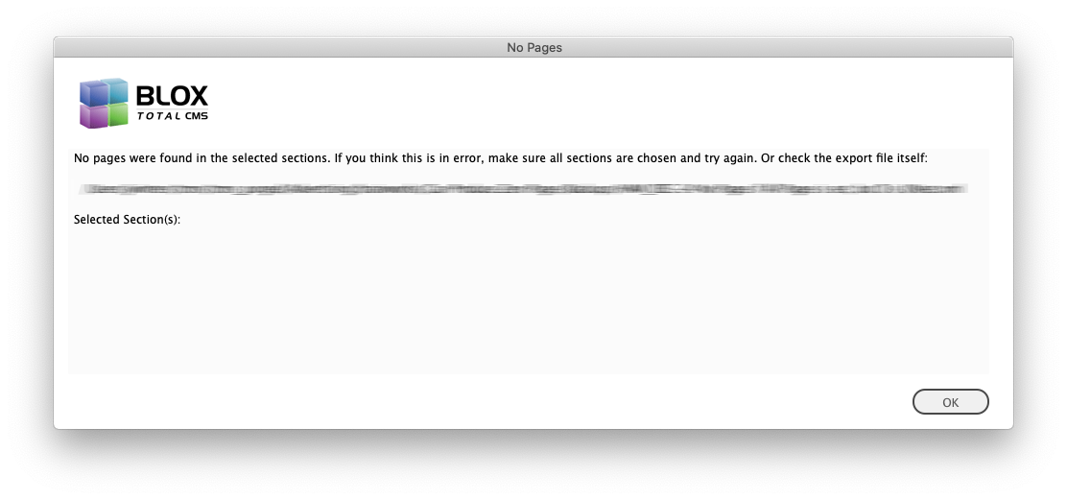
Minor Bug Fix) A user attempting to build an edition used an edition file with zero pages and received an error about the template versus the edition file. This has been corrected and a new dialog similar to the following will be displayed with more information. JIRA INDESIGN-3111
Improvement For Ruleset Sharing) Client version 5.34.01, released in October of 2018, added the ability to have domains share rulesets as part of the Distributed Production initiative. However, when that feature was added, we didn't extend the capability to support pulling from another server. With the increase in design centers for non-appliance-based sites, we have decided to extend this capability to alternate servers. To enable domain B to use domain A's rulesets the following four things must happen:
All Domain B's users must have login permissions for Domain A
Domain B will need to have a single ruleset.
That one ruleset in Domain B must be the Default ruleset
The name of the ruleset in domain B will be A's domain. For example, times.local (for appliance-based sites) or mytimesnews.com (for non-appliance-based sites).
It does NOT matter what is in that single ruleset. It will be ignored. I suggest adding comments explaining its purpose: "Redirecting to A." JIRA INDESIGN-3297
Minor Asset Manager Bug Fix) If a user in the Asset Manager in Adobe InDesign selected both the Duplicate option and the Merge option, the merge request was ignored. This has been fixed and users can now merge a duplicate of an asset. JIRA INDESIGN-3155
Bug Fix for Create Article Asset from the Pasteboard) There was a long-standing bug with the Create Article Asset function (and its precursors) if the text frame was on the Pasteboard to the left of a single-page document. It might have affected other locations, but the left of a single-page document always caused a problem. The result is that an error would be generated and the placement information could not be properly recorded. This has been fixed. JIRA INDESIGN-2979
Minor Bug Fix for NewzWare Ad Layout Format) The NewzWare format's .XML file does not indicate how many pages are actually in a section so the BLOX Total CMS client for Adobe InDesign displays a Pages per Section dialog. If a user canceled that dialog, the client used to display a warning about a non-uniform NewzWare file which was incorrect. The process should have just canceled. This has been corrected and canceling the Page per Section dialog now correctly cancels the entire process. JIRA INDESIGN-3295
Minor Trimming Change) In the past, you were allowed to pretend to trim image caption text. Trimming does not actually existing in BLOX CMS other than for Body Copy field of Article assets. Prior to this version you would allowed to pretend to trim some other other fields, like image captions, but the result was the ‘trimmed’ text was just deleted from the asset. Thus, users should actually just delete the text they don’t want in those fields as then the result matches the behavior. Because of this, the BLOX Total CMS client no longer allows user to pretend to use trimming in caption fields. INDESIGN-3205
5.52.04-1 Released 2021.06.02
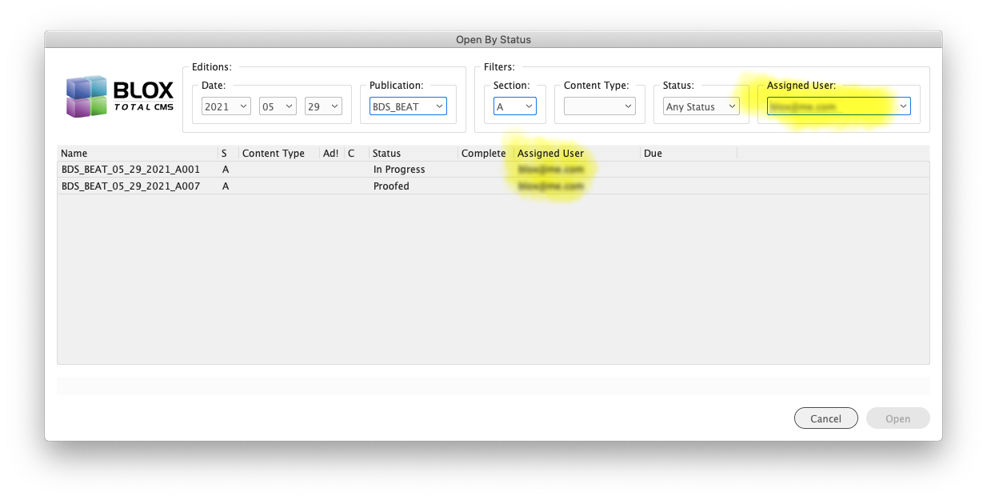
New Feature to allow users to accept ownership of pages) For sites that use Page Tracker and have supplied even the most basic of deadline information, they can now assign pages to users and allow the users to open pages that have been assigned to them. Page Tracker itself has an Assigned User: field in the Page View, but Adobe InDesign now offers BLOX Total CMS > Documents > Set Owner of All Pages > userid. When users are assigned, there is deadline tracking available within Page Tracker and eventually as part of Edition Reports available at BLOX Total CMS > Documents > Build Edition Report... JIRA INDESIGN-2831
Edition Reports now Include both Assigned User and Deadlines) The Edition Report, available at BLOX Total CMS > Documents > Build Edition Report... now includes columns for the page's Assigned User and Deadline. As always, the function exports a .csv file that can be manipulated as needed by the site to provide various forms of reporting. Please file a support ticket at support.townnews.com if there is some piece of data you need in the edition reports. Lots of options are possible. JIRA INDESIGN-2860
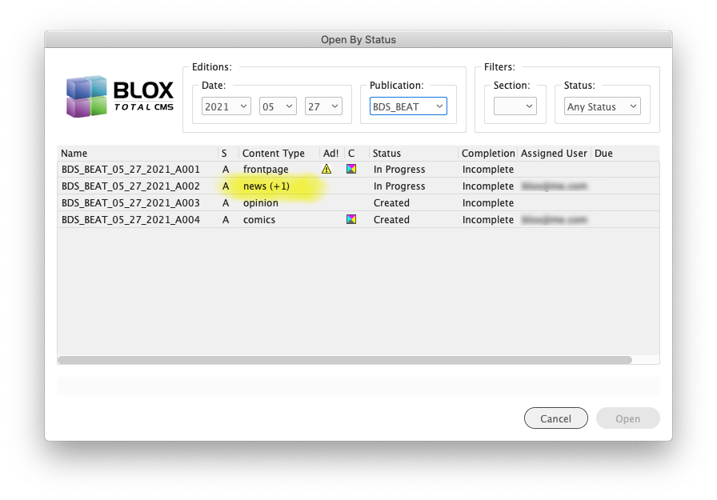
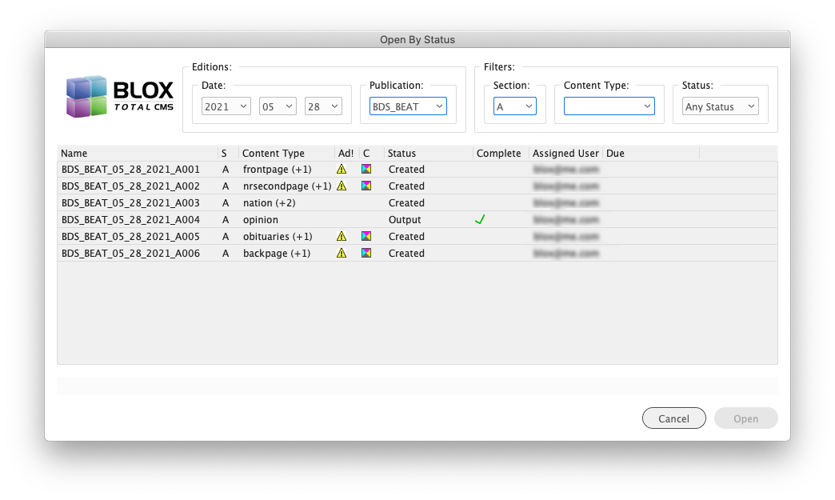
Page Content Type Display Change in Open by Status) While somewhat rare currently, pages can have more than a single page content type applied. But the Open by Status dialog didn't display that others were available. Now the display of the Page Content Type will be modified to include a (+1), (+2), etc to indicate that there are other Page Content Types applied. The primary one is important because that is how it is displayed to the users in Live e-Editions. JIRA INDESIGN-3281
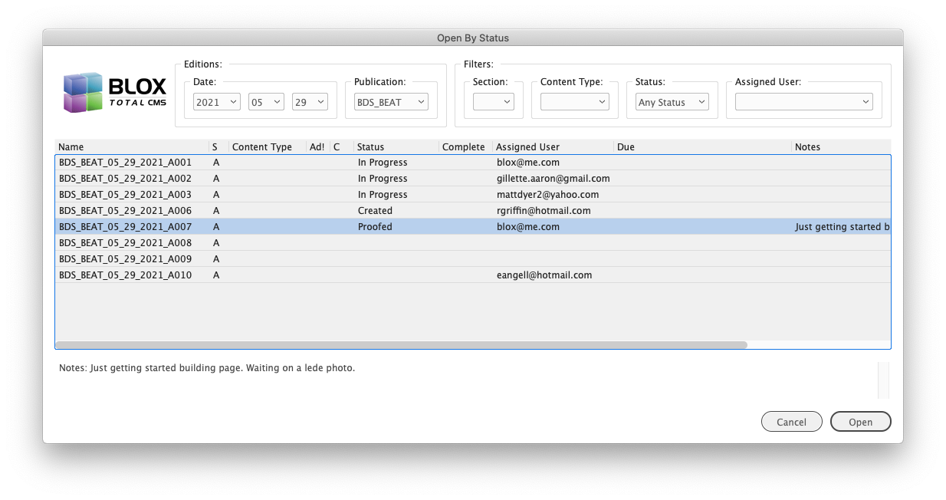
Open by Status allows for filtering by User) The Open By Status function has been extended to allow filtering by the user id. Thus, if your site assigns pages to users, your users can quickly locate their pages in the edition. JIRA INDESIGN-3283
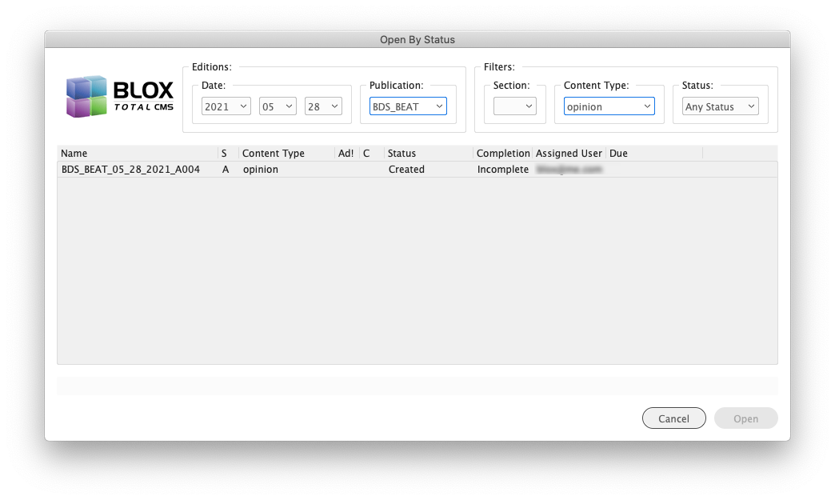
Filter Pages by Page Content Type) The Open by Status dialog now has filtering options for Page Content Types. Thus, a user can use that dialog and quickly find the Opinion page or the block of Sports pages for any edition. Page Content Types have been available for years and many Ad Layout Formats pre-set them. JIRA INDESIGN-3284
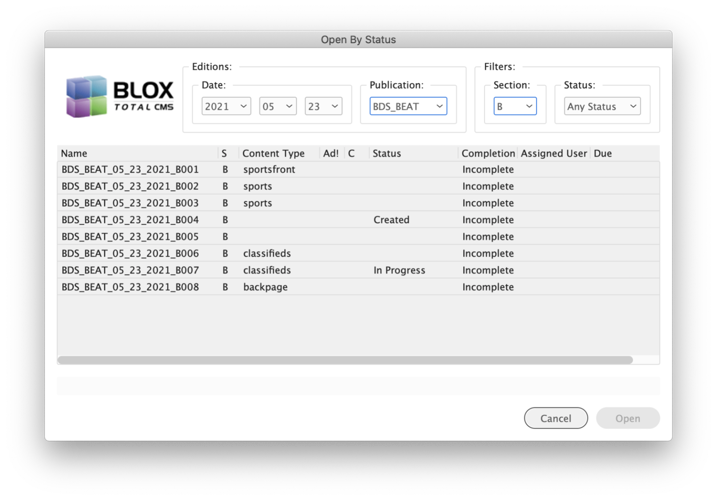
Open by Status now displays Page Notes) The Open by Status dialog now displays page notes. The beginning of the note will be displayed in the list of pages but clicking once on a page will cause the entire note to be displayed beneath the list of pages. JIRA INDESIGN-3285
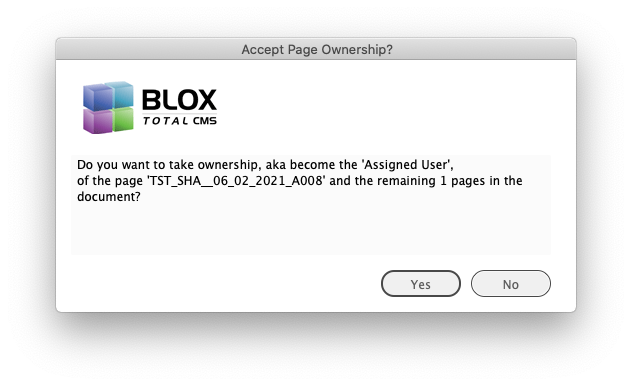
New Feature to automate Page Ownership) When a user uses Combine With or Combine Multiple in Adobe InDesign and the user is already the owner of the main page of the document, the combined pages will be assigned to the active user. If the user is NOT the owner of the main page, they will be prompted with a dialog similar to the one below. JIRA INDESIGN-3288
Image Statuses Bug Fix) A change in client 5.51.01 modified the way that the Image Toning Preferences were parsed and that actually broke the Image Statuses function. This has been fixed. JIRA INDESIGN-3291
Open by Status ui change) The dialog now displays page completeness with a check icon when the page is complete versus using 'Incomplete' and 'Complete' which were harder to delineate. JIRA INDESIGN-3294
5.52.03-1 Released 2021.05.24
New Feature to Set Page Workflow Process when Creating Edition from Edition file) As part of the process of monitoring page deadlines, when a page is created with either version of Create Edition from Edition file, the workflow of the page will be automatically set to the first process of the Pages workflow for any page that doesn't already have a workflow setting but has either an ad, a page color, or a page content type specified. This works for all Ad Layout Formats except for Managing Editor's Ad Force and ALS systems. Note 1: not all systems provide Page Color or Page Content Information. Note 2: Since client version 5.37.x, the second workflow process is automatically selected when placing the first asset on a page. Most sites' Output Preferences automatically set the proofing and file process. All of this helps to provide more accurate deadline tracking. JIRA INDESIGN-3271
Extension to the Open by Status to show Page Content Types) Open by Status now displays the page's Page Content Type. JIRA INDESIGN-3275
Bug Fix for handling users with Apostrophe in Account) After over a decade we finally had a user added whose e-mail address used for their account had an apostrophe. With the site's ancient Creative Suite version of Adobe InDesign this causes problems as asset information is converted from the CMS to a format for Adobe InCopy and Adobe InDesign. To accommodate such user ids, the appropriate field is now encoded internally. JIRA INDESIGN-3276
New Feature to Auto Set Page Workflow to the first process when setting Page Color) Page Tracker version 1.15 added several features to allow additional reporting for page deadlines. Part of that requires advancing the Page Workflow to the 1st process in the Pages Workflow at the appropriate time. Some Ad Layout Formats do not support Page Content Types nor Page Colors and thus any pages without ads will not get the workflow advanced. Now when a user applies a Page Color to one of those pages during the use of either version of the Create Edition from Edition file process, the workflow of the page will be set to the first process. This does not happen when using BLOX Total CMS > Documents > Set Color of All Pages, only the version that appears when creating editions. JIRA INDESIGN-3277
New Feature to Auto Set Page Workflow to the first process when setting the Page Content Types during Create Edition from Edition File) Page Tracker version 1.15 added several features to allow additional reporting for Due Times. Part of that requires advancing the Page Workflow to the 1st process in the Pages Workflow. Some Ad Layout Formats do not support Page Content Types nor Page Colors and thus any pages without ads will not get the workflow advanced. Now when an Advertising user applies a Page Content Type during the Create Edition from Edition file process, the workflow of the page will be set to the first process even if the Ad Layout Format doesn't specify a Page Content Type. To force this, choose the desired Page Content Types for pages and click the Add button before closing the dialog with the OK button. JIRA INDESIGN-3278
Additional Feature to Set Page Workflow Process when Creating Editions) As part of the process of monitoring page deadlines, when a page is created with Create Edition from Edition file, the workflow of the page will be automatically set to the first process of the Pages workflow for any page that doesn't already have a workflow setting if the Update Page Tracker with Previews option is checked in the Enhanced Create Edition dialog. This works for all Ad Layout Formats. Additional processes in this version handle setting this process for pages with Ads, Page Colors, or Page Content Types. JIRA INDESIGN-3279
Esoteric Bug Fix when Creating Editions from Edition Files) While testing some recent changes with support for various Ad Layout Formats, it was discovered that if a user chooses to only build sections of an edition, the client software will update Page Tracker with each page in the original edition file when using the following ad layout formats:
Ad Base PGL Text
BLOX Very Simple Ad Layout
Brainworks XML
NewzWare XML
This has been fixed and only the selected sections will have pages created in Page Tracker. In most cases, a site would have never noticed this issue (it had never been reported), but it likely would be most easily seen when producing early sections for a Sunday publication. This change should measurably speed production of these editions since much less work is done and much less communication with Page Tracker happens. JIRA INDESIGN-3280
5.52.02-1 Released 2021.05.19
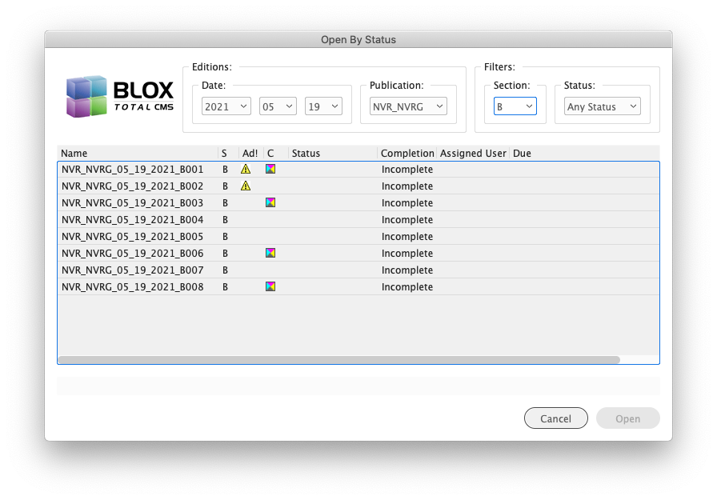
New Feature to Open Documents by Status) One of the issues that some sites occasionally struggle with is knowing what pages and documents need to be worked on. There are new options in the File menu and the BLOX Total CMS > Documents menu to open pages by status. That will open the dialog shown below which allows a user to select pages to open. The feature requires access to Page Tracker version 1.15. So appliance-based BLOX Total CMS sites will need to install Appliance OS version 2.30. JIRA INDESIGN-2051
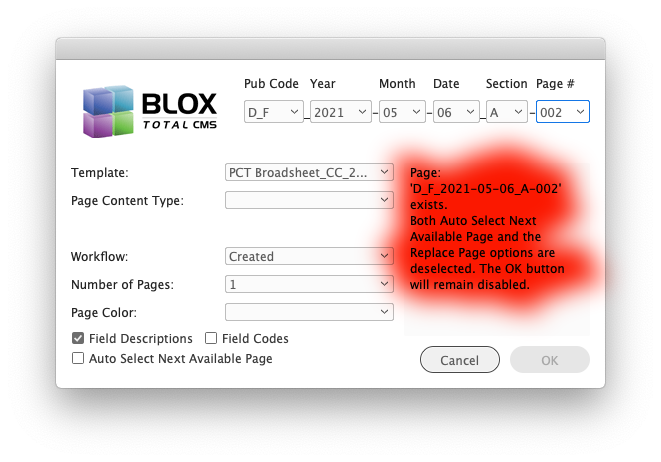
Improvement to Page Creation) While not many sites have users create pages using BLOX Total CMS > Documents > New... it has been improved to verify that the page the user is creating doesn't exist elsewhere. For example, assume a user builds all of Section B in one document. The 2nd B page wouldn't exist as a stand-alone document and so prior to this change, another user could build it and it would exist twice. Now that is no longer possible. The New document dialog will warn the user of the pages that exist even if they never existed as a stand-alone Adobe InDesign document. JIRA INDESIGN-2328
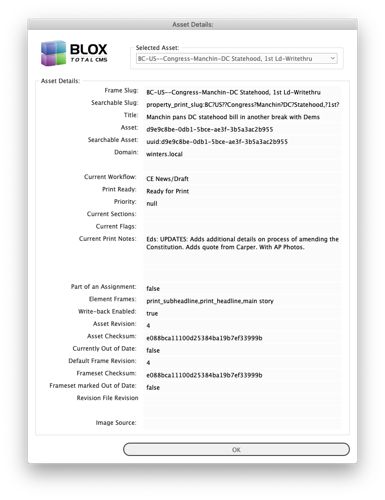
Improvement to Viewing Asset Print Notes) Some of our sites make heavy use of the Print Notes that are visible in the browser-based Asset Manager and in every Check In dialog in Adobe InDesign and Adobe InCopy. Previously if an Adobe InDesign or Adobe InCopy user wanted to view the Print Notes they could use BLOX Total CMS > Details > Asset Details and view the print notes of a single asset. That looks like the following:
The legacy Asset Details dialog.
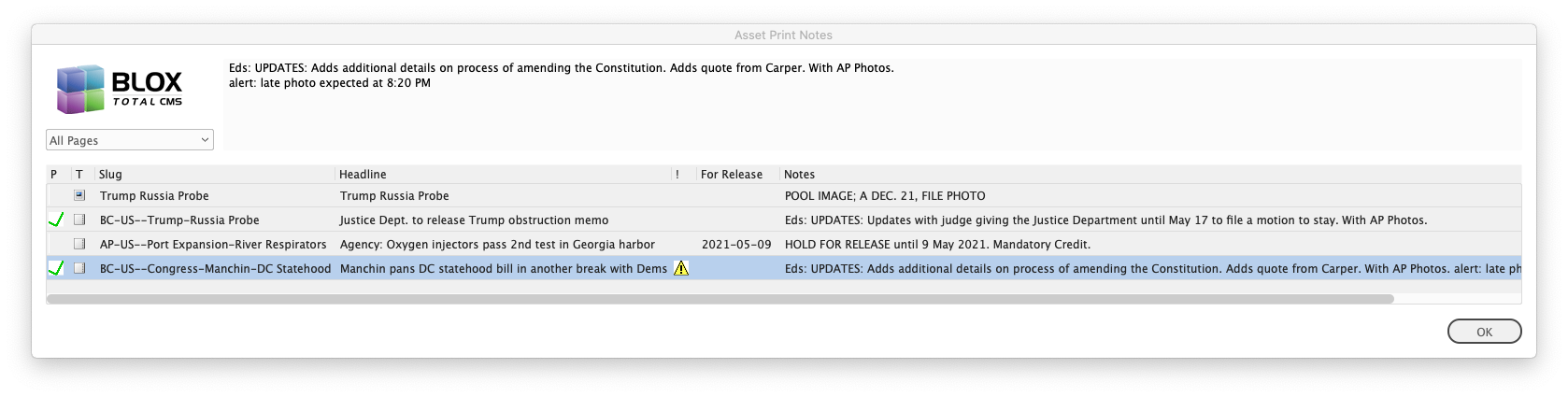
It's not very pretty and it only works one asset at a time and you have to select a frame of the asset first. That means the asset has to be placed. Now, however, there is a new function that allows you to view the print notes of ALL the assets that are budgeted for the page. That means, if they are slotted for the page or already placed on the page, you can see them print notes of all of them at once.
This new dialog can be accessed via either of these two options:
BLOX Total CMS > Details > Show All Asset Notes...
BLOX Total CMS > Documents > Show All Asset Notes...
JIRA INDESIGN-2561
Bug Fix) For nearly a decade a user could add the word 'alert' on the first line of a paragraph in the print notes field and it would force the Asset Print Notes dialog to open during placement or reflow of an asset. Unfortunately, at some point in time, part of that behavior broke and it would only work if 'alert' was the first word of the asset's print notes. This has been fixed. Neither the use of capital letters nor a colon is necessary. The word just has to start one of the paragraphs of the asset's print notes. JIRA INDESIGN-2561
Bug Fix) The change to storing Image Toning Preferences in Page Tracker created a bug in the client software when that feature activated with the release of Page Tracker version 1.15. The bug has been fixed. JIRA INDESIGN-3235
Change to how file extensions can be entered) Page Tracker version 1.15 moved preferences from Desktop > Settings > InDesign > Preferences to Page Tracker's Application Settings' accordions. One change that happened, is that the Advertising Edition and Layout File extensions could no longer be entered with a . (dot/periods). To counteract that flaw, the dots/periods will be added by the client code and extra leading dots/periods will be removed. JIRA INDESIGN-3270
Bug Fix for Naviga XML Ad Layout Format in Page Tracker's Application Settings) Sites using Naviga XML for their Ad Layout Format can now specify that format as a standard menu item in Page Tracker's Application Settings' Advertising accordion starting with Page Tracker version 1.15. Unfortunately, the client software wasn't configured to accept the value returned by Page Tracker. This has been fixed. This would primarily only affect new sites using Naviga XML as existing sites will still be configured as Custom. JIRA INDESIGN-3272
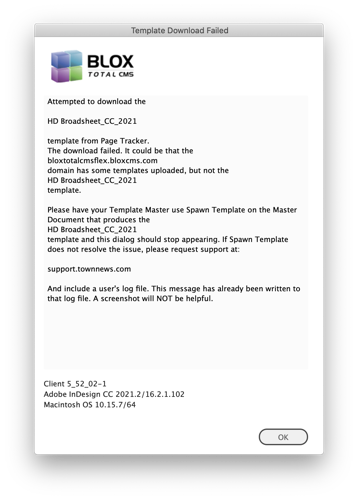
Change to Dialog Warning about Templates) Client version 5.44.x got support for uploading templates to Page Tracker. Page Tracker version 1.15 enabled that support. Unfortunately, the client was configured to immediately expect the templates to be uploaded and produced the following warning message:
The client has now been changed to hide that dialog until the first template has been uploaded via the use of Spawn Template. In addition, the dialog has been rewritten to more specifically explain the need to use Spawn Template as shown below. JIRA INDESIGN-3274
5.52.01-1 Released 2021.04.30
Improvement to New Documents Dialog for Default Publication) The browser-based preferences have always supported in the Page Creation Settings tab a Default Publication. Not all sites have one set, and that is fine. The BLOX Total CMS client will default to the first publication in the list if a Default Publication is not set. In fact, right not something is broke in Page Tracker and that default isn't getting set. However, an individual user might have a specific publication that they work on and now a user can set their own default by simply creating a new document using BLOX Total CMS > Documents > New... If the browser-based preferences doesn't have a default (or as is currently the case, it isn't getting returned), then each user will automatically create and save and use their own personal default. This doesn't change the normal behavior of making a new document that matches the current publication code. The defaults only kick in when creating a new document from scratch. It also has no impact on the use of BLOX Total CMS > Documents > Advertising > Create Edition from Edition file... JIRA INDESIGN-2976
Bug Fix With Page Name Enforcement 'Missing Section Letter') Client 5.49.02 added a check for pages having a section letter as it is a required part of the document name, even if you don't actually print a section letter. But because of the way the event handlers sometimes run, some users were getting prompted to add the section letter when opening up new pages. This has been fixed. Now the users should only see this dialog when the page is visible and one or more pages in the document doesn't have a section letter applied. JIRA INDESIGN-3208
When users manually add pages, or manually renumber pages, and forget to set a section letter, this dialog can appear. Simply provide the correct section letter and click the OK button.
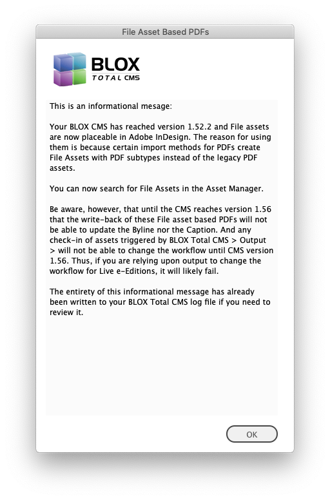
Change to Support of File Asset based PDFs) Full support for File Assets was originally to begin with the release of BLOX CMS version 1.55, but the final component needed wasn't released into BLOX CMS version 1.56. The client code had a switch added looking for CMS version 1.55 but that was wrong. It has, however, been changed so that it actually allows placement of File assets with CMS 1.52 and then full support with CMS 1.56. Appliance-based sites get BLOX CMS 1.52.2 with Appliance OS 2.29. Non-Appliance sites are already BLOX CMS 1.57.2 (as of 2021.04.30) and thus have full support. The first time a user launches with access to BLOX CMS version 1.52 or greater but less than BLOX CMS 1.56 they will get the informational warning below. The important thing here is that if File Assets are used, only write-back and changing workflows for Live e-Edition forward does NOT work. However, some media import jobs will only import PDFs as File Assets. Manual asset creation and Batch upload asset creation will continue to create legacy PDF assets. JIRA INDESIGN-3266
Bug Fix for Dead Jumps) A change in the 5.48.02 client broke the placement of the Continued From Jump Items when working with dead jumps if, and only if, the user was just clicking on the page when placing the dead jump. This has been fixed. The workaround is to first draw a frame and then when using Place Dead Jump it will place into the selected frame. JIRA INDESIGN-3267