



This is a very useful function when working with sports agate or any type of tab delimited columns of data. It can also be used with Table assets.
The function will examine the column width of the frame and set right-align tab stops to proportionally align the columns of text based upon the number of characters or the width of those characters in each column.
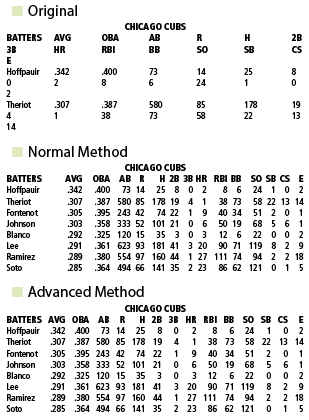
adjusttabs Details
| Title | Details |
|---|---|
| Name | adjusttabs |
| Generic Calls | <&adjusttabs:>|<&adjusttabs:p1>|<&adjusttabs:(p1,p2,p3,p4,p5,p6, p7)> |
| Sample Calls | <&adjusttabs:>|<&adjusttabs:0>|<&adjusttabs:(1,,5)>|<&adjusttabs:(0,3)>|<&adjusttabs:(1,,,200)>|<&adjusttabs:(1,,,,1)>|<&adjusttabs:(0,,,,1,1)>|<&adjusttabs:(0,,,,1,,9)> |
| Parameters | A maximum of 7 with all of them being optional. |
| p1 | Optional. Set all the tabs the same, or set by group. This can be a 1 (one) or a 0 (zero). If anything other than 0 then the function works on each group of consecutive paragraphs containing tabs independently. Thus an agate story, or groups of them, with multiple configurations of tab delimited columns will have their tab stops set independently. |
| p2 | Optional. Specify specific group. This value is only examined if the p1 value uses the default You can use this to specify the specific group of consecutive paragraphs containing tabs to work on. Specifying a value of 1 will cause it to work on the second group of consecutive tabbed paragraphs. A value of 0 points to the first group. If you specify a group that isn’t available, then it applies the <&adjusttabs: function to all the groups. |
| p3 | Optional. Determines the minimum number of paragraphs that are considered consecutive. The default is 2. Use a value greater than two if you want to prevent having the <&adjusttabs: function work on smaller items. Values less than 2 are ignored. |
| p4 | Optional . Column 1 scale. Sets a relative value for the first column of text. In sports agate, the first column is nearly always letters. Letters typically take up less space than the numbers in the rest of the columns. The default is a value of 100. Set a value of 100 if all the data is text and the width of the first column of information should use the same width as the rest of the text. If the story is agate then determine the percentage of letters that can fit in the same space as the numbers. Because of the white space between columns, a value of 100 will tend to produce a very open first column. Values greater than 100 are common. For example in the font used in this documentation 21.25 letters and spaces fit in the same space as 20 numbers. Thus the value to enter would be 106 because 21.25/20 is 106% Howard Smithy Jon Doe 21.25 12345678901234567890 20 In the following example, 8 letters fit in the space of 7 digits. So the value to enter would be 114 because 8/7 is 114%. Fontenot 1234567 When p5 is set to 1, the value of p4 is ignored. |
| p5 | Optional. Advanced Mode. When this value is set to 1 the <&adjusttabs: custom function will use the actual width of the text rather than just the character counts to set the tab positions. This creates exceptionally even column spacing, but it requires slightly more time to set the tabs because it requires more calculations. See “Sample Results” on page for samples of the differences between normal and Advanced Mode. When p5 is set to 1, the value of p4 is ignored. When calling the Advanced mode the normal parameter setup is: <&adjusttabs:(1,,,,1)> |
| p6 | Optional. Remove Warning. When this value is set to 1, the <&adjusttabs: custom function will not alert the user when it is unable to set the tabs to fit the column width. |
| p7 | Optional. Right Indent. When using this value, the right tab will be indented by the specified number of points. When this value isn’t specified, then it will be set to zero. If the value is larger than the column width, it will be ignored. |