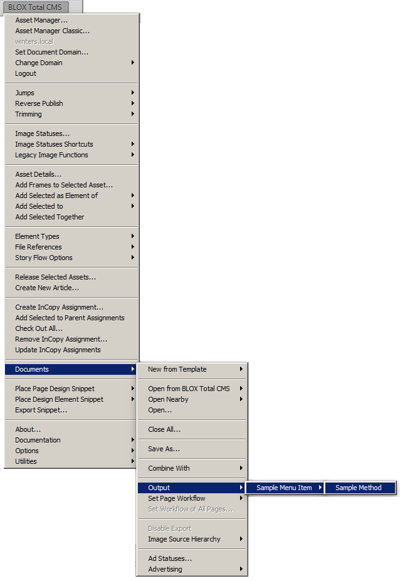
The listed minimalized Output Preferences would produce a single menu under Output with a single menu item.
output minimal xml
By Jon S. Winters
Product Architect
The below sample is the minimal XML file that will produce an output.
<root>
<com>
<electronicpublishingsupport>
<outputMethods>
<menuGroup>
<menuGroupName>Sample Menu Item</menuGroupName>
<outputType>pdf</outputType>
<preset>[Smallest File Size]</preset>
<method>
<menuName>Sample Method</menuName>
</method>
</menuGroup>
</outputMethods>
</electronicpublishingsupport>
</com>
</root>
What does that create?
The end result of that minimized XML shown above file is that it will produce the following menu in Adobe InDesign:
The listed minimalized Output Preferences would produce a single menu under Output with a single menu item.
What does that do?
That method takes advantages of the many, many defaults in the Output Preferences XML and sends a PDF matching the name of the document to the user's desktop using the built-in Adobe InDesign PDF Export Preset [Smallest File Size]. If the document has multiple pages, all pages will be in the PDF.
Are the aligned indents necessary?
For functionality, the indentation shown in the sample above is not necessary. But indenting with spaces (instead of tabs) makes editing the files much easier.
Overall Structure
The XML is structured into a wrapper containing all four of these tags in the order shown below:
<root>
<com>
<electronicpublishingsupport>
<outputMethods>
Those four tags must be closed in the opposite order as shown below:
</outputMethods>
</electronicpublishingsupport>
</com>
</root>
Between the opening and closing tags you can place as many items like this as desired:
<menuGroup>
<menuGroupName>menu name here</menuGroupName>
<!-- Group Settings -->
<method>
<menuName>method A name here</menuName>
<!-- Method Settings -->
</method>
<method>
<menuName>method B name here</menuName>
<!-- Method Settings -->
</method>
</menuGroup>
Group Settings versus Method Settings
The settings for the XML can be placed in either the parent Menu Item or the individual methods.
Comments
Since the Output Preferences is valid parsable XML (though without a CSS or XTD), you can use comments.
Best Practice Comments
If you are editing the Output Preferences file, you might want to add a comment such as this:
<!-- Edited on 2013.06.13 by user@domain.com to add support for new full page ink jet proofer -->