


This article describes how NBC local affiliates can configure an Editorial Importer in BLOX CMS to bring in Olympics article content from NBC using an NBC API key.
In Editorial > Assets, click on the gear at top right next to your logged in user, and select Importers. Go to New > Custom.
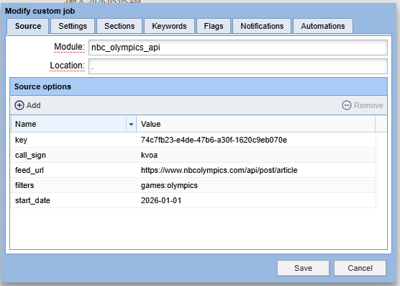
Under Source, populate as follows:
Module: nbc_olympics_api
Location: .
Source options:
Enter name key and populate as a value your NBC Olympics API key
Enter name call_sign and populate as a value your TV station call letters (that NBC uses for analytics)
Enter name feed_url and populate value: https://www.nbcolympics.com/api/post/article
Enter value filters and populate value games:olympics (or paralympics if desiring paralympics articles)
Optional: Enter name start_date and populate a date/time string for the start of the query range (examples: 2026-01-01, yesterday, +1 hour ago)
Optional: Enter name end_date and populate a date/time string for the start of the query range.

Under Settings, give your job an Importer Name. Review other settings here (such as selecting “set un-published if you want to decide which articles to publish)
Under Sections, define any section tags to apply to all imported assets.
Under Keywords, define any keyword tags to apply to all imported assets
Under Flags, define any flags to apply to all imported assets.
Under Notifications, define any email you want to sent job logs to
Under Automations, define any transformations BLOX allows to be made to assets that you want to apply.
The job will run hourly and bring in all new articles created in the past hour. You can also select the job and click “run” to run the job within the next five minutes.