This article describes how users with a BLOX VMS account that wish to import and host videos can use BLOX CMS syndication to import videos from MRSS feeds to BLOX VMS.
BLOX CMS syndication by default does not support direct download and hosting of third-party video assets; instead imported assets are remote video assets in which the video binary remains hosted and served from the third party (not stored/served from BLOX CMS). By importing to BLOX VMS, users can work with content providers that require downloading and hosting of video binary files.
2. An additional BLOX C<S software privilege (contact support to have added to your BLOX site)
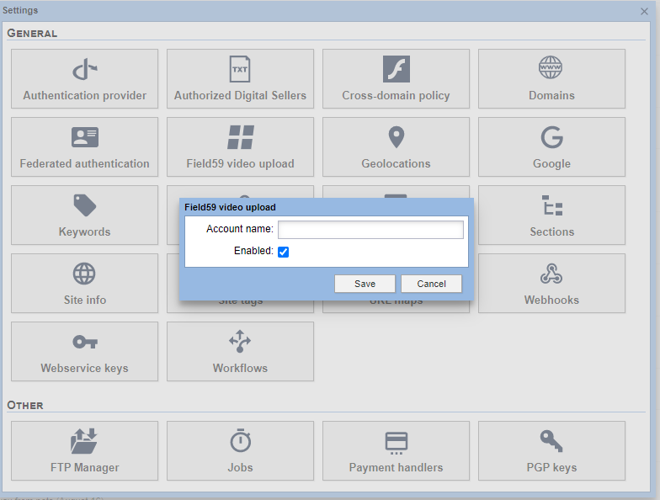
First, in Settings > General, verify that the "BLOX VMS video upload" setting has the correct BLOX VMS account specified and is enabled.
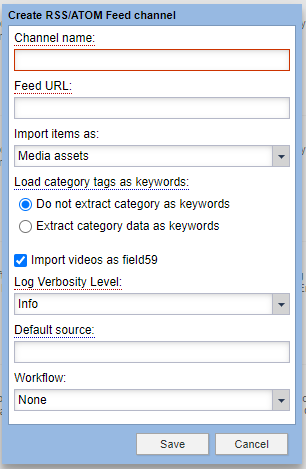
Next, go to syndication and create a new MRSS/ATOM channel or open an existing channel. Check the "Import videos as BLOX VMS" option.
When videos from the MRSS feed are added to site, BLOX CMS creates a remote video asset that refers to the video as hosted in BLOX VMS.
- On the BLOX VMS side, the BLOX CMS title, description, and keywords fields will map to the respective fields on the BLOX VMS asset.
- Updates to those fields will be updated in BLOX VMS.
- Setting archive or dead dates on the BLOX CMS asset does not update in BLOX VMS at this time.
- All newly created items in BLOX VMS generated from BLOX CMS will default to category news.