This article describes how to create delete rules to manage video storage in a BLOX VMS account.
BLOX VMS users may wish to create jobs that automatically remove videos from a BLOX VMS account after some time. VMS has an interface for this, but BLOX Digital support must configure the rules at this time. This article is presented as a guide to help you construct rules, but please submit them via a BLOX Digital support ticket to have them implemented.
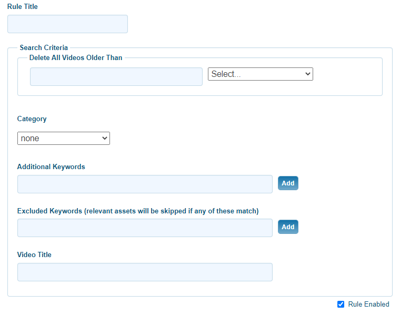
Under Search Criteria, define the search that will be performed to find assets to mark as deleted.
Delete All Videos Older Than (required): Options are Day, Week, Month, or Year to set your time frame.
Category (optional): Defining a category will limit the rule to delete only videos with that category.
Additional keywords (optional): Define keyword(s) that will limit the rule to delete only videos with the provided keyword(s).
Excluded keywords (relevant assets will be skipped if any of these match) (optional): Define keyword(s) that will allow assets to be excluded from deletion if assets would otherwise match on other criteria.
Video Title (optional): Defining a title will limit the rule to delete only videos with the provided title.
Rules are run hourly. Videos that match the search criteria in a rule will be marked as deleted.
Actual purging of items occurs daily, at midnight UTC. There is a 14-day grace period between items being marked as deleted and actual purging, so if you believe you have made an error in configuration of content removal, please contact support and we can assist in restoring assets if still inside the 14-day grace period.
Please note BLOX VMS delete rules will only mark as deleted the video assets in the BLOX VMS account itself. It will remove a BLOX VMS video player from displaying to end viewers. It will not remove assets from BLOX CMS or any other downstream application where assets have been created that refer to a BLOX VMS video player embed code but the publishing status of the asset itself is controlled by the other application. As a result, you may end up with an empty but still published assets in that downstream application.