



The original order of the business tabs on the front end is Profile, News, Blogs, Ads, Coupons, Menu, Photos, Videos, Awards, Staff, and Email Us. You cannot rearrange the order of the tabs themselves, but you can rename SOME of the tabs using Custom properties and then assign the assets to the correct new section. (You cannot rename News or Blogs.)
If you do not assign an asset to a section tag that tab will not appear on the navigation.
As an example, if you want to change the tabs to be About Us, Staff, Menu, Specials, Coupons, Photos, Videos, Awards, and Email Us you would need to rename some of the tabs and assign assets to different sections.
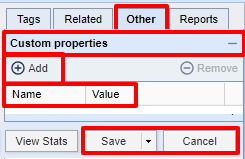
Click Add.
Name will be the tab name you wish to change, and Value will be the text you want displayed instead.
Using our previous example:
profile_tab = About Us
product_tab = Staff
coupon_tab = Menu
menu_tab = Specials
photos_tab = Coupons
video_tab = Photos
award_tab = Videos
staff_tab = Awards
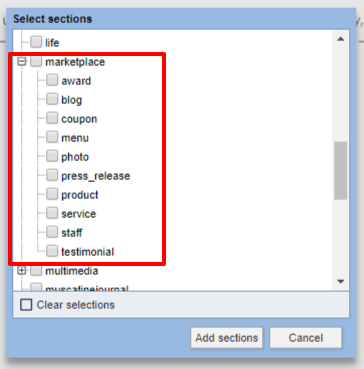
Then assign the asset to the tab's original name (section). If you were changing the "staff_tab" to say "Our Team", after adding the custom property above you would then assign your asset to the marketplace/staff section.

Click Save and Close, or Save and Close.