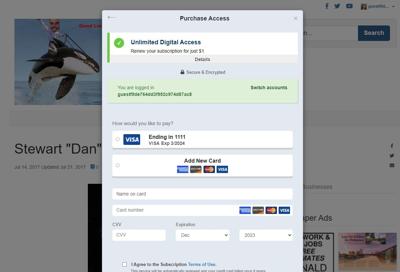
1. To test the Formers rule/paywall you created, you must be logged in as a user who had a subscription in the past, but it is no longer active.
a. To see if a user account has an active subscription, go to BLOX Subscription and search for an email address.
b. If you do not have access to an account with a past subscription, you can create one.
i. Subscribe on the front end of your website as a regular user. You will need a valid credit card.
ii. After you go through the process, check BLOX Subscription to ensure that it was purchased successfully by searching for the account.
iii. Cancel the account by clicking the cancel button, move the expiration date to the past, and refund the transaction.
c. It will take 5 minutes for the system to refresh. We recommend logging out of the user account and logging back in to speed this up, then logging back in.
2. Log in as a user with the past subscription and click articles/content to hit the rule you created. You should see the customized Formers paywall and win back offer.
3. For Audience+ sites using 1-page purchase and Wallet, the user’s credit card information is saved and will be accessible for easy re-subscribing: