What are BLOX Comments?
BLOX Comments is where user-contributed comments are managed.
Interface Overview
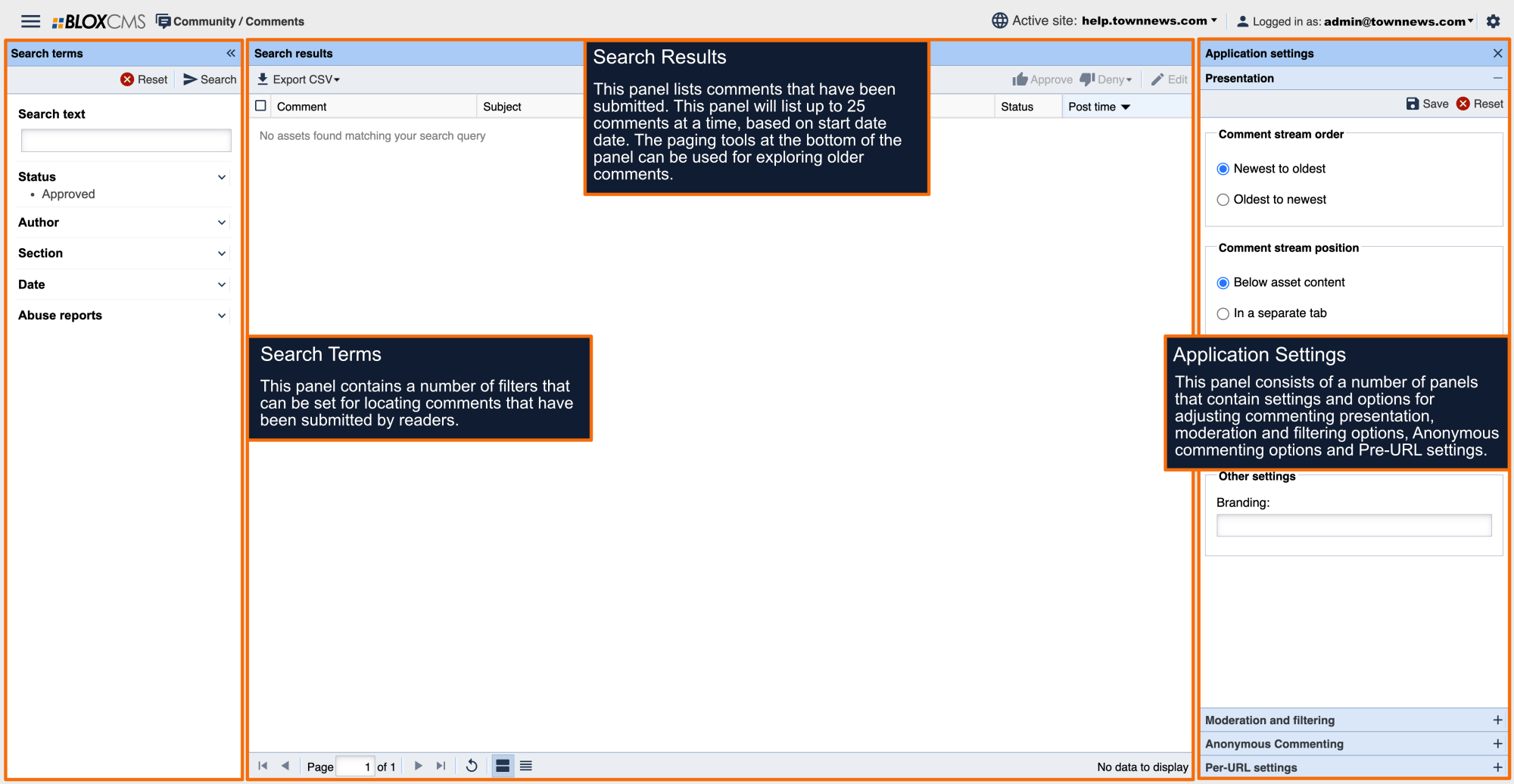
The BLOX Comments interface consists of 3 panels:
Search terms: This panel contains a number of filters that can be set for locating comments that have been submitted by readers.
Search results: This panel lists comments that have been submitted. This panel will list up to 25 comments at a time, based on start date date. The paging tools at the bottom of the panel can be used for exploring older comments.
Application Settings: This panel consists of a number of panels that contain settings and options for adjusting commenting presentation, moderation and filtering options, Anonymous commenting options and Pre-URL settings.
BLOX Commenting Modes
BLOX Commenting consists of three modes: Comments, Guestbook or Reviews
BLOX Comments: This mode is set by default and works well with most Editorial assets.
BLOX Guestbook: This mode is set by default within Obituaries and BLOX Tributes.
BLOX Reviews: This mode is set by default within BLOX Businesses URL skin.
All three styles can be moderated easily in the BLOX CMS Comment Manager, in the assets themselves, or in an email sent to up to three comments moderators.
Additionally BLOX Commenting offers "threaded" commenting, (replying to an existing comment), and allows readers to "watch" a discussion, guestbook, or review. They can receive an email when someone makes a comment on the article or business.