BLOX Mobile NX supports Chartbeat analytics for screenviews. You will need to have support for mobile applications within your Chartbeat package. This may require an upgrade directly from Chartbeat. Some configuration is needed before events will flow through.
Navigate to AppMan (Apps)
Click “Customization”
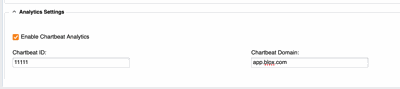
Scroll down to the section labeled “Analytics Settings”
You will see a checkbox labeled “Enable Chartbeat Analytics”. Click to turn on.
Below the checkbox, you should see two fields “Chartbeat ID” and “Chartbeat Domain”. You will need to retrieve these two IDs from your Chartbeat dashboard then enter them into the correct fields.
Click “Save”
Make the changes live
As per the documentation from Chartbeat, we are sending screen events on article views. When author and section tags are available, these are sent in conjunction with the screen events. Additionally, the user’s subscription and/or registration state are sent at app boot up and when the state may change during the app lifecycle such as logging in.