What are BLOX Forms?
BLOX Forms is a form-builder application for creating and managing custom forms on your site.
Effortless drag-and-drop form creation
BLOX Forms are built using hardcoded, customizable widgets called Fields. Fields can be configured to capture information in accordance with your workflow.
Fields are organized within the form in containers called Fieldsets. Form Properties can be modified on an individual-basis for specifying form specifics, notification, recipient and other form-related options.
Interface Overview
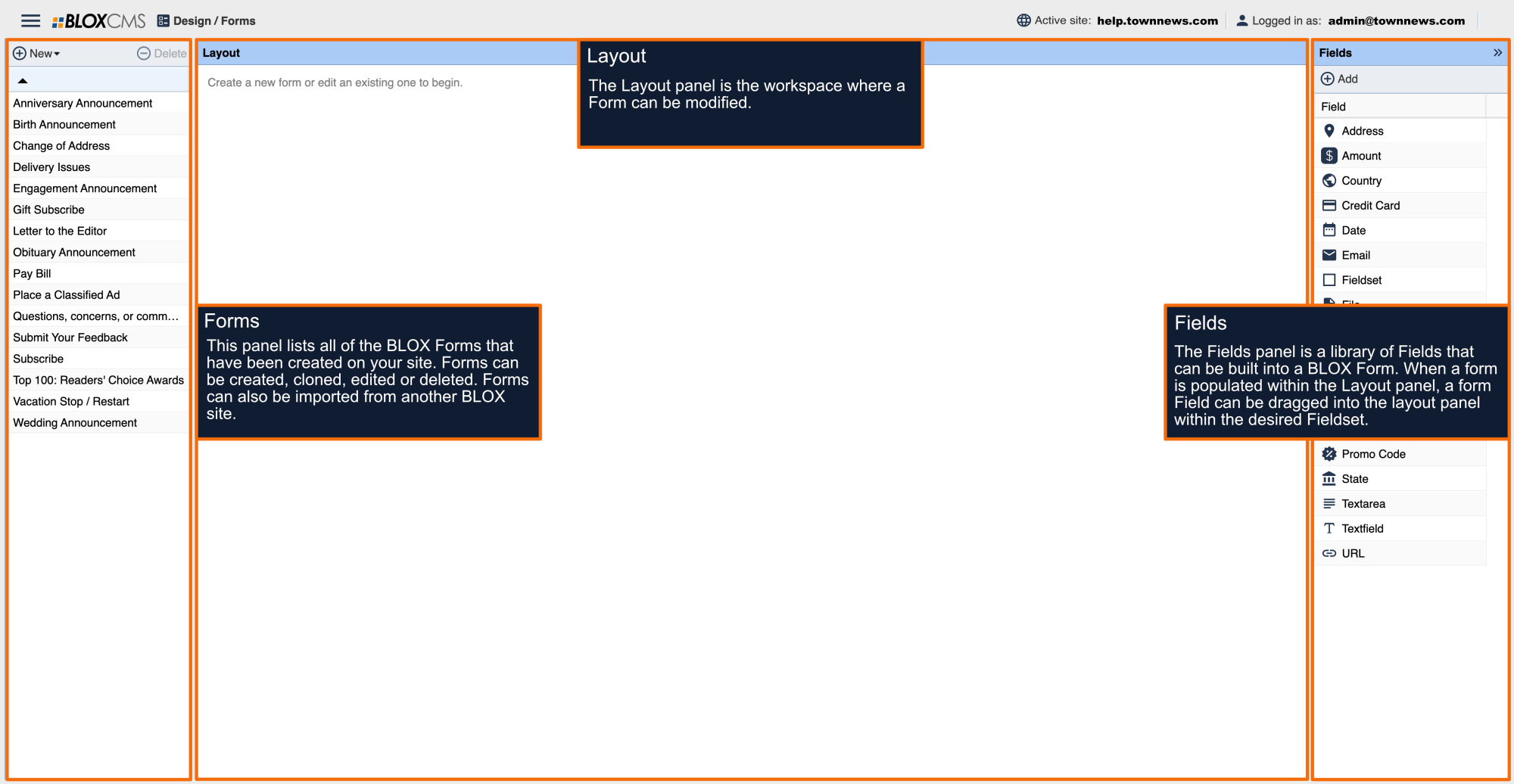
The BLOX Forms interface consists of 3 panels:
Forms panel: This panel lists all of the BLOX Forms that have been created on your site. Within this panel, forms can be created, cloned, edited or deleted. Forms can also be imported from another BLOX site.
Layout panel: The Layout panel is the workspace where a Form can be built and modified.
Fields panel: The Fields panel is a library of Fields that can be added into a BLOX Form. When a form is populated within the Layout panel, a form Field can be dragged into the layout panel within the desired Fieldset.