You have permission to edit this article.
Edit

How to customize columns on the BLOX CMS interface

In the most BLOX CMS applications there are several columns which show information about content. By hovering over the column titles, you'll see a small arrow to the right of each column title. Clicking on it allows you to customize the columns visible on the page. You can hide existing columns here.
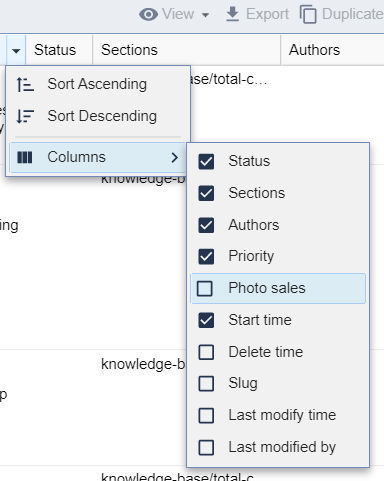
Adding columns

Clicking and holding the column title itself allows you to drag and drop the column and change their order.

We want your feedback!

See something that needs updating or additional clarification? Want assistance with a topic that isn’t listed here? Please let us know!

At BLOX Digital we are dedicated to providing you the information you need to be successful when you need it.

Visit our feedback page to log in, submit a support ticket, and track the progress of your open requests.