



Set Preferences
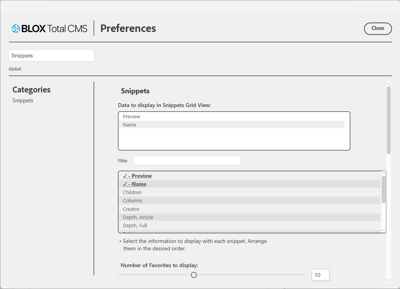
The BLOX Total CMS client for Adobe InDesign allows users to set snippet preferences. This includes the number of snippets to be displayed, snippet data, snippet type, and snippet labels.
There is also an option to display the removed checkbox. When it is checked, it will display the removed snippets.
How to Set Preferences
The Preferences dialog can be accessed through the Snippets tab or the BLOX Total CMS Plug-in menu.
- Click the Snippets tab
- Click the gear icon on the rightOR click the BLOX Total CMS Plug-in menu
- Click Preferences...
- Under Categories, click Snippets
- The Preferences dialog will display
- Preferences include
- Data to display
- Double click on each option to add it to the table at the top.
- After more than two are added, an Arrange selector appears that allows the order to be changed with the click of Move Up or Move Down
- Delete a selection by double clicking on it or click Remove
- Number of favorites to display
- Use the slider to select the number
- Select the Default Snippet Type
- Design Element
- Page Design
- Show Removed Checkbox
- Click the checkbox to display the Removed Checkbox
- Download All Snippets OR Update All Snippets
- Click Download All Snippets to replicate the structure of the snippet database on the local workstation
- Click Update All Snippets to re-export all snippets from the current document
- Snippet Label Contents
- Double click on each option to add it to the table at the top.
- After more than two are added, an Arrange selector appears that allows the order to be changed with the click of Move Up or Move Down
- Delete a selection by double clicking on it or click Remove
- Data to display
- After all preferences have been selected, click the Close button

The Preferences dialog for the BLOX Total CMS Client for Adobe InDesign