



3451 Automated Production Hierarchy
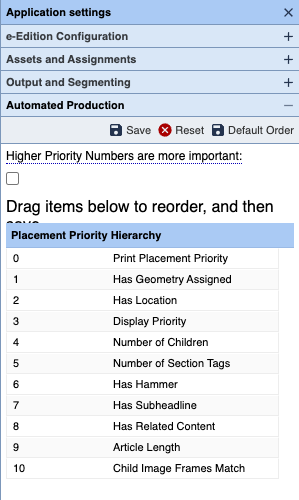
This image shows the default configuration of the Automated Production Hierarchy. Drag the items in the list up or down to set their importance. The ones at the top of the list (marked in that image with 0, 1, 2, etc.) are weighted higher (more important) than those at the bottom of the list (marked 9, 10, 11).
Two of the values read numerical scores that are assigned to the assets by the asset's editors: Display Priority and Print Placement Priority. Since the site determines if a value of 1 or 9999 is more important, there is an added check box: Higher Priory Numbers are more important. When that is checked, then values closer to 9999 are scored higher than those with numbers closer to 1.
As featured on
One of the ways that Automated Production works its way into everyday page production is via the selection of assets to place on a given page or in a given frame. Part of that process is governed with an asset's score. This document outlines how that score is calculated and thus how the BLOX Total CMS client for Adobe InDesign selects assets to place on the page using both Automated Production and the Budget View tabs.
