Approved for Use on 6 December 2021
The BLOX Total CMS client for Adobe InDesign and Adobe InCopy version 5.54.04-1 was approved for use by TownNews' Quality Assurance department on 6 December 2021. It is recommended for all Adobe Creative Cloud based sites. It may be downloaded using the adjacent link.
The Goal of Client 5.54.x
The overall goal of client 5.54 is to provide a framework to build the Automated Production feature. Because of this, some of the development work won't be listed in the release notes as the development is providing features that will be used by future functions.
There are, however, incremental enhancements to the Distributed Production feature. And now that Page Tracker version 1.16 has been released, TownNews will be working with Beta sites on that major feature.
5.54.04-1 Released 2021.12.01
Auto Log In for MacOS Users) In addition to the VPN issue noted with the Auto Log In feature for MacOS users in client version 5.53.16, it appears that because of the enhanced security in some versions of MacOS that the feature might not work for some users because Adobe InDesign doesn’t return the proper value. INDESIGN-3329
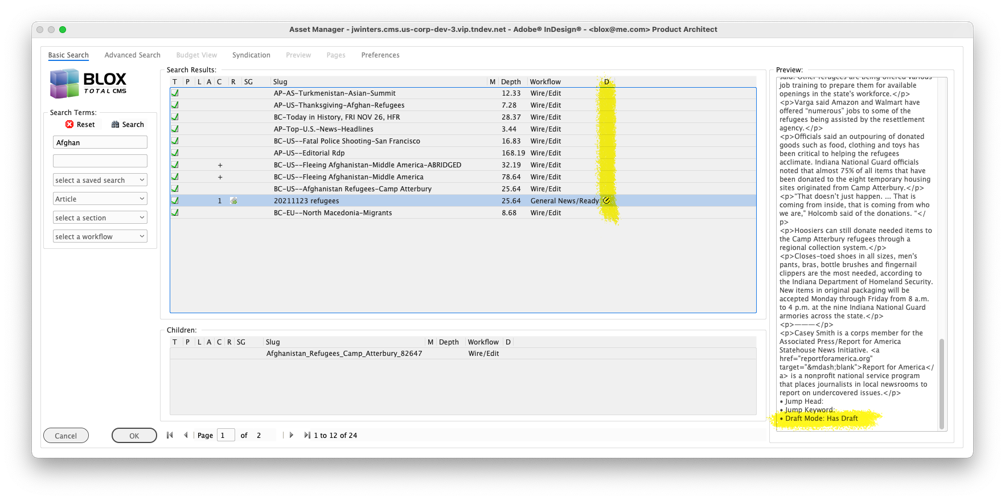
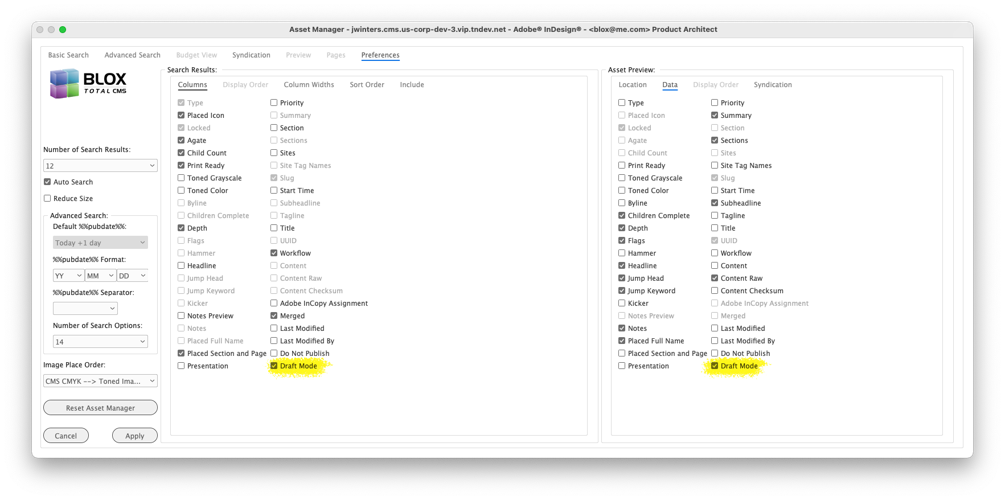
Support for Draft Mode) BLOX CMS version 1.60 added an experimental feature for Draft Mode. To support this the Asset Manager has a new column that displays an icon when the asset includes a draft. Assets with drafts can NOT be checked out in Adobe InDesign. They can, however, be placed locked or released to the page. They can be printed or output. But no editing of the actual asset can occur in Adobe InDesign or Adobe InCopy until the draft version is published and becomes the live version in the browser interface. INDESIGN-3550
Design Element Snippet Export including Images Bug Fix) We had a site export a grouped image in a Design Element Snippet and a bug prevented the export. This has been corrected. INDESIGN-3557
5.54.03-1 Released 2021.11.19
New Feature for Automatic Checking of Client Updates) There is a new option in the Support tab of BLOX Total CMS > Settings and Support... to turn on Automatic Checking for Client Updates. When enabled, the client software will check once a week to see if new versions are available and then tell the user if they are. No dialog appears if no updates are available. As of this version, any user entering Development Mode (typically only the site's Template Master or Information Technology staff use Development Mode) will have Automatic Checking for Client Updates turned on. INDESIGN-3503
Automatic Client Installation) Any user who has used Development Mode with client 5.54 and newer will have the option to install any client updates found with BLOX Total CMS > Update and Reset > Check for Updates… or the Automatic Check for Updates that was established in an earlier version. JIRA The process, just like the documented procedures will decompress the .zip file and stage the client in the NextVersion folder. When ready, the feature will automatically move the ActiveVersion to the RecentVersion and then the NextVersion to the ActiveVersion. You can review the manual update procedures here:
And you can find the current Town News Quality Assurance approved versions here:
Note: Because Quality Assurance works after a version is completed, that link above will likely show older versions.
Important note for Cross-Platform Sites: Use MacOS to handle the automatic installation if you need to support BOTH Windows and MacOS users. The official policy is that BLOX Total CMS supports either Windows OR MacOS but not both simultaneously (primarily because the links used in Adobe InCopy and Adobe InDesign are not compatible), this shouldn’t be an issue. But for the handful of sites that are ignoring that policy, make sure that it is a MacOS user that handles the client update as MacOS can handle the special communication libraries for both platforms whereas windows can only handle Windows-based installs. This is different from manual installs where Windows is recommended to avoid an issue with Adobe InDesign and Adobe InCopy trying to run the MacOS-based . (dot) files.
| All Users | Perform Automatic Client Update With | Perform Manual Client Update With |
|---|
| Just Windows | Windows | Windows |
| Just MacOS | MacOS | Windows |
| Both Windows And MacOS | MacOS | Windows |
5.54.02-1 Released 2021.11.12
Bug Fix for Folio Text Variables) There were problems with the L, U, and numbered W text variables. These have been corrected. INDESIGN-718
New Feature for Re-budgeting Unplaced Assets) There is a new Output Preference option that is useful for Automated Production. If assets were budgeted to a specific page but not used, they can be assigned to the page's section as a feature of output. This allows them to be picked up for automated production on other pages of the section. As with many of the more advanced features of output, this one is only applicable with an output type of Page Tracker. To use this feature add true to a Page Tracker output. INDESIGN-1565
Bug Fix) Page Tracker version 1.8.0 included a feature to allow the Edition view to show the ad number and the advertiser name/id on ads managed through BLOX Total CMS. Unfortunately, the BLOX Total CMS client for Adobe InDesign wasn't always sending the proper information to enable that feature. This has been fixed. The hope is that at some point in the future either Live e-Editions or Business Directory will use the information. JIRA INDESIGN-2298
Important Bug Fix for Updating Placement Information Following Save As) The BLOX Total CMS > Documents > Save As... function never bothered to update the placement information. This means that for sites that used this feature to produce Advanced Pages if they didn't somehow force an update of placed information the e-Editions for those pages could have the wrong information. Now when using BLOX Total CMS > Documents > Save As... the resultant document will generate placement information for all live assets. Save As also does an automatic check in of all assets as part of its operation. Thus, for uses that were properly check-in in all before, they can let the Save As handle that for them and speed up the process. JIRA INDESIGN-2921
Esoteric Bug Fix) If a user tried to place a snippet on a Master/Parent Page, the client code threw an internal error trying to back up the snippet when placement on Master/Parent Pages isn't allowed. This has been fixed. JIRA INDESIGN-2934
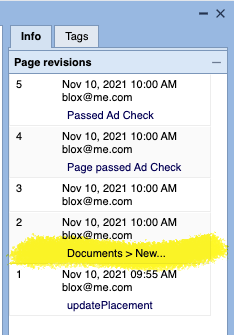
Minor Page Tracker Bug Fix) If a user had a document and then used BLOX Total CMS > Documents > New... and created a new document. The 2nd revision of the new document in PAge Tracker would have referenced the name of the original open document because of a bug in the commenting system. This has been corrected and now that revision will list Documents > New... JIRA INDESIGN-2972
Bug Fix for Override .adinfo) An earlier change to allow the .adinfo to be stored in Page Tracker for Distributed production and disaster recovery caused the BLOX Total CMS > Documents > Advertising > Override .adinfo file… function to fail. The result is that the Override function would not complete and Ad Statuses would return the ads to the way they existed when the Edition was built. This has been fixed. INDESIGN-3420
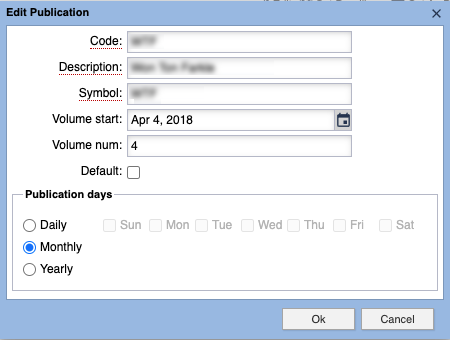
Automatic Issue Number Calculation for Monthly Publications) Version 5.53.21 added support for super-accurate issue number calculations given the listed production schedule. But it purposely skipped handling monthly publications. That support is now added. Your Template Master can configure it using Edit Publication in the browser at Desktop > Applications > Settings > InDesign > Page Creation Settings. The calculation for the issue number ignores the publication day. So if the Volume’s Start date’s Month is June, any date of June will produce issue number 1. Even if the actual publication date is before the Volume Start Date for a given year. Yearly publications now set their issue number to match the volume number. JIRA INDESIGN-3515
Asset Notes Dialog Improvement) Client 5.53.21 added a feature to warn users when attempting to place an asset that was not yet print-ready. Unfortunately, some assets have non-standard values for the print-ready flag that the Asset Notes dialog wasn’t expecting. This caused them to occasionally display a text value of ‘null’ or an empty field instead of the standard red x for not-ready or our legacy green printer icon for print_ready. This has been fixed. JIRA INDESIGN-3516
New Feature to Check for Updates) Any user, at any time, can now use BLOX Total CMS > Update and Reset > Check for Updates… to compare the current client version with the most recently released version. INDESIGN-3517
Change to Output Preferences Upload to Page Tracker) During some routine testing of the BLOX Total CMS client for Adobe InDesign we found some output preference files that would fail to upload to Page Tracker as part of the preparation for Distributed Production. When that failure happens, the client code will read the XML file, strip out any necessary high byte order characters, recompose as XML, and then upload the XML to Page Tracker. This could make slight changes in the formatting of your XML Preferences file, but the functionality should be the same. JIRA INDESIGN-3525
5.54.01 Released 2021.11.02
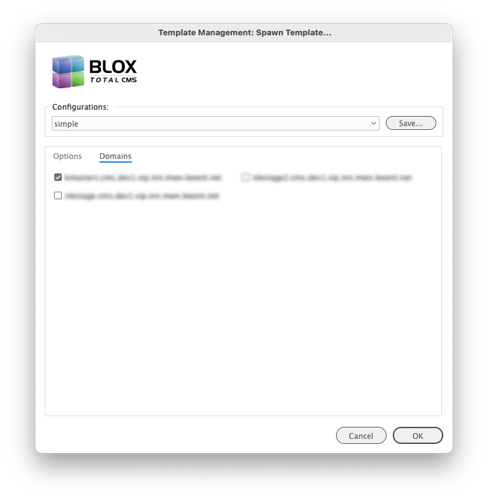
Multi-domain Support for Spawn Template) The Template Master's function to Spawn Template now allows the same template to be uploaded to multiple Page Tracker domains. To facilitate this, the Spawn Template dialog will gain a Domains tab where all the available domains for the current account will be shown. The Template Master can check the domains that the template should be exported to. This is a real-time-saver after the storage of templates moved to Page Tracker to aid in disaster recovery, Distributed Production, and Automated Production. Previously, the Template Master would have had to manually switch domains and use Spawn Template sequentially. Note: if your set of domains aren't pooled then the domain list has to be selected each time as it will only default to the current domain and effectively this new feature doesn't help you. If you need assistance to pool your domains, please file a support ticket at support.townnews.com. JIRA INDESIGN-3321
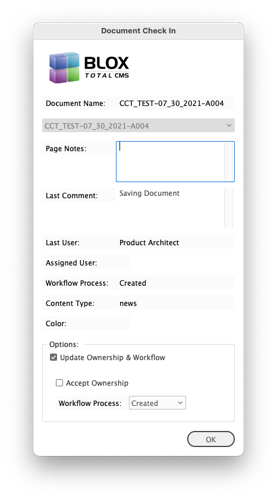
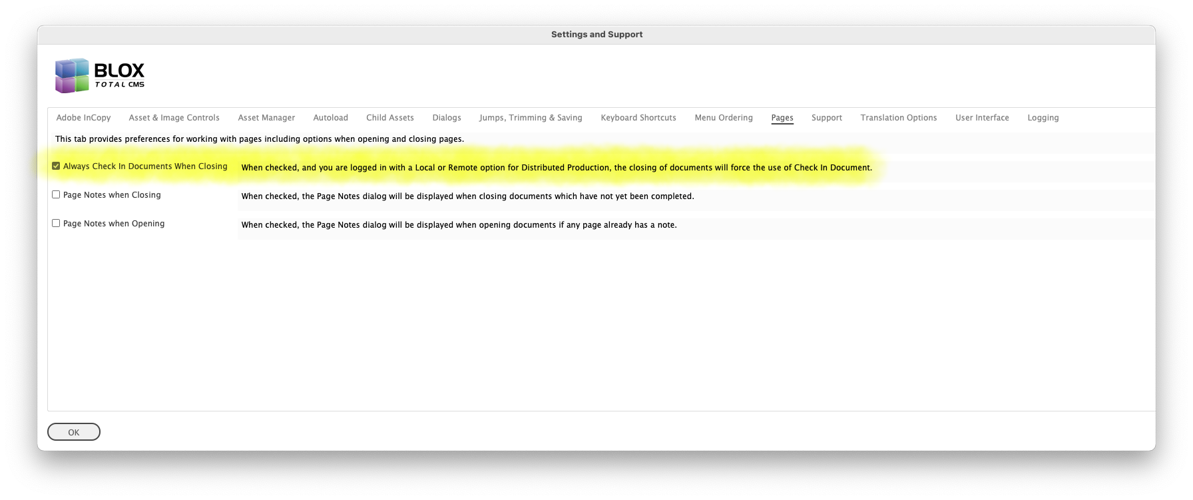
New Preference for Check In All Documents when using Distributed Production) If a user is logged in using either a remote or a local option, when closing documents the user will be shown the Document Check In dialog and the Cancel option will not be allowed. JIRA INDESIGN-3385
Major Change to the Fit Translation command) The Fit command for Translation, responsible for enlarging or reducing the size of the multiple types of frames, has been changed to prevent it from enlarging a frame lower than the bottom margin of the page. No translation ruleset changes are necessary. JIRA INDESIGN-3458
Bug Fix for Open by Status) It is possible that in certain circumstances that the Open by Status function would fail to open pages if Page Tracker had not reached version 1.16. We believe this has been corrected. JIRA INDESIGN-3458
Improvement to the display of a Menu of Folders) There are several places where the items in the BLOX Total CMS menu are displaying the contents of folders. Some of those contents might actually be Windows Shortcuts or MacOS Aliases. And, because of the way that prior users mounted the servers, the shortcuts/aliases might not be resolvable to the current user. In the past, when this happened the earlier items (the menu is built upside down) won't display. Now, however, when this happens the non-resolvable shortcut/alias will be ignored and the rest of the menu will be constructed. JIRA INDESIGN-3496
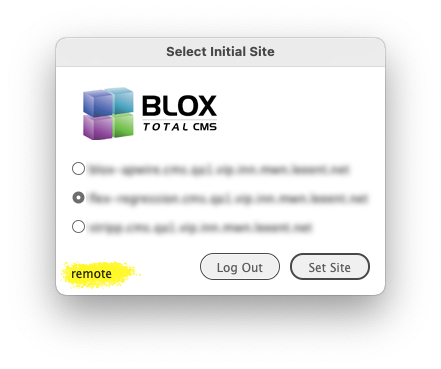
Minor Change to Select Initial Site Dialog) When logging into a server, or a servers.jsx controlled pool, the Select Initial Site dialog will now indicate if the login is a Distributed Production Remote or Local choice to aid in troubleshooting. JIRA
Better Method of hiding Open Recent for Distributed Production Users) The earlier 5.53.16 version of the BLOX Total CMS client for Adobe InDesign attempted to remove the display of Adobe InDesign's File > Open Recent menu item for Distributed Production users. But in some cases, the menu would re-appear in a different location. We have attempted a second method of removing it. If a user is testing Distributed Production, as opposed to actively using it, they may find that even in Normal mode, the Open Recent... menu items will no longer appear. JIRA INDESIGN-3504
Bug Fix for Link to Help site and Client Release Notes) The Settings and Support dialog's links to the Help Site and the Client Release Notes pointed to the legacy location. This has been changed and they now point to the current site. In addition, modern MacOS systems won't permit browsers to open from an application. Instead, the user needs to specifically choose to 'Open Link'. So MacOS users now get a dialog displayed with the URL. As instructed, they can right-click and choose Open Link to visit the help site or view the Client Release Notes. JIRA INDESIGN-3514
Prior Version
Release notes for the prior version, 5.53, can be found here.
Instructions for upgrading and downgrading can be found using the links below:
The linked asset has a downloadable PDF with instructions for upgrading the BLOX Total CMS client for Adobe InDesign and Adobe InCopy
The linked asset has a downloadable PDF with instructions for downgrading the BLOX Total CMS client for Adobe InDesign and Adobe InCopy