The Goal of client version 5.60
This version of the client makes additional improvements for Distributed Production and adds substantial background support for Automated Production.
Approved for use by TownNews Quality Assurance on 17 June 2022
The BLOX Total CMS client for Adobe InDesign and Adobe InCopy version 5.60.00-12 was approved for use by TownNews' Quality Assurance department on 26 April 2022. It is recommended for all Adobe Creative Cloud based sites. It may be downloaded using the adjacent link.
5.60.00-12 Released 2022.06.17
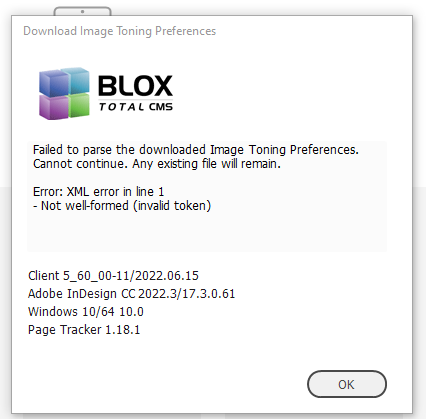
Bug Fix for Image Toning Preferences Parsing Error) During recent regression testing we noticed that uploaded Image Toning Preferences Files (primarily a requirement for Distributed Production) were generating a parsing error similar to the one shown below. This has been fixed. INDESIGN-3875
5.60.00-11 Released 2022.06.15
Template Master Bug Fix) A change in version 5.60.00-8 caused a bug that prevented the use of double-clicking on an asset to refresh the rulesets when the Template Master was using Development Mode. Instead the Template Master had to click the Refresh button to place the asset and refresh the rulesets. This has been fixed and double-clicking on an asset while in Development Mode will refresh the rulesets. INDESIGN-3850
5.60.00-10 Released 2022.06.10
Bug Fix for Windows based Remote Users) An earlier build of 5.60 allowed a remote distributed production user to self update the client. Unfortunately a typo prevented that from working on Windows. This has been fixed. INDESIGN-3695
5.60.00-9 Released 2022.04.27
Bug Fix for Setting Workflow of multi-page documents) There was a bug that prevented the use of BLOX Total CMS > Documents > Set Workflow of All Pages… if the pages had previously been set to the final process of the Pages workflow,. Choosing this function failed to set the workflow of the any page but the first page of the document if they were already at the final process. This has been fixed. INDESIGN-3751
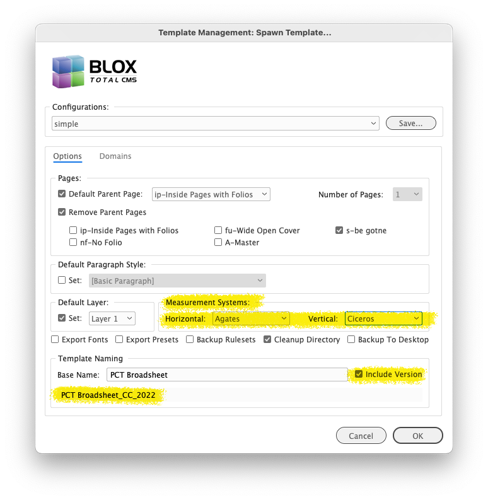
More options for setting Measurements when using Spawn Template) We now support the Agates and Ciceros measurement systems. A Template Master using Spawn Template can now select those measurements systems. INDESIGN-3756
Both Ciceros and Agates are now available for the Vertical and Horizontal measurement systems.
Bug Fix for Image Statuses using %%pubcode%% before %%images%%) Client version 5.42, from the middle of 2020, added a feature that allows images to export to folders based on the document’s publication code. This made it easy for sites to tone uniquely for magazine stock vs. newspaper stock without needing to have a separate menu items for Color vs. Black and White for each paper stock. However, one site attempted to use that feature with the %%pubcode%% in the wrong location and besides not working, it was difficult to troubleshoot. To make that process easier in the future, there is now an internal test of the use of the %%pubcode%% in the Image Toning Preferences parsing. INDESIGN-3776
Bug Fix for Setting Workflow) The menu item at BLOX Total CMS > Documents > Set Workflow > options didn’t set the workflow of the active page in a multi-page document. Instead, it set the workflow of the first page. This has been corrected so that it sets the workflow of the active page. INDESIGN-3784
5.60.00-8 Released 2022.04.20
New Automated Production tab in Asset Manager) There is a new tab in the Asset Manager. Creative Cloud sites will now see an Automated Production tab. It will, however, be disabled until the Automated Production features are released. INDESIGN-3724
5.60.00-7 Released 2022.04.06
New Text Variables for Relative Dates) There are 6 additional text variables that provide individual numbers for the month and day of the month for day after the publication date, the day before the publication date, and two days before the publication date. These are M1, D1, M9, D9, M8, and D8 respectively. They can be viewed along with all the other default text variables at the link below. INDESIGN-3749
This document outlines the Folio Text Variables that will exist even when the site and or user doesn't have access to the standard legacy add-ons for `folioProperties`.
5.60.00-6 Released 2022.04.06
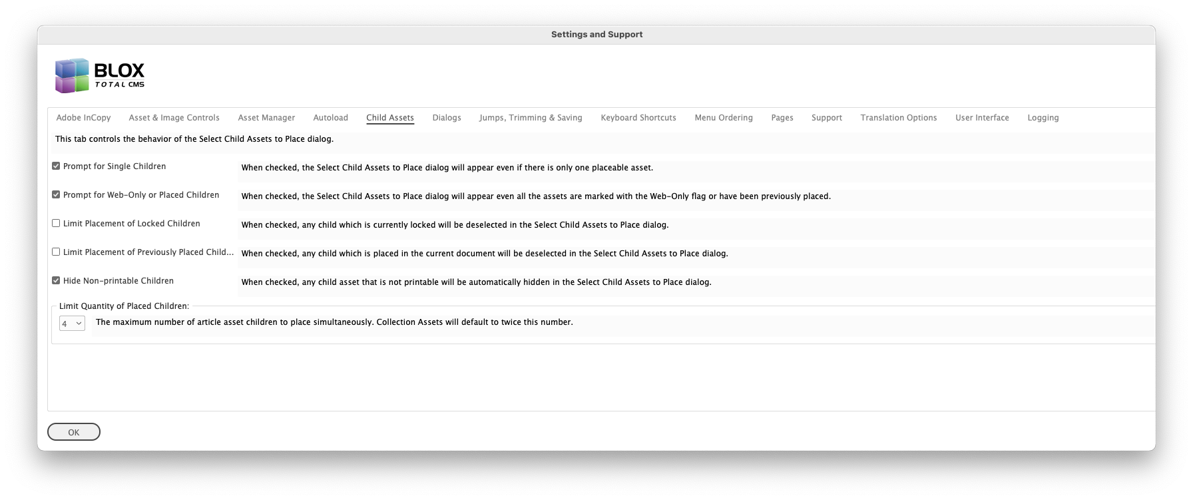
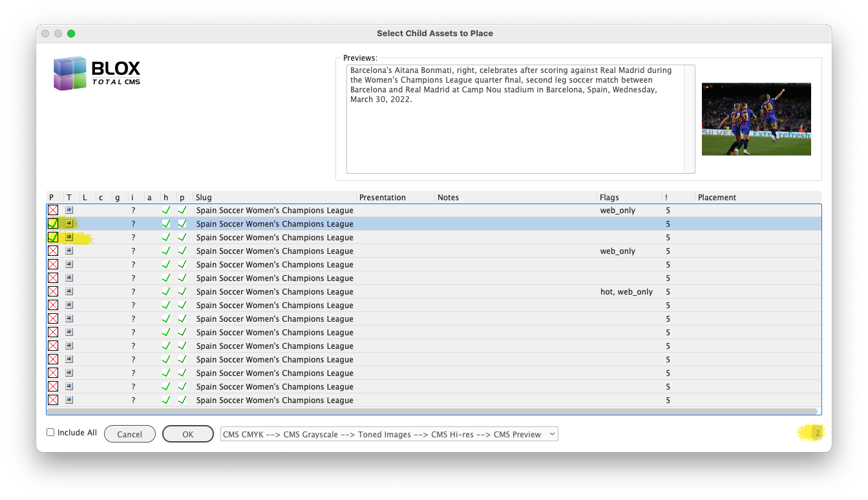
New Limit to Default Number of Selected Child Assets to Place) For years we’ve had users place all the child assets on a page with the parent asset. This is slow. And it slows down the rest of the site’s users because of the extra bandwidth this requires. And it is truly counter-productive for the user because they know in advance that they can’t leave but one or two images on the final page. So the Settings and Support > Child Assets tab now has a user preference for the maximum number of child images to pre-select in the Child Assets to Place dialog. The default is set to 4. The user, can, as always, modify the number for images to place in that Child Assets to Place dialog. Thus, efficient users won’t notice any changes. It is the users who attempted to place them all and consequently slow down all the users that will have their counterproductively limited. INDESIGN-1590
New Template Master Feature for Total Depth) There is a new Development Mode function to measure the column inches of a page. This can be used when supplying the future function in the browser to list the column inches of a page which then is used to supply the advertising % in Page Tracker and the available space within the Budget View. Note: If you want this value to be match your advertising rate card, the height of the space between the top and bottom margin should match the height of a full page ad. This might mean that you have to move the top margin down and place the folios above the top margin. INDESIGN-2008
Bug Fix) A change to the client in version 5.53 broke the ability to use BLOX Total CMS > Add Frames to Selected Asset... without generating an internal error. This has been fixed. INDESIGN-3721
5.60.00-3 Released 2022.03.15
New Template Master improvement to Upload Output Preferences to All Domains) When uploading Output Preferences to Page Tracker for use with Distributed Production and Disaster Recovery, there is now an option to upload to all domains. Note: A change in client 5.59 limits the available domains when logging in with a Distributed Production mode to only those domains in your server pool that are also enabled for Distributed Production. Thus, if you want to upload to all available domains, log in via a Normal mode. JIRA INDESIGN-3520
New Distributed Production Tagging in Dialogs) To make it easier to provide on-site support the Create Edition, Create Pages, and Open by Status dialogs now include a Remote or Local tag in their title bars as the New dialog has had for many months. INDESIGN-3705
5.60.00-1 Released 2022.03.10
Ability to remove uploaded snippet) As part of an Adobe InCopy initiative several years ago, the the BLOX Total CMS client for Adobe InDesign gained the ability to upload Design Element Snippets to Page Tracker. This ability allows content to be edited within the geometry of the page, and thus edited to fit, before the asset is placed on the Adobe InDesign pages. It’s a real time saver for those sites that use it. However, the BLOX Total CMS client for Adobe InDesign never provided a method to remove an uploaded. That ability has now been added. Development users have an option to remove them at BLOX Total CMS > Development > Remove Uploaded Snippets… INDESIGN-3610
No longer can a snippet be uploaded to Page Tracker with the same name) Distributed Production and Automated Production make good use of the uploaded Design Element Snippets. It could be confusing, however, because two different snippets could be uploaded with the same name. This is no longer possible. INDESIGN-3610
Geometry Export Improvement) When Design Element Snippets are exported to Page Tracker for use as a Geometry Item the Article Depth value can actually be more than the Full Depth if the domains Depth Conversion Factor is set wrong. The proper fix would be to correct the Article Depth Conversion Factor, but the client now sets the article_depth to the full_depth if the conversion factor is wrong and calculates a larger article than the full depth. These Geometry Items can be used with editing in InCopy within the Geometry before being placed on the page, for use with Automated Production, or to allow (eventually) the Remote Distributed Production users to download all the Design Element Snippets/Geometry Items. INDESIGN-3616
New Feature for Remote Distributed Production User client updates) A user who is logged in as a distributed production remote user and who also already has the client installed on their local machine will now automatically be granted permission to update their client software. Previously, only users who were in Development Mode could do that. But in a Distributed Production remote environment, the remote users need an easy way to update and this has now been provided. INDESIGN-3695
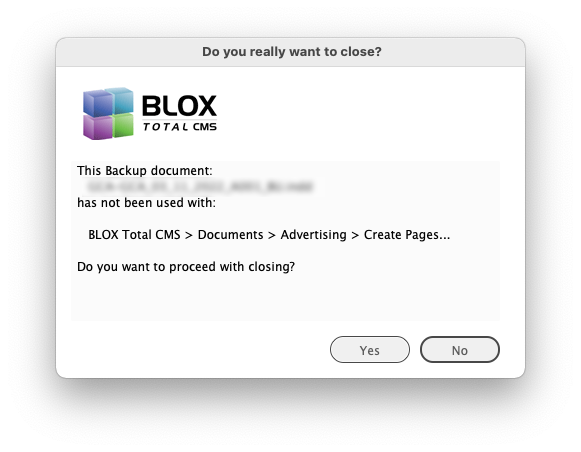
New Safety Feature for Edition Creation with Distributed Production) Distributed Production users in a Local or Remote mode are now warned if they attempt to close a Backup (_BU) document created using BLOX Total CMS > Documents > New... or BLOX Total CMS > Documents > Advertising > Create Edition from Edition file... without using BLOX Total CMS > Documents > Advertising > Create Pages... This is done because those _BU document can be difficult to re-open when the users are in a Local or Remote mode. The warning dialog is shown below. INDESIGN-3698
Page Tracker Preview Output Generation Now Disables Spreads) We had a site that modified the PageTrackePreview preset that is used to make previews for Page Tracker. They chose the spreads options and then when they created edition files, the previews displayed in Page Tracker as spreads of spreads or double-trucks of double-trucks. To prevent a user from doing this again, the process that now uses the Adobe PDF based preview for Page Tracker only, specifically disables the Spreads option. INDESIGN-3699
E-Edition Cutout Preferences Change) The BLOX Total CMS client for Adobe InDesign no longer has the option to create a the e-Edition cutout preferences file. The settings for that file was moved to the browser based preferences in Page Tracker’s Application Settings starting with Page Tracker version 1.15. Non-Appliance based BLOX Total CMS has used that version for many months and the current appliance also includes that. Only outdated appliance OS would need the file and those sites should just update their appliances. If, for some reason, the preferences can’t be read an error log will not be generated. INDESIGN-3700
Prior Version
The release notes for client 5.59 can be found here.