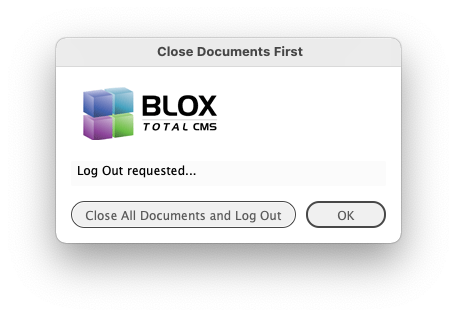
If you have any documents open and choose BLOX Total CMS > Log Out... you will be prompted with a dialog similar to the own shown above. Click the Close all Document and Log Out button and all documents will be automatically closed before the Log Out is completed. If you have your user preference to Prompt for Log In after Log Out (from the Dialogs tab of the BLOX Total CMS > Settings and Support... dialog) you will not be prompted to Log In, however.
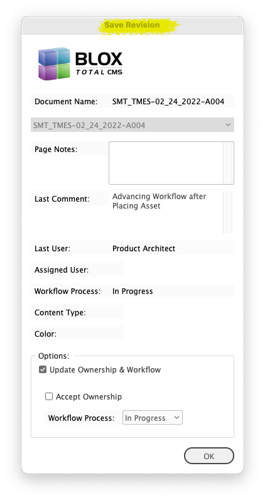
The Save Revision dialog is a Distributed Production dialog. It's matches the options in Check In. When using BLOX Total CMS > Documents > Check In... the document is closed and stays closed until the next manual opening via BLOX Total CMS > Documents > Open by Status... When using BLOX Total CMS > Documents > Save Revision... the document is closed and then automatically re-opened. The end result is now there is a backup/disaster recovery version of the page in Page Tracker where a future feature will allow it to be downloaded.
Client 5.59 Release Notes
By Jon S. Winters
Product Architect
Updated
Next Version
The release notes for client 5.60 are available here.
Approved by TownNews Quality Assurance for use on 26 April 2022
The BLOX Total CMS client for Adobe InDesign and Adobe InCopy version 5.59.00-6 was approved for use by TownNews' Quality Assurance department on 26 April 2022. It is recommended for all Adobe Creative Cloud based sites. It may be downloaded using the adjacent link.
This is another small release with a couple of Distributed Production bug fixes and some custom features to facilitate needs by our clients.
5.59.00-6 Released 2022.03.01
Another macOS 12.x workaround change) We’ve be improving the process of the causing the macOS Finder to open an Adobe InDesign document which then causes the Adobe InDesign’s menu to behave normally. This version added some more bypasses for the event handlers processing that document and this in turn allows the document to both open and close faster. INDESIGN-3673
New Menu to trigger the macOS 12.x workaround) If an Adobe InDEsign user choose to not initially log in to the BLOX Total CMS client, then the macOS 12.x (Monterey) workaround process will not run. We’ve added a menu item at BLOX Total CMS > Update and Reset > Perform macOS Monterey Workaround that will have the macOS Finder open the document we use. This is only for Creative Cloud sites using macOS versions 12.x or newer. We still hope that Adobe fixes the issue. INDESIGN-3673
Change for Ruleset Redirection with Distributed Production) As sites move to Distributed Production there there can be an issue when they have also used the controls that allows rulesets to come from other domains. If the domain that they are using for Remote or Local Distributed Production also pulls its ruleset from another domain, it’s important that the other domain also be enabled for Distributed Production. If not, as the rulesets are loaded, they will get a series of messages about the lack of rulesets. INDESIGN-3684
5.59.00-5 Released 2022.02.25
Bug Fix for Output Preferences) Since around 2015 various complex arrangements were used to determine if when parsing the output preferences XML a value for was going to be injected if it wasn’t explicitly stated. For Page Tracker based output types, the value could be injected if the option was requested in the browser based preferences. Unfortunately this injection ended up causing plain PDF and Print and other non-Page Tracker output types getting set to sendAdInfo if the domain’s browser based preferences were configured to do so. And then, because that option isn’t actually available for PDF and Print and other non-Page Tracker output options, the updating of the output menu would complain about its injection. In most cases nobody ever saw the complaint because it was just a logged message. But when the Template Master was using Development Mode and updating the Output Preferences they would see a warning about a tag that they didn’t actually have. This has been corrected. INDESIGN-3689
Bug Fix for Distributed production Output Preferences Uploading) The initial release for uploading output preferences to Page Tracker for Distributed Production and Disaster Recovery in client version 5.49 had a flaw in that it checked for a proper already uploaded preferences first. But if that uploaded XML was flawed, it was impossible to upload a properly configured output preferences XML file. This has been corrected. INDESIGN-3691
5.59.00-4 Released 2022.02.24
New Feature for Distributed Production Save Revision) Want an extra insurance copy of your document? In addition to the long-standing Documents > Check In… for distributed production use, there is now a Documents > Save Revision… which follows the Check In process by re-opening the same document. Thus, Page Tracker gets a revision of the document for safekeeping. This also updates the Page Tracker Preview and Wireframe views and it checks in all the assets. INDESIGN-3522
The Save Revision dialog is a Distributed Production dialog. It's matches the options in Check In. When using BLOX Total CMS > Documents > Check In... the document is closed and stays closed until the next manual opening via BLOX Total CMS > Documents > Open by Status... When using BLOX Total CMS > Documents > Save Revision... the document is closed and then automatically re-opened. The end result is now there is a backup/disaster recovery version of the page in Page Tracker where a future feature will allow it to be downloaded.
Note: A future version of Page Tracker will be including a download button so that users can download these prior versions for disaster recovery purposes. This is to help with sites that chose not to use our BLOX Total CMS appliances with their built in snapshots and available disaster recovery options.
New Feature for Naviga XML support) We had a client site whose feed provided the section letter in the tag instead of the tag. We now support using that by setting the advertising preferences to Custom and setting the Custom Ad Number Location: to `NavigaXMLsectionletter'. INDESIGN-3665
Template Master Output Preferences Improvement for Distributed Production) Part of the preparation for Distributed Production is the uploading of the Output Preferences XML file to Page Tracker for the Remote users as well as for Disaster Recovery. However, if the Template Master is actively making edits, as opposed to a simple upload of existing preferences, it was annoying that the new preferences weren't immediately displayed in the BLOX Total CMS > Documents > Output >. Now, as part of the Template Master’s use of BLOX Total CMS > Development > Page Tracker Output Management > Upload Output Preferences XML, the output menu will be updated to show the currently uploaded preferences. INDESIGN-3667
Better support for certain PNG images in Image Statuses) Some PNG graphics report their format as ‘Portable Network Graphics (PNG)’ instead of just ‘PNG’. The Image Statuses function was set in one place to only accept ‘PNG’ but now it accepts both classifications. INDESIGN-3671
Esoteric Translation Bug Fix) Client 5.53.18 brought a new feature to prevent the fit translation command from extending off the page. But routine regression testing found a very specialized placement that caused the function to generate an error. The end result was that no special fitting to the page happened and a slight delay to the translation process. The client software now checks for this esoteric positioning and prevents the fitting and the error from happening. INDESIGN-3680
Bug Fix for Image Toning for macOS users using Uploaded Image Toning Preferences) Client 5.51 added support for uploading Image Toning Preferences for use with Distributed Production and for Disaster Recovery purposes. Unfortunately, macOS users who were configured to use the default Images paths weren’t getting those paths correct if they were a Normal (non-Distributed Production) or a Local user. This has been fixed. Remote users functioned properly. INDESIGN-3686
5.59.00-1 Released 2022.02.18
Distributed Production Log In Bug Fixes) There were two bugs related to attempting to Log In to a domain that didn’t support Distributed Production. In one case, when prompted that the domain didn’t support distributed production, it used to offer the user to log out and then attempt to log them into the domain without distributed production. That failed option has been removed. Instead, if the selected domain doesn’t support distributed production the user will automatically be logged out. The second bug fix concerns attempting to use BLOX Total CMS > Change Domain when one domain is configured for Distributed Production and others are not. Now, when logging into a domain as a Remote or Local user, the only domains that will be presented in the Change Domain menu item will be those that also have Distributed Production activated. INDESIGN-3650
Consistent Icon for Uploaded Page when using Distributed Production) The Open by Status dialog now displays the same icon for an uploaded page when Distributed Production is being used as what Page Tracker displays. In the past, the Open by Status dialog showed a paperclip icon. INDESIGN-3661
Bug Fix) A recent change allows for a prompt to close documents when logging out, but it conflicts with the user preference to prompt for Log In after Log Out. This has been fixed. The result is that the documents will be allowed to close, but the automatic prompt for Log In will NOT happen. INDESIGN-3663
If you have any documents open and choose BLOX Total CMS > Log Out... you will be prompted with a dialog similar to the own shown above. Cl…
New Output Method for .idml document) BLOX Total CMS for Adobe InDesign can now export an .idml document as part of the output. Specify an idml in your output preferences xml file to activate this feature. Because of the nature of exporting to an .idml file, there is no provision for exporting individual pages of a multipage document. So those output preference options as well as those for color and page content type are ignored. The only supported options are <allowOverwrite>, <folderPath>/<folderPathMacOS>, and either <namingConvention> or <validateName> INDESIGN-3666
Prior Version
The release notes for the prior version are available here.