This is medium sized release and primarily addresses some esoteric situations affecting the sites where Distributed Production is enabled. It does, however, add a new date range folio text variable and a new option to switch domains in the Open by Status dialog.
Approved for use by BLOX Digital Quality Assurance on 22 March 2023
The BLOX Total CMS client for Adobe InDesign and Adobe InCopy version 5.65.00-14 was approved for use by TownNews' Quality Assurance department on 22 March 2023. It is recommend for all Adobe Creative Cloud based sites. It can be downloaded from the following link.
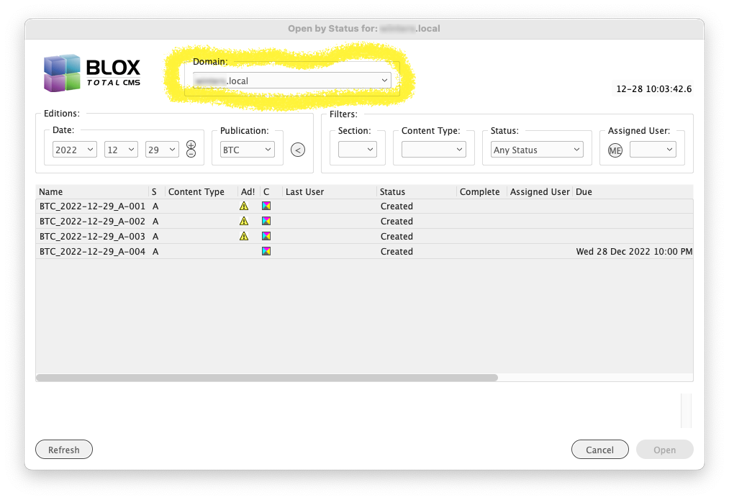
Removed Domain Menu from Open by Status for Local Users) Due to some unforeseen behaviors with closing inactive documents in Local mode, the Domain menu is now limited to Non-Distributed Production users and those in Remote mode. INDESIGN-3996.
5.65.00-12 Released 2023.03.13
Another Important Bug Fix for Multi-Domain sites) Our Quality Assurance team found that if multiple documents are open from multiple domains that it is possible to click the document close icon (an x in the document’s tab) and the document will attempt to close without switching to the document’s domain. For many sites that share document storage, this isn’t a problem. But for Distributed Production sites this can cause the upload to fail because it would want to upload to the wrong domain and since the naming convention might not match, the upload could fail. INDESIGN-3996
5.65.00-11 Released 2023.03.07
Important Bug Fix for Multi-Domain sites) A prior version of the client broke the ability of the BLOX Total CMS client for Adobe InDesign to switch domains when switching documents. This has been fixed. INDESIGN-3996
5.65.00-9 Released 2023.01.30
New Advertising Support Feature) Adobe Creative Cloud users now have an option at BLOX Total CMS > Documents > Advertising > Update Unplaced Paths... that is intended to be a workaround for when sites build a publication with the wrong advertising paths. This could be because the paths changed or because they weren’t available when the edition was created and the person building the edition ignored the warnings and built it anyway. Another reason for using this function is when an edition gets built in the wrong domain and each domain has unique paths for ads. There are some esoteric workarounds to getting that document moved when the better choice is to just recreate it in the correct domain, but that esoteric workaround also means that any existing ad frames will still point to the wrong paths. This feature exists to help with these situations. It effectively does what any user can do already: Delete the ad placeholder frames and allow Ad Statuses to rebuild them using the current paths. Thus, make sure the paths are correct for the user before initiating this feature. JIRA INDESIGN-2142
Modified Process for Distributed Production Document Creation) When when logged in as Remote Distributed Production user, the document is automatically closed, checked in, and then re-opened immediately after using the BLOX Total CMS > Documents > New... This prevents another user from creating the same page. Other modes don’t need this because the documents are created in shared storage, but Remote users create on their own workstations. INDESIGN-3660
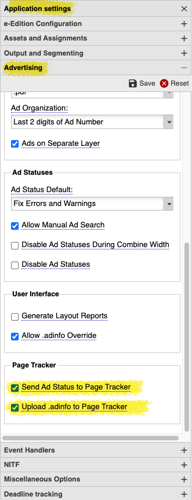
Improvement for Ad Percent) When calculating the page’s Advertising Percentage, the calculations now incorporate the top text wrap value into the ad’s height. Thus, if you had a 9 point top text wrap and the ad was 3” tall, the hight of the ad would be considered 3.125” or 225 points. And then the percentage of the page occupied by ads will take this extra height into consideration since it truly affects how much space remains for editorial. Currently you can view the Advertising % via BLOX Total CMS > Documents > Advertising > Display Total Ad Depth per Page… if the necessary options are turned on in Page Tracker’s Application Settings as shown below. Note: for the most accurate measurement, the top text wrap should match the internal spacing between ads according to your ad layout system. INDESIGN-3745
Important Ad Statuses Bug Fix for Distributed Production Sites) After a bunch of digging we were able to replicate an esoteric case where Ads were not populating on some Remote Distributed Production pages. The issue was caused by some of the internal functions that check for AdInfo for uses besides ads such as Page Content Type and Page Color. Those functions weren’t checking for Page Tracker when Distributed Production was enabled but not active. And the result was that Page Content Type or Color of Page could overwrite the ads themselves. As best we know, this was only reproducible when a Normal user created the edition, but did not check in the pages, and then a Remote user created an individual page. In that special case, the Ads would be unknown. INDESIGN-3989
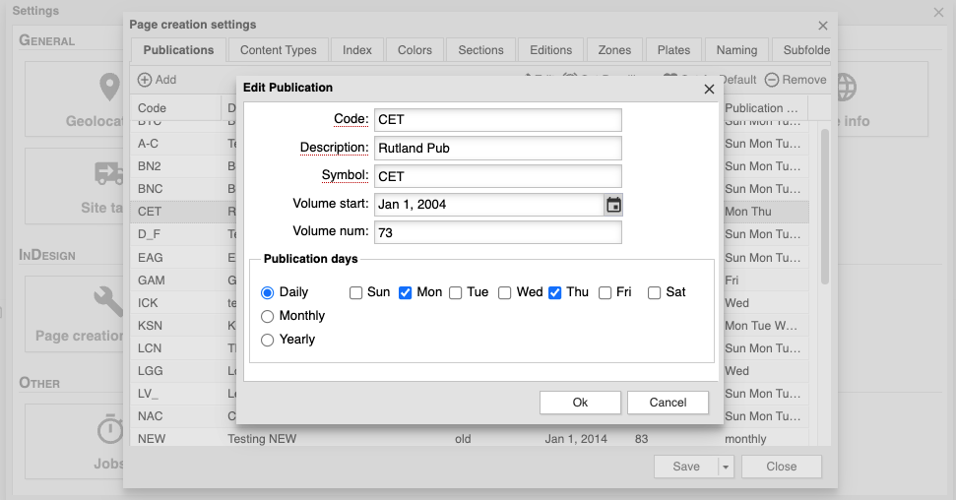
New Automatic Date Range Folio Text Variable) There is a new Folio Text Variable R that is publication schedule aware. For example, if you print on Monday and Friday, the R value from Monday would be a date range from Monday-Thursday. On Friday it would be a Friday-Sunday date range. This is all automatic if the dates are configured in the publication settings in the browser interface. On non-publication days the R value will have the single publication date matching what the F text variable uses. INDESIGN-3997
Publication Schedules can be set in the browser interface.
Partial Support for Case Sensitive Ad Naming) To help out a site that was using a mis-formatted server for ad storage, we now allow TownNews staff to turn on a feature that supports searching for ad files using a capitalized .PDF file extension in addition to the default lowercase .pdf In most file severs, the two are equivalent. But some servers allow their drives to be case sensitive and on such a server an ad image file of 123.pdf is a different file from 123.PDF. Since we assume case insensitive, we sort for the default lowercase version. But on this one site’s severs, it won’t find an add file named with a .PDF (uppercase) file extension. If you need this support, please file a support ticket at suppor.townnews.com and the BLOX Total CMS team can enable it. Note, this is only full uppercase .PDF. The new feature will not help with mixed cases like .pDF. INDESIGN-4007
5.65.00-6 Released 2023.01.05
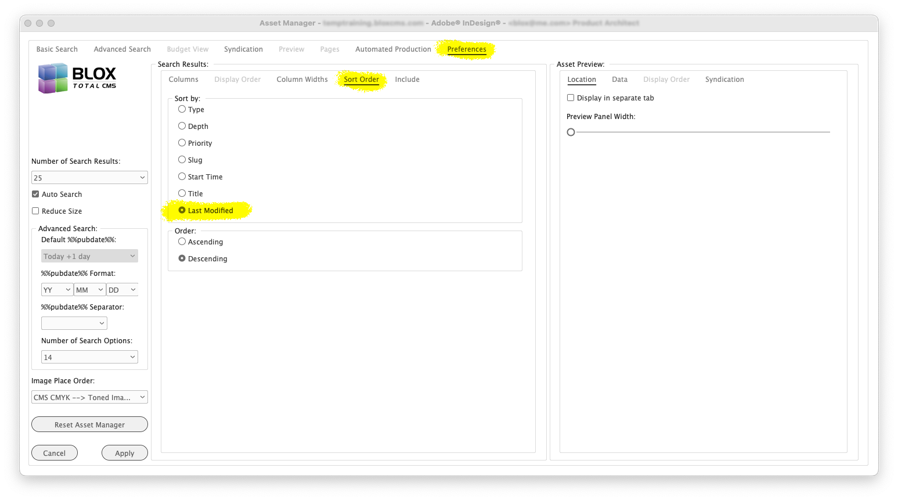
Asset Manager Sorting by Modify Time) Results in the Asset Manager can now be sorted by the time of last update. This is useful if you are trying to locate assets that either were just recently updated on deadline. INDESIGN-1734
Asset Manager can show number of sibling assets) Using the Asset Manager’s Preferences tab, users can now activate the display of a count of sibling assets in both the Search Results and the Asset Preview. This was added because the number of sibling assets can be used to modify the Asset Placement Score when using Automated Production. INDESIGN-3450
macOS 12.x or newer and Adobe InCopy UI helper) Like Adobe InDesign with macOS version 12.x or newer, Adobe InCopy has a bug with properly handling menu operation until a file is opened. To combat this, we now include a small Adobe InCopy file which is opened and closed when the user logs in. INDESIGN-3956
Major Change to Open by Status) The Open by Status dialog now contains the option of switching domains as shown in the image below. This is useful for all sites with multiple domains as it allows for faster method of locating and opening documents without the distraction of documents from other domains. INDESIGN-3996
5.65.00-4 Released 2022.12.15
Creative Suite users no longer have access to Open by Status) Due to a compatibility issue with the decade old Creative Suite versions, the Open by Status option has been removed for Creative Suite users. INDESIGN-3957
We now log when a user chooses Check Out All) Check Out All causes performance degradation for the active user and the entire network. The option was added about a decade ago when assets needed to be checked out to cause the output functions to check them in to provide at that time the only way to modify asset workflow to force the assets to the final process to facilitate publishing for eEditions. However, there is now other, way more efficient, methods of providing the push to the file workflow stage. Unfortunately, users are sometimes still using Check Out All and we’re trying to discourage it. So we’re now logging more clearly when it happens so we can prevent efficient alternatives when sites ask for support. INDESIGN-3970
Remote user Temporary File Purging) When logging in as a Remote Distributed Production user, the BLOX Total CMS client for Adobe InDesign will attempt to purge the Temporary directory where distributed production items are sometimes stored. While macOS users tend to not accumulate these files, Windows users can have them fill the drive, according to reports we’ve gotten. So now, each Remote Installation launch of Adobe InDesign where the user logs in as a Distributed Production remote user will attempt to remove up to 10% of the files in the temporary directory that are older than 30 days. Because of this, the first several launches of this version could be slightly slower. INDESIGN-3979
Bug Fix for Setting Page View during Document Check In) The prior version of the client forces the page view prior to checking in. That could only happen when the document was visible and certain functions in the client use invisible documents. For example, the Create Pages process. So, during those times, we don’t force the view of the page. INDESIGN-3982
macOS UI workaround extended to macOS 13.x and newer) While the original macOS version 13 didn’t have the prior ui problems with menu items, version 13.1 reinstated that that troubling behavior. We’ve changed the client to now use the osWorkaround documents for InDesign versions 2021-2023 and macOS 12.x through 14.x. INDESIGN-3995
5.65.00-3 Released 2022.12.13
Language Translation Bug Fix for Mismatched Domains dialog) A site was transitioning from staging sites to live domains and encountered the built-in function for domain change. Unfortunately, that rarely needed function was missing access to the language translation features. This has been fixed. https://townnews.atlassian.net/browse/INDESIGN-3992
5.65.00-2 Released 2022.12.13
Distributed Production Ad Statuses Bug Fix) We had a couple of reports of where the Ad Statuses dialog did not re-open upon the same user rebuilding the same edition during the same log in. We believe this issue has been resolved. INDESIGN-3987
5.65.00-1 Released 2022.12.09
Distributed Production Workaround) macOS Distributed Production users in Local mode were occasionally getting prompted that they had a document open when they tried to open one which had been edited remotely. This has been worked around by no longer doing a check to see if the user can open the out of date local copy. It is now extremely important that no user at a distributed production site use a method to open BLOX Total CMS pages other than the Open by Status dialog. INDESIGN-3985
Change for All Sites with Distributed Production Enabled) To help prevent Local Distributed Production users from overwriting edits to pages made by Normal users (and vice versa) we are now forcing the use of the Open by Status dialog and have removed access to the following menu options at all domains where Distributed Production is enabled. As of today, this might affect a total of 5-6 sites. INDESIGN-3985
BLOX Total CMS > Documents > Open...
BLOX Total CMS > Documents > Open Nearby >
BLOX Total CMS > Documents > Open from BLOX Total CMS >
File > Open Recent >
File > Open BLOX Total CMS Document...
Prior Version
The release notes for client version 5.64 can be found here.