


The Goal of 5.66
This release's main goal was to provide the Distributed Production feature to support multipage documents.
As with all releases, there are additional related features, improvements, and bug fixes. Of importance here are some new translation features and related functions to allow sites to move photo caption text.
5.66.00-33 Released 2023.10.20
Change to Distributed Production Remote User Temporary Directory Purging) Client 5.65 added a feature for Remote Distributed Production users to purge their workstation’s Temporary Directory. That version, however, had a minor bug that caused it stop working if an item it found had no modification date. An error would be logged and likely no further purging would ever happen. This appears to have been solved. INDESIGN-4165
5.66.00-32 Released 2023.10.17
Bug Fix for Menu Options when Trimming is Disabled) While testing a ticket in the 5.66.x release, we discovered that if Trimming is disabled for a domain that several other menu options are also disabled. This has been corrected. https://townnews.atlassian.net/browse/INDESIGN-4035
Modified Reaction To Updating Rulesets) For several years when first logging in, the rulesets would not initially be loaded or processed. Then when a document was first created or opened, they rulesets would load. However, there are a couple different functions that require specific ruleset options. For example, copy fit and head fit use options in a CopyFitStyles ruleset. Those menu items weren’t getting activated during a normal load of the rulesets and instead required an update to the rulesets or a domain change to update the menu. Now, whenever the rulesets are updated, the main BLOX Total CMS menu will be recreated to show the ruleset enabled options. INDESIGN-4110
Removed Self Updating Option) The ability for the client to update itself from a released version was broken in 5.66 and can’t be repaired until 5.67 with the ability to install 5.68. So the option was removed from this version. A Template Master who set for auto checking for updates will still have that function enabled. But the update itself cannot be triggered from it. They will just get a dialog explaining that an update is available. INDESIGN-4169
5.66.00-31 Released 2023.10.05
Named Support for Adobe InDesign version 18.5) Adobe released Adobe InDesign Creative cloud version 18.5. Unfortunately that wasn’t an expected version number and the version information would appear incorrectly in the Settings and Support dialog. The only adverse effect was the Spawn Template feature would show the word undefined versus Master Page or Parent Page. We now support this version completely. INDESIGN-4158
5.66.00-30 Released 2023.09.13
New Folio Text Variable for Range of Dates without Days of the Week) There is a new R0 (zero) Folio Text Variable for an automatic publication schedule based date range. This R0 value is the same date range as the R value that was released with client 5.65, but this version doesn’t include the days of the week. It was added to replicate what we already do with Monthly and Yearly publications where no day of the week is included. INDESIGN-4153
5.66.00-29 Released 2023.09.13
New Folio Text Variable for Range of Dates without Days of the Week) There is a new R0 (zero) Folio Text Variable for an automatic publication schedule based date range. This R0 value is the same date range as the R value that was released with client 5.65, but this version doesn’t include the days of the week. It was added to replicate what we already do with Monthly and Yearly publications where no day of the week is included. INDESIGN-4153
You can see all of the default Folio Text Variables at: https://www.help.bloxdigital.com/default-folio-text-variables/table_d2d10b61-93df-58d9-b880-249005ab43d4.html
5.66.00-28 Released 2023.09.13
Modification to Opening Distributed Production Documents) A change was made to the document opening process to remove an incorrect dialog that could appear when documents opened but had improper links. That misleading dialog no longer appears in these cases. INDESIGN-4146
Ability to Ignore Out of Date Links) We had a single site which had some third party application that was modifying the links of the files that Adobe InDesign uses to asset locking. At all other sites these links are a great way to verify that the assets are current. But because of this sites' external application, it was causing the asset to be marked as out of date. But because they had yet written back the changes, they were losing their edits when they reflowed (or incorrectly updated the links). To combat this situation for this one site, BLOX Digital (formerly TownNews) staff can add a setting to any domain to cause it to ignore these links. Adobe InDesign, will however, show the out of date :warning: flag on any frame that is linked to a file that has been modified but with the domain setting in place, the entire asset should not get marked as out of date and thus it would allow further editing and write-back. Since BLOX Digital has no way to simulate this issue, there could be other unforeseen issues with implementing the setting. INDESIGN-4147
Modified Servers.jsx Verification for Distributed Production) While we have Development Mode functions to configure the servers.jsx file for Distributed Production at BLOX Total CMS > Development > Add Distributed Production to Servers.jsx..., it is possible to manually edit that file and put in the wrong values. Unfortunately the log in process did NOT adequately validate the entries and the users could think they were choosing a Distributed Production option when in fact they were logging in as a legacy Normal user. This has been changed and if the servers.jsx file is incorrectly configured for a Distributed production every user will get warned. INDESIGN-4150
5.66.00-27 Released 2023.09.11
Modification to Opening Distributed Production Documents) A change was made to the document opening process to remove an incorrect dialog that could appear when documents opened but had improper links. That misleading dialog no longer appears in these cases. INDESIGN-4146
5.66.00-26 Released 2023.09.07
Modifications to Multi-page document check in for Distributed Production users) A prior feature for version 5.66 of the client added the ability to work with multi-page documents for Distributed Production via the BLOX Total CMS > Documents > Page Management > Combine Pages... feature. For safety purposes, we originally created a package of the entire document for each page. We now will reuse the original package. This improves the performance of the Check In and Save Revision processes. INDESIGN-4142
5.66.00-25 Released 2023.09.06
Distributed Production Ad Statuses Improvement) We changed some internal test conditions when opening documents in a Distributed Production Local or Remote modes that could have caused Ad Statuses to not automatically run. The situation would only affect users who were not the 1st user to open the document in a Distributed Production mode. This issue also affected the use of the Flag Out of Date. That function, however automatically runs frequently and thus isn’t as important. INDESIGN-4143
5.66.00-24 Released 2023.08.31
Support for Adobe InDesign Creative Cloud 2024 and macOS) We’ve added the necessary changes so that when Adobe releases Adobe InDesign Creative Cloud version 2024 the macOS menus will continue to remain responsive. No change was needed for Windows. INDESIGN-4136
5.66.00-23 Released 2023.08.11
Minor to Logging of Output) We now log some additional information to help determine how long it actually took for an output to happen. This now indicates how long the pure output took and is separate from how long the idle tasks for things like checking in assets is taking. In addition, the Slow Line Finder now aggregates this information. INDESIGN-4138
5.66.00-22 Released 2023.08.10
Internal Menu Change) Modified an internal setting affecting the ordering of some menu items. It would be rare for a user to notice the change. INDESIGN-4135
5.66.00-18 Released 2023.07.27
New Ad Organization method) We now support 5 different organization methods for sharding/segregating ad image files. The latest is by a full dated folder in the pattern of Year, Month, date with this pattern: YYYY-MM-DD. Similar to the 01-31 folder organization, the date is determined by the Edition date of the pages/documents. If you would like to organize your ads this way, file a support ticket at support.bloxdigital.com WARNING: Many sites are still using legacy folioProperties.jsx and dateBasedFolioProperties.jsx files that could have an alternate definition of the D2 value for the folio text variables. To speed up the advertising functions, we now reply upon the built-in D2 value rather than reconstitute it. But this could change the name of the folder when using this option. In general, those legacy .jsx files shouldn’t be needed. INDESIGN-4132
5.66.00-17 Released 2023.07.14
New Advertising Percentage in the Edition Report) With Page Tracker version 1.25, the reports available within the BLOX Total CMS client at BLOX Total CMS > Documents > Create Edition Report... will now include the % of the page that is advertising if a domain’s Page Tracker Application Settings > Advertising > Page Tracker options are both checked. The values will range from 0 to 100. INDESIGN-3726
Major New Feature to Automate Passive Budgeting) Page Tracker version 1.25, released 2023.07.11, includes both Default Slugging for the domain as well as overrides for each publication. Since sites are very used to supplying a standard edition based prefix to an asset’s slug this allows both the Budget View to provide an edition based search as well as allow the new Automated Production functionality to locate assets for an edition’s pages without requiring sites to use active budgeting techniques. There are details on Passive Budgeting at the link below. INDESIGN-3734
Passive Budgeting provides everyday users a quick way to locate assets for their publication.
Click the headline for details on configuration and using this important new feature.
5.66.00-16 Released 2023.07.10
Change to Creating New Pages as a Remote Distributed Production User) An earlier BLOX Total CMS client for Adobe InDesign version 5.66 change forced a revision to be created for all remote users creating a new document. That process displayed the Save Revision / Document Check In dialog. It no longer bothers to show that dialog. If you needed to set the ownership or workflow, that can be done in the New Document dialog and you can change the Page’s notes by using BLOX Total CMS > Documents > Set Notes of All Pages… The lack of the dialog now makes this process faster. INDESIGN-4023
Improved Copy Fit and Head Fit functionality) If the site hasn’t loaded the proper ruleset that lists the style information, then the menu items will be disabled. INDESIGN-4110
Path changes for Distributed Production) To prevent issues with subpaths for images and articles (and maybe other links), we will no longer allow Windows mapped drives to be used as base paths in the browser based Path Configuration dialog when logging in as a Distributed Production Local user. To prevent issues for sites migrating, the Distributed Production Preparedness Test will also flag this problem. INDESIGN-4125
Output Logging Change) We had previously, incorrectly, assumed that all sites would enable image downsampling in their Adobe PDF Presets because it can reduce the size of the Adobe PDF that the site requests when using our optional BLOX Total CMS > Documents > Output functions. However, we had a site that specifically chose to not allow those images to be downsampled to a more reasonable value and thus the users Translate.log file failed to list that information. It now logs that the downsampling is turned off. INDESIGN-4126
Translation Change affecting Inline Assets at the end of the article) We’ve changed the way that inline assets are translated when they are placed at the end of an article asset. Previously this location wasn’t allowed. Now you can locate inline assets at the end of an article. INDESIGN-4127
5.66.00-14—15 Released 2023.06.27
Additional Methods to Prevent the use of Document Jumps with Distributed Production) Document Jumps are a physical impossibility with Distributed Production. Yet a site that has Distributed Production enabled could still use Document Jumps while logged in via Normal Mode. There is now, however, some limited precautions that prevent the use of those documents with Local or Remote mode. Attempting to use Document Jumps with Local or Remote mode would cause the pages to become permanently out of date. JIRA INDESIGN-3371
Minor Change to Open by Status) There has been a time stamp in the Open by Status for some time. This time now displays the time that Page Tracker was last polled for information. This is important because if you are waiting for a change to happen, you might have to click, the Refresh button to get an updated list of all the page’s statuses. INDESIGN-3924
Distributed Production Change with Check Out All) There is a very old BLOX Total CMS function to allow automatically checking out asset when opening documents. This was put in place when the only way to advance the asset workflow when finishing the page was by having the BLOX Total CMS client for request the workflow promotion via the optional output functionality. That limitation disappeared years ago, but some sites still have Auto Check Out enabled which hurts their performance when closing and/or outputting pages. It will now be more difficult to turn on this feature and keep it on with goal of improving performance for all users. INDESIGN-4077
New Confirmation for Uploads for Distributed Production and Disaster Recovery) The Development Mode uploads for Folio Text Add-Ons, Image Toning Preferences, Jump Items, and Output Preferences now have intermediary confirmation dialogs which clearly list the type of upload, the file(s) being uploaded, and the domain being uploaded to. This is to prevent a user from attempting to update one type of item and accidentally getting another item which is common with both Image Toning and Output Preferences. This is also important because these items generally don’t have the ability to remove an upload yet. INDESIGN-4120
5.66.00-13 Released 2023.06.15
Additional Security Precautions for checking uploaded Add-Ons) An earlier version of the client allowed for the upload of Add-Ons for easy/automatic installation for the Remote Distributed Production users. That upload checks for terms in the Add-Ons that could be a security risk. That checking has now been expanded to additional terms and also runs on the download for the remote users. INDESIGN-4001
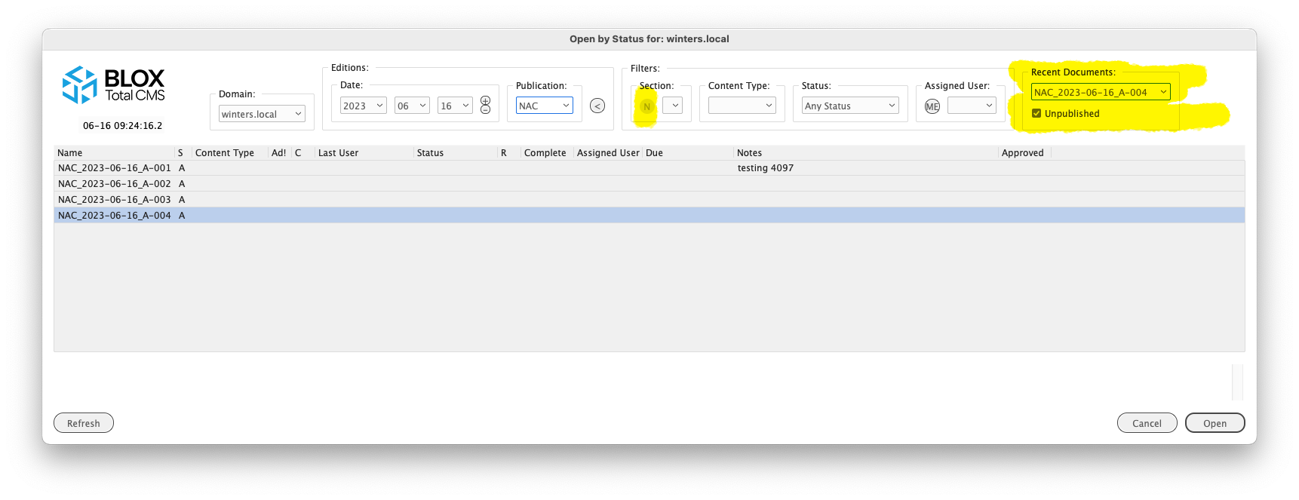
New Option to Open Recent in Open by Status) There is a new set of controls in Open by Status to allow the user to quickly re-open the last few documents that they had either created or opened in BLOX Total CMS providing they are using the approved methods to open documents. https://townnews.atlassian.net/browse/INDESIGN-4015

The Recent Documents area in the Open by Status dialog lists the last 24 documents opened by the user. They are sorted so the most recently opened is displayed at the top of the menu. Select one of the items in the menu and the rest of the Open by Status dialog's controls will be modified to match the selected document name. And then that document will be automatically selected and the OK button enabled.
The highlighted `N` is a quick setting to only display pages from the same section. It is one of the two options to mimic/replicated the legacy `Open Nearby` function.
Disabling the ability to switch domains with incorrect setup) For sites that don’t have Page Tracker Application Settings Event Handler’s Miscellaneous option for Process Application Activations chosen, the Domain controls in the BLOX Total CMS menu and in the Open by Status dialog will be disabled. This is because a user that had documents open from more than one domain wouldn’t be able to automatically switch domains. So this makes it harder to get documents from other domains open. INDESIGN-4053
Change to Distributed Production Preparedness Testing) The Distributed Production Preparedness Testing now verifies that the Page Tracker Application Settings Event Handler’s Miscellaneous option for Process Application Activations is checked. Without this, a user wouldn’t be able to switch domains automatically. INDESIGN-4053
Distributed Production Split Document) Unlike with the legacy Combine With and Combine Multiple functions, with Distributed Production there was not a manual method to uncombine the documents that had previously combined. There is now a BLOX Total CMS > Documents > Page Management > Uncombine Pages… function which will unthread the any jumps and return the pages to stand alone pages. There are two known issues with uncombining: 1) The placed Editorial assets will be marked as being budgeted and not placed after the uncombine; 2) the uncombined pages can’t successfully be used with Combine Pages again. The moral: Don’t combine what you don’t intend to keep combined. INDESIGN-4068
Updates to Slow Line Finder) The Slow Line Finder in Settings and Support’s Support tab has existed for many years. It provides a simple method to check to see if an individual workstation or network is providing subpar experiences. It is also a useful tool for the BLOX Digital (formerly TownNews) Customer Service community to quickly looks for problem areas. Previously, the tool only compared the time between lines of the user’s log and flagged those differences greater than three seconds. But the process skipped logging those items that were internally time measured. Those summary times are now added at the bottom of the report and it can provide a more complete accounting of the time to output a page, for example. INDESIGN-4076
Automation for Local Mode Documents not yet in Page Tracker prior to Combine Pages) For pages that were created in Normal Mode and wish to be combined in Local Mode, the client will automatically check in those documents to Page Tracker so that they can be combined. This change also enables Combine Pages for Local mode, but Uncombine Pages is NOT a Local mode option. So be careful what you choose to combine in Local Mode. INDESIGN-4082
New Hundred Folder Ad Number Sharding Option) In the past, the hundred folder ad sharding would use the last two digits of the ad number unless a v or _v was included in the ad number to represent the version number of the ad. So an ad number 123456_v02 would be expected in the 56 folder. Now there is a BLOX Digital (formerly TownNews) setting that can be turned on to instead use a hyphen to separate the ad number from the ad version number. With this new setting an ad number like 987654-03 would shard into the 54 folder. If you would like this option, please file a customer support ticket at https://support.bloxdigital.com/ INDESIGN-4119
5.66.00-12 Released 2023.06.01
Modified Support for Miles 33 Ad Layout Format) We have modified our support for Miles 33 based XML edition files, from what we created back in 2013 for use at one site, to a new file format that received in 2023. Ultimately what is different is that we now expect the ad positions to be measured from the bottom left of the page rather than the top left of the page. INDESIGN-4133
5.66.00-11 Released 2023.05.31
New Advertising Function to Open Existing _BU Document) We’ve added a shortcut for the Advertising staff who uses the BLOX Total CMS > Documents > Advertising > Create Edition from Edition file… feature. This new option to Open Recent _BU Document... allows them to quickly re-open any unsplit backup document file that they have recently created. They might want to do this to rearrange the ad positions and then use Override .adinfo to send that to Page Tracker to update the pages without having to recreate the edition. This new feature is slightly faster than creating a new edition. In addition, this is particularly handy for Distributed Production users that don’t have access to open files from the file server or local workstation. INDESIGN-4089
New Open by Status in Same Section) There is a new icon N in Open by Status to the left of the Section menu. When a document is open, the user can click this icon and the section menu will be changed to match the section of the top/front most document. This is to replicate an experience similar to Open Nearby for those sites that segregate documents by section. But this also hides documents from different editions whereas Open Nearby, unfortunately, would have shown them. INDESIGN-4092
Improvement to Opening Distributed Production Documents) We have had reports from a couple of our Distributed Production sites that on rare occasions the Adobe InDesign documents will open with one or more of the file links to the article assets marked as missing. We believe that the issue occurred when the prior user checked in the document and they chose to allow the check-in with the bad link. Thus, the following user would have, correctly, gotten a message about the links being missing. To help prevent this, if any of the asset’s InCopy Markup links are missing, the BLOX Total CMS client for Adobe InDesign will attempt to recreate the links prior to the document check-in. INDESIGN-4099
Inline Notes bug Fix) A six-year old bug concerning spaces surrounded by notes was recently discovered by a site and reported to us via https://www.bloxdigital.com/support Since 2017, if an article asset is edited such that it is left with two notes separated by any type of white space the white space will be swallowed into the adjacent notes. This has been corrected. Note, however, that your site might have ruleset rules that is adding spaces around notes. Those rules should not been needed any longer. INDESIGN-4106
5.66.00-10 Released 2023.05.01
Close all Documents in Remote mode Enabled) Remote Distributed Production users now have an option to use BLOX Total CMS > Documents > Close All.... Like the legacy function of the same name, the users will not be prompted, but all documents will be checked in to BLOX Total CMS for other users to use. INDESIGN-4093
New Options for Check In All document in Remote Mode) Remote users will find a new Check In All... option which will check in all open documents. The users will be prompted with the same Check In dialog as if they were closing each one individually INDESIGN-4093
5.66.00-9 Released 2023.04.27
Client Update Improvement) As originally configured, we assumed that the sites would have been following the update procedures and that would have meant that there would be an existing NextVersion folder. We found, however, that it is possible for a site to remove that folder after launch and that would cause the semi-automatic update process to fail. Now, if the folder has been removed, it will be returned and the update process can continue. INDESIGN-4080
Open by Status UI change) The width of the Open by Status dialog has been changed to show more of the columns of data. It will, if needed, be extended to nearly fill the full width of the user’s screen. INDESIGN-4083
Speed Enhancements for Creating Distributed Production Pages) When creating individual pages using either Distributed Production mode, the process now happens quicker as there are fewer background events that happen. The behavior is both measurable and noticeable by users. INDESIGN-4086
Behavior Change when creating Pages in Creating New Pages in Remote Mode when Existing Pages are Open) In order to prevent any potential issues with document locks, if a Remote user has pages open, they will be closed (and not checked in) before the new document is created. Then, those closed documents will be reopened one at a time. Finally the new document will become active, but it will usually appear as the left most tab. Since most Remote users do not create new documents, this change will not affect many people. INDESIGN-4086
5.66.00-8 Released 2023.04.19
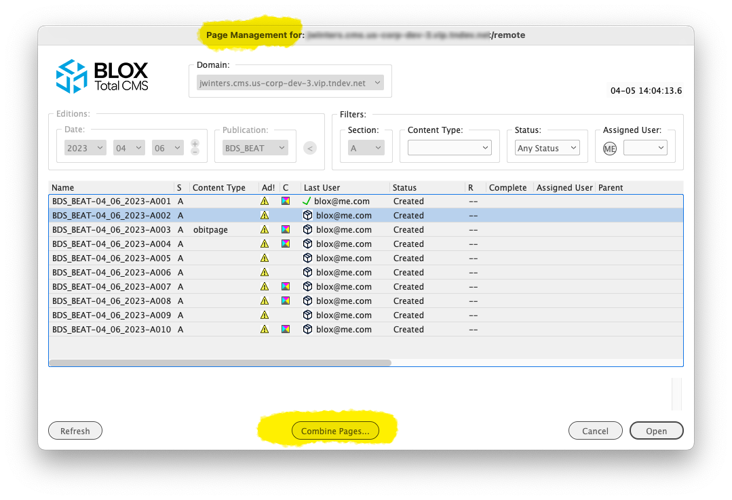
Remote Distributed Production Users can build multi-page documents) With this release, Remote Distributed Production users can combine pages to produce a multi-page document. The process works similarly to the legacy BLOX Total CMS > Documents > Combine With. The user will open the main/first page and then choose BLOX Total CMS > Documents > Page Management > Combine Pages... They will then have a dialog that looks like Open by Status but has a Combine Pages... button at the bottom that can be used to combine a single document. This functionality is enabled only for Remote users. It is disabled for Local users at this time. INDESIGN-3073

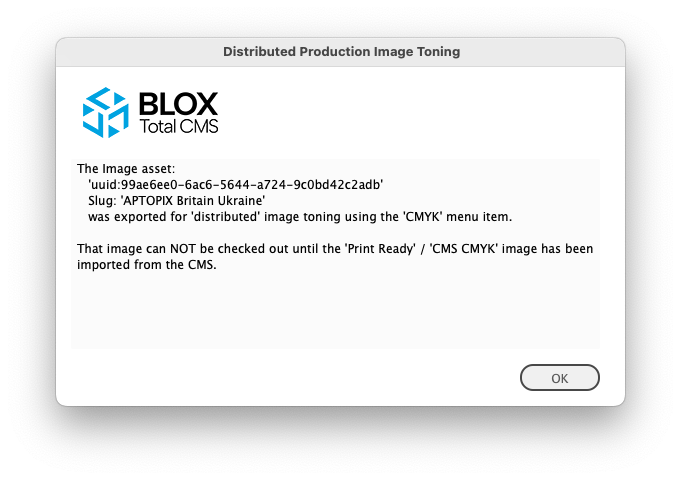
Important New Image Toning Option for Distributed Production) Client 5.52, back in October of 2021, added a feature to allow an Adobe InDesign user export images to the hosted server’s data feeds folder. This was designed to allow remote users to export image for toning. The site would need to be monitoring that folder via FTP and when an image appears they can tone it using any method they desire. Around the same time a different feature allows a different data feeds folder to be monitored by BLOX Total CMS and can auto import images the toned, print_ready, images to the original asset. That feature required that the asset not be locked by any user. So when exporting to the hot folder using a that method, the image asset is automatically checked in on the Adobe InDesign page/document. A new feature now prevents it from being checked out until Image Statues has imported the toned copy from the print_ready version. That feature will display a warning dialog similar to the one shown below. And then after acknowledging the dialog, the Image Statues dialog will be opened with import from CMS choice automatically selected. INDESIGN-3252
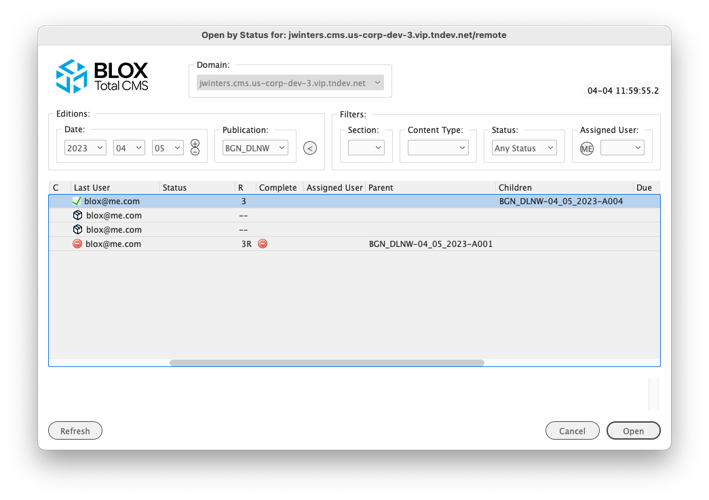
Open by Status Parent and Children Columns for Combined Pages) Distributed Production users will now have two new columns: Parent and Children as shown below. These show the name of the documents that hold other pages. The main document would be considered the parent and the pages that were combined would be the children. Thus, is A4 is added to A1 then for A1 it has a child of A4 and A4 has a parent of A1 as indicated in the image below. If additional pages are combined, the Parent will be populated, but the Children field will get a counter displayed indicating the total number of pages. INDESIGN-3326

Removed Domain Menu from Open by Status for Local Users) Due to some unforeseen behaviors with closing inactive documents in Local mode, the Domain menu is now limited to Non-Distributed Production users and Distributed Production users in Remote mode. INDESIGN-3996.
Distributed Production Remove or Restore Page) Users can now both remove or restore an uploaded version of a page. Like with the Open prior Revision function, this new feature can be found in the menu at BLOX Total CMS > Documents > Page Management. About the only valid reason to remove a page manually would be allow a Normal user to build a page in office outside of the Local mode. And about the only reason for doing that is to to combine pages while waiting for that feature to be added. INDESIGN-4022
Open by Status UI change) The width of the Open by Status dialog has been changed to show more of the columns of data. It will, if needed, be extended to nearly fill the full width of the user’s screen. INDESIGN-4083
5.66.00-7 Released 2023.03.15
New Distributed Production Output Improvement) The output preferences has long supported an option to close the Adobe InDesign document after completing the output. This has now been extended to do a Distributed Production Check In using the same <closeWhenComplete>true</closeWhenComplete> tagging providing that the document is a single page document and the user is a remote user. In other cases the document will close to match the original definition of the feature. INDESIGN-2866
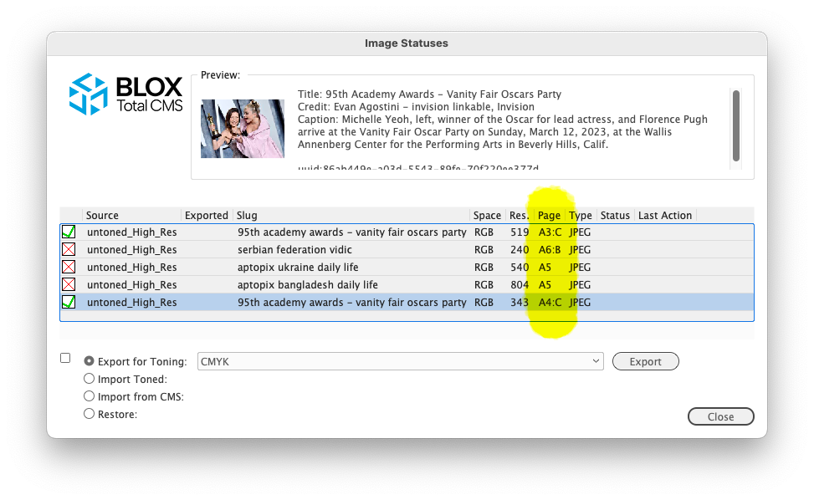
Image Statuses Dialog Improvement) As part of the ongoing improvements to the Image Statuses functionality, the Image Statues dialog will now display a page color suffix after the name of the page. For example if page A7 is a Color page, the Page column would list the page as A7:C. A Black and White page will have a :B suffix. Sites that have not enabled page color tracking or pages without an indicated page color will not show any suffix. The purpose of this is to help users to make good choices when exporting images for toning. The ability to determine page color is controlled by the Page Tracker Application Settings' Output and Segmenting accordion’s Track Page Color option. When selected, images on the pasteboard will not be included in Image Statuses. INDESIGN-3259

This version of the Image Statues dialog shows the color of a page with a :B (for Black and White) or :C (for CMYK/Color) suffix after the id of the page of each image. This information can be used by the users to help guide the export for toning.
Note: Images are presented in the order they were placed as opposed to the page order.
Bug Fix For Closing Documents from Alternate Domains) Our Quality Assurance team found that if multiple documents are open from multiple domains it is possible to click the document close icon (an x in the document’s tab) and the document will attempt to close without switching to the document’s domain. For many sites that share document storage, this isn’t a problem. But for Distributed Production sites this can cause the upload to fail because it would want to upload to the wrong domain and since the naming convention might not match, the upload could fail. INDESIGN-3996
Behavior Change for Closing Distributed Production Documents in Local Mode) If you are using Distributed Production in a Local Mode and attempt to close a document that isn’t active. It can prompt you to save changes but it will no longer trigger the check-in if that document is from another domain. The recommended practice is to first activate (bring to the front) any document that you want to close. INDESIGN-3996
5.66.00-6 Released 2023.03.07
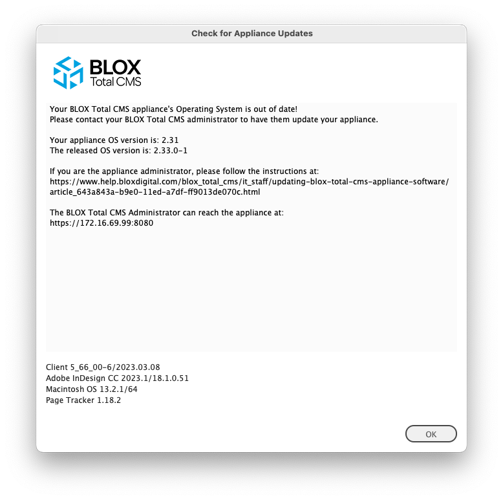
New Feature to Check Appliance OS Versions) Users connected to appliance based BLOX Total CMS can now choose BLOX Total CMS > Update and Reset > Check Appliance Version... to find out if the current appliance OS is out of date or not. In addition, appliance based uses will now get warned, on a somewhat random basis, when they are connected to out of date appliances. Sites with users getting this warning should update their appliances! Information Technology administrators should be doing this, but many fail to make it a priority to keep them updated. Out of date appliances risk security of the site as well as limit BLOX Digital (formerly TownNews)'s ability to resolve problems during an emergency. INDESIGN-3541

This dialog shows a sample of the warning that appliance based BLOX Total CMS sites can begin seeing if they don't keep their appliances current.
Important Bug Fix for Multi-Domain sites) A prior version of the client broke the ability of the BLOX Total CMS client for Adobe InDesign to switch domains when switching documents. This has been fixed. INDESIGN-3996
5.66.00-5 Released 2023.03.03
Major New Translate Script function) Template Masters now have a major new tool to add to their arsenal for formatting text: The BLOX Total CMS client for Adobe InDesign and Adobe InCopy can now move text within an asset. A really common desire is to move the Image Asset Credit/Byline to after the Image Caption. Note, if this is the only thing you want to move, and if you always want to move it, BLOX Digital (formerly TownNews) can enable a feature on a domain by domain bases to move those two. But if you only want to occasionally move them in print, then you need this new function.
Auto Export for Toning with Image Placement For Automated Production) Sites with Automated Production enabled will now have the option of causing the placed images to be automatically exported for image toning based upon the page color. This requires that Page Color tracking is turned on. If you want additional information on this feature, please file a support ticket at support.bloxdigital.com INDESIGN-4034
Modification to Spanish Folio Text Variables) Spanish folio and range (F and R) folio text variables now preface the month and year with the word `de`. For example: `15 de octubre de 2023`. INDESIGN-4044
5.66.00-4 Released 2023.02.22
Spanish and French Language Development Mode Passphrase) In our continuing march towards better support for foreign languages the Development Mode now supports both French and Spanish versions of our standard development mode passphrase. To know when one to use, make sure the menu at BLOX Total CMS > Language > is correct. INDESIGN-4041
Spanish Language Text Variables for Dates) The BLOX Total CMS client for Adobe InDesign can now generate folio text variables using spanish language words for components of the dates. To enable this file a support ticket at Support and a BLOX Digital (formerly TownNews) staff member can enabled it. At this point it makes all date based variables in Spanish. A future change will allow individual publications Spanish for French. INDESIGN-4042
5.66.00-3 Released 2023.02.17
Progress Bar Added When Checking In Multiple Pages for Distributed Production) There is now a progress bar that appears when checking in multiple pages. In general, the only time that should be appearing is when the advertising staff is checking in multiple pages from creating an edition. INDESIGN-3311
Distributed Production Edition Check In Enhancement) For sites using Distributed Production, there is a new shorter/faster method to check in all the pages of an edition. Now a user can choose BLOX Total CMS > Documents > Advertising > Create Edition from Edition file... and then simply follow it up by BLOX Total CMS > Documents > Check In.... The user will get prompted if they want to create and check in all the pages of the entire edition. Answer positively and there are no further prompts to answer and this greatly speeds the process. JIRA INDESIGN-3320
New Distributed Production Options to Open Prior Revision of Page) There is now an option for Distributed Production users at BLOX Total CMS > Documents > Page Management… where a prior revision of a page can be opened. This has been added for disaster recovery purposes, though none of our existing Distributed Production sites have needed such a feature. In the future, additional Page Management functions will be added here including the ability to combine pages. INDESIGN-3361
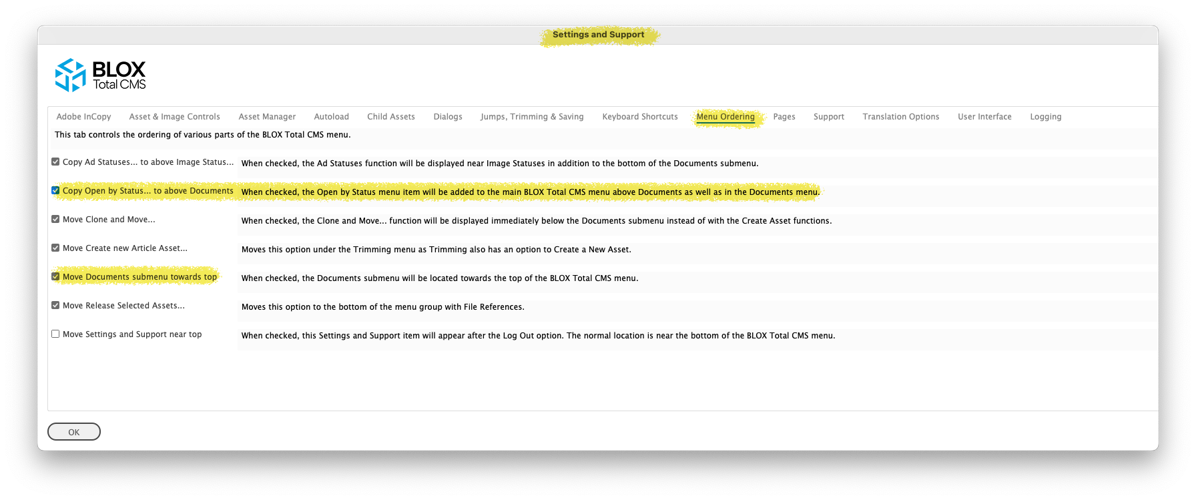
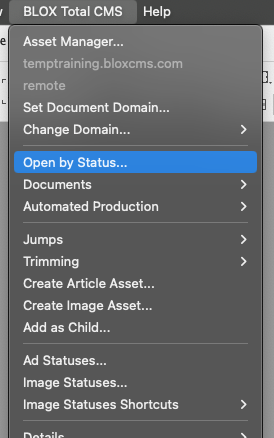
New Option to Display Open by Status at the top level of the Menu) Since Open by Status is the designated way to open documents going forward, we’re adding an option to display it at the top level of the BLOX Total CMS dialog. To choose this option, select BLOX Total CMS > Settings and Support… Then click the Menu Ordering (MO) tab and select the option Copy Open by Status... to above Documents. Click OK and there will be an Open by Status option above Documents as shown below. INDESIGN-3361

Bug Fix for the G Text Variables) The G text variables, as outlined in the link below, was incorrectly setting the numbered digit versions, e.g. G1, G2. Instead they matched the G value. These values are typically only used inside of custom output naming functions because within an individual document they will always be the same. Nonetheless, they were wrong and now they function as described. INDESIGN-4026
New Translation Option for Image Cutline/Credit Ordering) Historically, when translating an image asset, the text for the photo credit always come before the photo caption. Now, however, you can ask BLOX Digital (formerly TownNews) to change a setting and on a domain by domain basis the photo credit can follow the photo caption. Besides the change to the setting, you will also need to adjust the rulesets for the domain to expect the different order and format accordingly. INDESIGN-4029
Page Color Labels are now required for Automated Production) Sites using Automated Production are now required to turn on Page Color Labels. This facilitates marking the page color and thus allowing for the options to import the correct print ready image. INDESIGN-4033
New Option to Translate Non-Assets) Some sites had a utility script to translate to end or Translate Existing Text. That, however, requires a utility script and as such isn't 100% compatible with Distributed Production. And it won't be compatible with a forthcoming update to the BLOX Total CMS client (likely in late 2024) which will disable most, if not all, of the utility scripts. Thus, some prior functions will be integrated into the client code such as this one. In this case, if a site has a ruleset with the name Non-Asset then a new menu Translate Non-Asset option will appear with the Create Article Asset... and Create Image Asset... functions. When chosen, the function will then run the designated ruleset on the text in the selected frame - same as the legacy function but with the change that it starts in the new ruleset. This ruleset segregation provides more options with less work because the rulesets can be optimized for what is being translated and this speeds up all translations since there won’t be needless stuff in either the asset based nor the non-asset based rulesets. INDESIGN-4035
Additional information can be found here:
5.66.00-1 Released 2023.02.02
Distributed Production option for Ads) If you are using Distributed Production, your Remote users will now be prompted with Ad Statuses, if your site uses it, when Checking In the document, if the page has already reached the penultimate or last workflow processes. If this process is problematic, it can be disabled by disabling the Send Ad Status to Page Tracker option in Page Trackers' Application Settings in the Advertising accordion. JIRA INDESIGN-3335
Prior Version
The release notes for client version 5.65 can be found here.