HOME
EDITORIAL
  • Assets
  • e-Editions
  • Syndication
DESIGN
  • Blocks
  • Forms
  • Media Library
  • Now app
  • OTT
  • Static Pages
COMMUNITY
  • Access Control
  • Calendar
  • Comments
  • Email Reach
  • Form Submissions
  • Notifier
  • Subscription
  • User Accounts
MARKETPLACE
  • Ad-Owl
  • Banner Ads
  • Businesses
  • Classifieds
  • Upsell Manager
STATISTICS
  • Analytics
  • Data Insights
OTHER
  • Developer's Corner
  • Integrations
  • Policies
  • Software
  • Settings
  • Support Ticket
BLOX TOTAL CMS
RAYOS PLATFORM
BLOX VMS
TOWNNEWS SUPPORT
  • HOME
  • BLOX CMS
  • BLOX TOTAL CMS
  • RAYOS PLATFORM
  • BLOX VMS
  • FAQ
  • BLOX Digital Support
  • BLOX University
site-logo
Advanced Search Close Search
From
To
Close Search
BLOX Digital Email Reach Training
Email Reach

BLOX Digital Email Reach Training

  • May 16, 2023

In this video the BLOX Digital training team will take you through the basics of setting up an Email Reach newsletter.

How can I set up a Newsletter Preference Center Page?
Email Reach

How can I set up a Newsletter Preference Center Page?

  • Aug 18, 2022
  • 2 min to read

You can encourage new signups on your Email Reach lists with different options for Newsletter signup blocks and a Newsletter Preference Center. 

Subscription

How can I update my Site Information within HTML5 email templates?

  • Jul 11, 2022

To update the Company / Business Name, Site Email, Phone, or Physical Address that appears by default within the HTML5 email templates, follow…

Subscription

How can I add my Logo to my HTML5 email template?

  • Jul 11, 2022

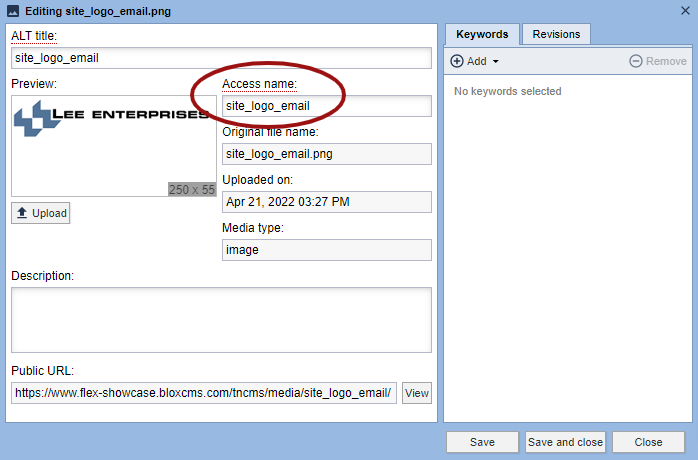
To add your logo to all HTML5 email templates that are setup to reference it, a Media Library item with an Access name of "site_logo_email" mu…

Subscription

How can I Adjust the Logo Width within HTML5 email templates?

  • Jul 11, 2022

To adjust the logo width with the HTML5 email templates follow the directions below.

Subscription

How can I Edit a Subscription Email Template? (via Community / Subscription)

  • Jul 11, 2022
  • 1 min to read

All Subscription HTML5 email templates may now be edited via Subscription!
How do I add a logo to a triggered email?
Media Library

How do I add a logo to a triggered email?

  • May 26, 2022

To add your  logo to any email templates that are set up to reference it, first a Media Library item with the “site_logo_email” access name.
Email Reach

UTM Variables

  • Apr 21, 2022
How do I incorporate my branding on my newsletters?
Email Reach

How do I incorporate my branding on my newsletters?

  • Apr 1, 2022

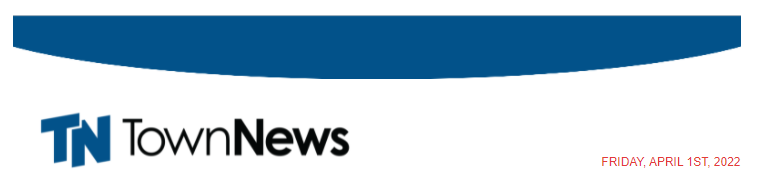
If you are looking to update your branding on your Email Reach newsletter lists, here are a few suggestions that will help you 

How do I add calendar events to an Email Reach newsletter?
Calendar

How do I add calendar events to an Email Reach newsletter?

  • Nov 16, 2021
  • 1 min to read

Learn how calendar events can be added to Email Reach newsletters.

Was this content helpful?

We want your feedback!

See something that needs updating or additional clarification? Want assistance with a topic that isn’t listed here? Please let us know!

At BLOX Digital we are dedicated to providing you the information you need to be successful when you need it.

Visit our feedback page to log in, submit a support ticket, and track the progress of your open requests.

Activating content. Delivering results.

Help.BLOXDigital.com
1033 7th St Suite 200
East Moline, IL 61244
Phone: 1.800.293.9576
Email: training@bloxdigital.com
site-logo

Sections

  • About This Site
  • BLOX CMS
  • BLOX Total CMS
  • Rayos Platform
  • BLOX VMS
  • FAQ
  • BLOX Digital Support

Follow Us

  • Facebook
  • Twitter
  • LinkedIn
  • YouTube
  • Instagram
  • Email

Browser Compatibility

Your browser is out of date and potentially vulnerable to security risks.
We recommend switching to one of the following browsers:

Microsoft Edge Google Chrome Firefox
© Copyright 2026 BLOX Digital 1033 7th St Suite 200, East Moline, IL  | Terms of Use  | Privacy Policy
Powered by BLOX Content Management System from BLOX Digital.