HOME
EDITORIAL
  • Assets
  • e-Editions
  • Syndication
DESIGN
  • Blocks
  • Forms
  • Media Library
  • Now app
  • OTT
  • Static Pages
COMMUNITY
  • Access Control
  • Calendar
  • Comments
  • Email Reach
  • Form Submissions
  • Notifier
  • Subscription
  • User Accounts
MARKETPLACE
  • Ad-Owl
  • Banner Ads
  • Businesses
  • Classifieds
  • Upsell Manager
STATISTICS
  • Analytics
  • Data Insights
OTHER
  • Developer's Corner
  • Integrations
  • Policies
  • Software
  • Settings
  • Support Ticket
BLOX TOTAL CMS
RAYOS PLATFORM
BLOX VMS
TOWNNEWS SUPPORT
  • HOME
  • BLOX CMS
  • BLOX TOTAL CMS
  • RAYOS PLATFORM
  • BLOX VMS
  • FAQ
  • BLOX Digital Support
  • BLOX University
site-logo
Advanced Search Close Search
From
To
Close Search
How To Create an Infinity Sticky Side Rail Ad
Banner Ads

How To Create an Infinity Sticky Side Rail Ad

  • Dec 13, 2017

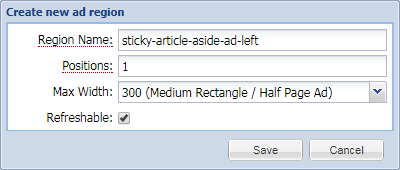
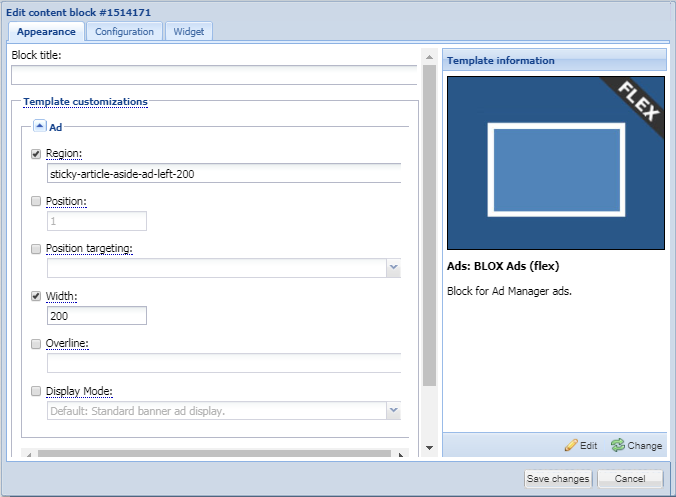
The Sticky Article Aside ad block uses a Utility Region to position the ad on the Left Rail of a Story if Related Content is added to the Article Asset (Story). 
StickeyUtilityRegions.png
Banner Ads

StickeyUtilityRegions.png

  • Updated Nov 10, 2021
StickyArticleAsideAdBlock.png
Banner Ads

StickyArticleAsideAdBlock.png

  • Updated Nov 10, 2021
StickyArticleAsideAdBlockConfigure.png
Banner Ads

StickyArticleAsideAdBlockConfigure.png

  • Updated Nov 10, 2021
StickyArticleAsideAdBlockWidget.png
Banner Ads

StickyArticleAsideAdBlockWidget.png

  • Updated Nov 10, 2021
sticky-article-aside-ad-left
Banner Ads

sticky-article-aside-ad-left

  • Updated Nov 10, 2021
How do I set up and use Sticky Ad Positions?
Banner Ads

How do I set up and use Sticky Ad Positions?

  • Dec 7, 2017

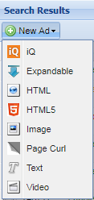
Sticky Ad Positions are positions that work using the BLOX CMS Utility Regions.  These Sticky Ads will stay positioned on the screen until the user scrolls to the end of the article. 

NewImageAd.png
Banner Ads

NewImageAd.png

  • Updated Nov 10, 2021
NewImageAdWindow.png
Banner Ads

NewImageAdWindow.png

  • Updated Nov 10, 2021
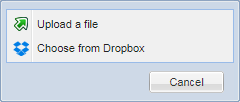
UploadDialogueWindow.png
Banner Ads

UploadDialogueWindow.png

  • Updated Nov 10, 2021
  •  
  • 1 of 3
  •  

Was this content helpful?

We want your feedback!

See something that needs updating or additional clarification? Want assistance with a topic that isn’t listed here? Please let us know!

At BLOX Digital we are dedicated to providing you the information you need to be successful when you need it.

Visit our feedback page to log in, submit a support ticket, and track the progress of your open requests.

Activating content. Delivering results.

Help.BLOXDigital.com
1033 7th St Suite 200
East Moline, IL 61244
Phone: 1.800.293.9576
Email: training@bloxdigital.com
site-logo

Sections

  • About This Site
  • BLOX CMS
  • BLOX Total CMS
  • Rayos Platform
  • BLOX VMS
  • FAQ
  • BLOX Digital Support

Follow Us

  • Facebook
  • Twitter
  • LinkedIn
  • YouTube
  • Instagram
  • Email

Browser Compatibility

Your browser is out of date and potentially vulnerable to security risks.
We recommend switching to one of the following browsers:

Microsoft Edge Google Chrome Firefox
© Copyright 2026 BLOX Digital 1033 7th St Suite 200, East Moline, IL  | Terms of Use  | Privacy Policy
Powered by BLOX Content Management System from BLOX Digital.