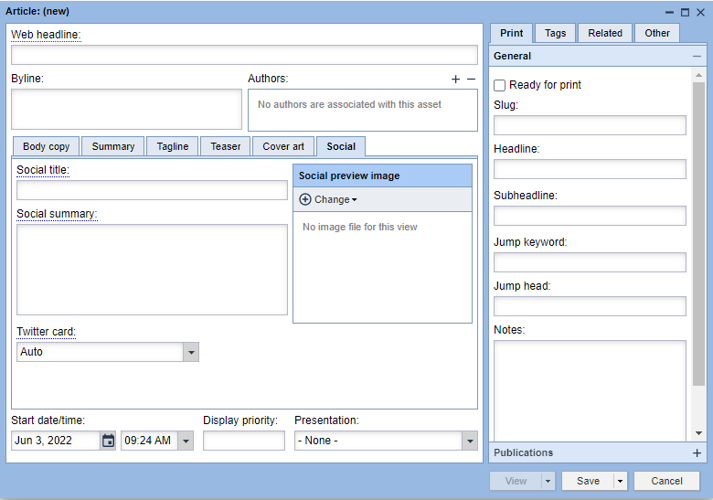
By default, social media meta tags are populated by the title, description and image used in the asset. But, with the 1.62 BLOX Core release, you can customize them on a per-asset basis if you want them to be slightly different for social media.
Filling out the fields in the social tab will change the og meta tags in the article’s source code, which will effectively change the headline and other fields on any external service that uses the og meta tags (which includes Facebook, Twitter and others).
Changing the Twitter card
In addition, we have added the ability to change the Twitter card meta tag in this new Social tab. While this is not an og tag specifically, it is a common request that a site may want this tag to be different than the default logic.
For articles, the Twitter card will show either a “Summary Card” or a “Summary Card with Large Image.” There are other kinds of Twitter Cards, but they are either not relevant for articles are not supported at this time.
By default, the Twitter Card value is determined based on the size of the article’s preview image. If the preview image is larger than 600px and is horizontal, it will use a “Summary Card with Large Image” card by default. If the image is smaller than 600px or is vertical in nature, it will use the “Summary” card.
With this new feature, that default logic can be overwritten and either size can be used.