How to add candidates and issues to a race
- Race assets should include either candidates or issue assets as related assets – depending if the race is for an open seat or for a ballot issue.
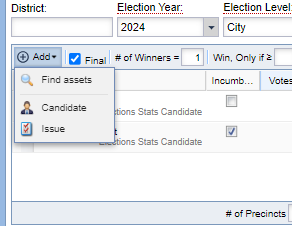
- To add candidates that already exist in the Elections Stats Application to the race, select Add>Find assets. This will open a search box, where one or multiple candidates or issues can be selected, and then select “Add selected assets.”
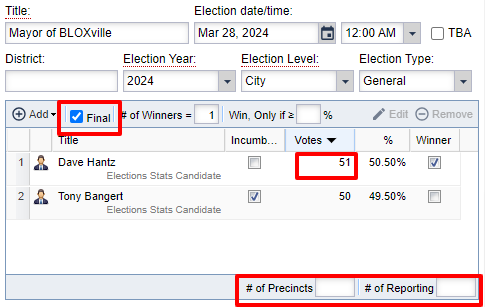
- After candidates are added to a race, the Incumbent checkbox can be selected to indicate whether a candidate is the incumbent in that specific seat.
How to update vote totals for a race
- To manually update vote totals on a Race asset in Election Stats, open the race asset, click on the vote total for each candidate to update and enter the new number. When votes are changed, the percentage amounts for each candidate are also automatically changed.
- With manual vote updates, the number of precincts reporting can be updated in the # of Reporting field. Race assets on the site will display percentages based on the total number of precincts, and number reporting, but will not display the actual numbers.
- When the race is fully counted, select the “Winner” checkbox on the winning candidate, or select the “Final” checkbox to indicate that the race is called. If the “Final” checkbox is selected, the winner will automatically be checked, based on the number of winners indicated on the race asset.
How to assign parties to candidates
- Party affiliations for candidates will be added using a section tag on the candidate asset. Default party options for all sites are set up by BLOX Digital staff during the onboarding process, and include section tags for Democrat, Republican, Green and Independent.
- All of the section tags to manage the party affiliations for candidates are located under the section tag news/politics/election-results/party. To add additional custom section tags,visit our documentation here.
- The candidate profiles and race results blocks will display Democrat results in blue, Republican results in red, Green results in green, and Independent results in default black. All other party results will be displayed in black.
How to set a new default section
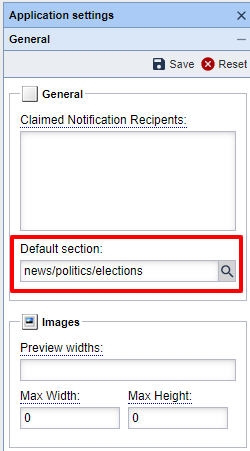
- As an admin, you can set a default section that all new Election Stats assets can be assigned to automatically, whether the assets are imported by a feed or started as a new asset manually. This default section can be set under Application Setting, under Default section. Click the search button to select from a list of site sections currently available.
Note: Election Stats requires a contract. You can put in a ticket or contact sales to add this package.