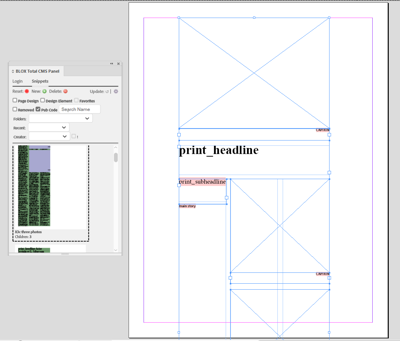
Here's how to place a snippet with the BLOX Total CMS Plug-in for Adobe InDesign.
There are two ways to place a snippet, which are Page Design and Design Element.
Place a Snippet with Page Design
- Open or create a new document in InDesign
- Load the BLOX Total CMS Plug-in for InDesign
- Click the Snippets tab
- Click the checkbox next to Page Design to select it
- Find the snippet to be placed
- Double click the snippet to place it on the page
- Adjust the snippet as desired
Place a Snippet with Design Element
- Open or create a new document in InDesign
- Load the BLOX Total CMS Plug-in for InDesign
- Click the Snippets tab
- Click the checkbox next to Design Element to select it
- Find the snippet to be placed
- Double click the snippet
- A preview of the snippet will display next to the mouse pointer
- Click on the part of the document you wish to place the snippet
- Adjust the snippet as desired
Use the BLOX Total CMS client for Adobe InDesign to find and place a snippet.