What is BLOX Total CMS Hosted?
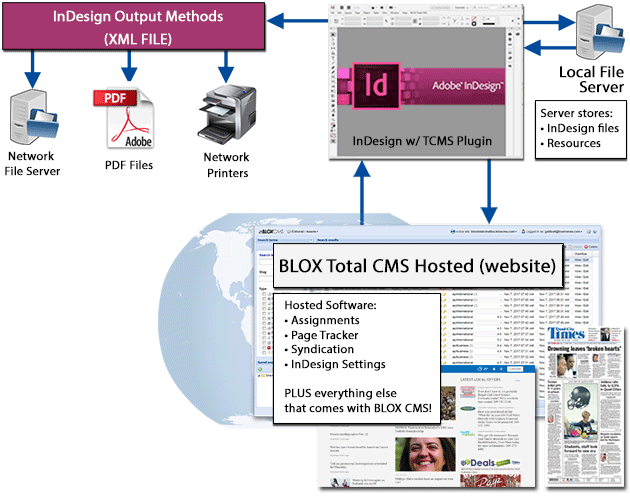
BLOX Total CMS Hosted is an online version of the traditional BLOX Total CMS system, designed to integrate both the print and online publication processes into a single, streamlined environment. It allows for the creation and editing of content that is ready for both online publishing and print layout.
How does Hosted BLOX Total CMS differ from the traditional Appliance version?
Unlike the traditional Appliance version, which requires a physical server at your facility, the Hosted version operates entirely online. This eliminates the need for server installations, making the setup and maintenance process simpler and more cost-effective.
After careful consideration, BLOX Digital has decided to discontinue service of the legacy BLOX Total CMS appliance OS, effective June 1, 2024. This decision was made to focus our resources on new strategic initiatives and better serve the evolving needs of our partners.
How it Works
How does the integration with Adobe InDesign work?
BLOX Total CMS Hosted integrates with Adobe InDesign through the creation of shared files containing configuration scripts and XML files. These files enable the BLOX Total CMS menu within Adobe InDesign, facilitating seamless design and page creation for print publications.
What training is available for using BLOX Total CMS Hosted?
On-site InDesign training is provided as part of the preparation for going live with BLOX Total CMS Hosted. This training covers the use of BLOX functionalities within Adobe InDesign for design teams and instructs reporters and editors on creating and preparing content for print publication.
BLOX Digital has decided to discontinue service for its legacy BLOX Total CMS appliance OS, …
Local Network Specifications
What are the recommended local network specifications for Hosted BLOX Total CMS?
The recommended specifications include a file server with at least 1TB of storage (3-10TB recommended for larger operations), performance sizing based on the number of simultaneous users, and a network connection that is gigabit or better, capable of 1-3 megabit transfer rate per client.
Editorial Assets / Article
What additional features does the Article Asset editing window have in BLOX Total CMS Hosted?
The Article Asset editing window includes a "Print" section with "General" and "Publication" properties. These are used to communicate details to the Copy Desk or Design Team and to assist in budgeting for the print publication.
What is the purpose of the Slug and how should it be formatted?
The Slug serves as a unique filename for the article, helping to organize assets. It should follow a recommended naming convention, such as a date code followed by a descriptive title, all in lowercase with no spaces (e.g., 20171005-spt-cubslosegm3nlcs).
How are Publication Details like Section, Plate, and Page used in the print process?
These details specify where in the print publication the article will appear, such as the section letter, the layout template (Plate), and the numeric page number. This information is crucial for the layout and design process in creating the printed newspaper.
What is Assigned Depth and how is it calculated?
Assigned Depth is a measurement in inches that indicates the length of the article as it will appear in print, based on average newspaper column widths. It's calculated using the word and character counts of the article, and can be viewed in the article asset editing window under the gear icon settings.
How does the content transition from online to print in the Hosted environment?
When content is created in the BLOX Total CMS Hosted Admin, it becomes immediately available for use in InDesign for print layout. Workflows ensure that content is flagged appropriately for print and online publication, allowing for a seamless transition between digital and print formats.