Next Version
The release notes for client 5.57.00 can be found here.
Approved for Use on 8 February 2022
The BLOX Total CMS client for Adobe InDesign and Adobe InCopy version 5.56.00-5 was approved for use by TownNews' Quality Assurance department on 8 Februrary 2022. It is recommended for all Adobe Creative Cloud based sites. It may be downloaded using the adjacent link.
The goal of 5.56
This version 5.56 release primarily adds under the hood features for Automated Production. There are, however a couple useful changes. Please see the notes below.
As is the plan for future releases, this release is smaller than most of the past updates for the BLOX Total CMS client for Adobe InDesign and Adobe InCopy to allow TownNews' Quality Assurance team to keep up to date.
5.56.00-5 Released 2022.02.07
Bug Fix for Domain Switch) The changes to re-enable the placement of assigned snippets/geometry items caused an internal error when switching domains. This has been fixed. INDESIGN-3601
5.56.00-4 Released 2022.02.03
Internal Bug Fix for Asset Manager) The recent changes in the Asset Manager to prepare for Automated Production caused a bug in the Asset Manager which in rare cases have prevented the Asset Manager from opening. This has been fixed. No sites received the version with the bug. INDESIGN-3451
5.56.00-3 Released 2022.01.28
Behavior Change) The 5.47 version of the client added a feature to clear up prior placement information which Page Tracker wasn’t keeping up to date. Unfortunately, while it was a successful workaround or a Page Tracker bug, it also caused the removal of geometry items from asset placement information. Thus, if an asset had to be moved for which the Automated Production planning had assigned geometry, the information was removed before the new placement was stored and subsequent placements would not have access to the assigned geometry. This has been corrected by removing the 5.47 version's workaround. Unfortunately, sites can now see incorrect budgeting again if they end up placing an asset on a page different from its budgeted position. INDESIGN-3601
5.56.00-1 Released 2022.01.24
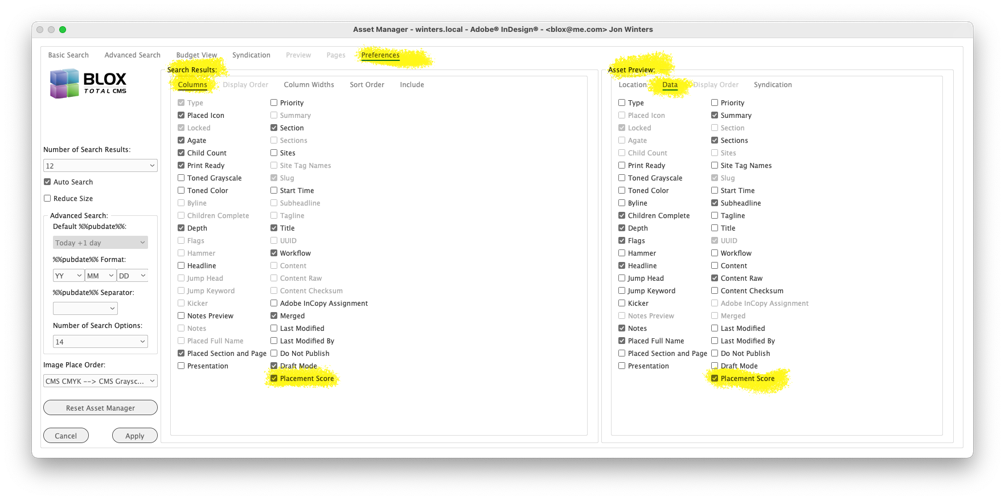
Minor Change for a future feature in the Asset Manager) As part of the preparation for Automated Production, the Asset Manager’s Preferences tab now displays two options for Placement Score. However, selecting those options won’t add any pertinent information until Automated Production has been enabled on the active domain. Thus, this option can be ignored at this point. INDESIGN-3451
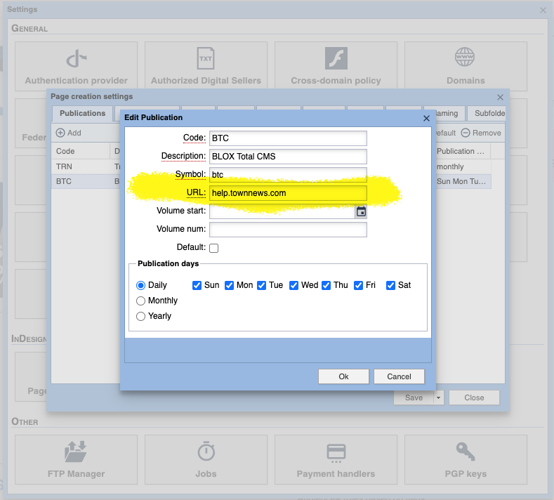
New Feature to Support printing URLs or other text about a publication) Page Tracker version 1.17 added a new URL property to a publication's Edit dialog in Desktop > Applications > Settings > InDesign > Page creation settings > Publications. When that value is set, a document's B3 Folio Text Variable will include the text from that URL field. While designated as a URL, it is just a text field and you can use it for any additional text that you want. JIRA INDESIGN-3472
Behavior change for Manual Page Creation) Client 5.52.08 added a feature to prevent users from inadvertently manually creating more than one copy of a page. Unfortunately, while it was successful, it also prevented sites from replacing pages. For example, if staff constructed pages with the wrong templates the client didn’t make it easy to replace those pages using the normal methods. This behavior has been depreciated. Now, the only time that a user cannot manually create a new page is when there is a page uploaded to Page Tracker for Distributed Production. INDESIGN-3577
New Automated Production Option for Preview Area in the Asset Manager) To prepare for testing Automated Production in the future, the Asset Manager now has a preference to display the Placement Score in the Asset Manager's Preview Panel. Since Automated Production isn't yet enabled, if a user chooses to display this value, they will always see a score of zero listed. INDESIGN-3588
Esoteric Bug Fix for Re-Exporting Design Element Snippets for InCopy/Distributed Production from Multi-page Master Documents) There was a bug in exporting snippets from master documents for use with Adobe InCopy and Distributed Production. If the user was viewing the spread but had a frameset selected on a page other than the page that Adobe InDesign considered the ‘active page’ the frames would not re-export. This has been fixed. INDESIGN-3596
Re-enabled the automatic placement of snippets when placing stories) Client 5.38.x from September 2019 finished a little-used feature that allowed snippets to be assigned to assets and then have the selected frame replaced by the snippet in Adobe InDesign. Unfortunately, a non-announced change in Page Tracker broke that feature sometime in 2021. It has been returned to functionality with this 5.56 version of the BLOX Total CMS client for Adobe InDesign. A description of its use can be found at the link below. INDESIGN-3601
Removed the <related_content_uuid> tag in Related Content) While waiting for the web-service for related content write-back to be fixed, we have removed the <related_content_uuid> tag from related content items. If you are seeing that tag in your related content items you should either add the related content write-back rulesets or update to client 5.56. INDESIGN-3608
Prior Release
The release notes for client 5.55.03-2 can be found at here.