



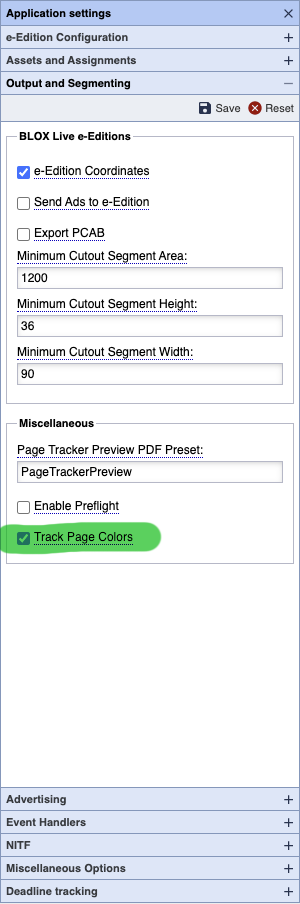
Who should read this document?
This help document is only for the user at a BLOX Total CMS who manages the site's Output Preferences XML file. It describes those options for either uniquely naming Color and Black and White (BW) pages or for sending those pages to different destination folders. This is traditionally handled by the site's Template Master but occasionally someone from IT handles the output file.
When did these features become available?
Support for tagging pages as Color or BW was officially added in the 5.44.x version of the client. Support for uniquely handling the output of said pages was added in client 5.44.07. Release notes for these versions are found here:
The Gist of the Changes
Within the Output Preferences XML, that produces the menu at BLOX Total CMS > Documents > Output and thus drives the output process, the following Output Preferences tags have versions for BW pages for use in <menuGroup> and <method> tags.
| Generic Use or Color Pages | Black and White Pages |
| <approvedPath> | <approvedPath_BW> |
| <folderPath> | <folderPath_BW> |
| <folderPathMacOS> | <folderPathMacOS_BW> |
| <namingConvention> | <namingConvention_BW> |
| <preset> | <preset_BW> |
| <validateName> | <validateName_BW> |
As with all other output preference items, the values in a <method> overwrite those listed in a <menuGroup>. And if not specified in a <method> the value in the <menuGroup> applies to all methods it contains.
In addition, each <chainLink> within a <chain> of an <outputType>pagetracker</output> also supports these optional versions for Black and White pages:
| Generic Use or Color Pages | Black and White Pages |
| <folderPath> | <folderPath_BW> |
| <folderPathMacOS> | <folderPathMacOS_BW> |
| <namingConvention> | <namingConvention_BW> |
| <validateName> | <validateName_BW> |
The parent <menuGroup> or <method> of the <chain> can use <preset_BW> but it can't be specified within an individual <chainLink> as it is each <chainLink> simply copies or renames and copies the PDF sent to Page Tracker.
folderPath Options
<folderPath> tags are used to specify the default paths for output. If an output <menuGroup>, <method> or <chainLink> has a <folderPath_BW> option, then that folder will be used for the location of the output file for a Black and White page. Output files produced from color pages will use the default <folderPath> location.
In all cases, macOS sites can specify either <folderPathMacOS> or <folderPathMacOS_BW> as the need arises and they are mixed platform (i.e. they have both MacOS and Windows users). Else the MacOS sites can just specify the <folderPath> and <folderPath_BW>. This is a change from prior behavior.
namingConvention Options
As with the normal <namingConvention> options, the <namingConvention_BW> can be used to name files uniquely and differently from the raw Adobe InDesign pages. If you want to provide fixed text, just specify lower case characters and they will be treated as constants and uppercased. For example <namingConvention_BW>YYYY-MM-DD_BBBBBB_SGGG_black</namingConvention> might produce something like 2022-01-01_GTIMES_B007_BLACK.
validateName Options
As with the normal <validateName> calls to custom Add-Ons scripts to rename output, the <validateName_BW> option can call a custom function (usually created for sites by TownNews) for Black and White page naming. If specified either <validateName> choice takes precedence over <namingConvention> but because of the way it is coded, you could have <namingConvention> for color pages and <validateName_BW> for Black and White pages.
The real advantage of <validateName> options over <namingConvention> is access to other parts of the naming convention such as the symbol field of the Publication Name or indicators for Day of Week. Thus far, we've been able to produce whatever naming option a site needs through the use of <validateName> and now that can be extended to Black White pages without needing a separate method for Black and White pages. All this simplifies output for users.
In addition, a page's Page Content Type can be used in the naming options when used with <validateName> or <validateName_BW>. Thus you could do something like 2022-01-01_SPORTS_GTIMES_07.
There are even some ways to redirect output to subfolders using <validateName>. Some sites use this for archive naming.
Finally, if the output names need lower case letters in them, this is only possible with custom <validateName> scripts as the <namingConvention> options only produce uppercase text.
The disadvantage of <validateName> scripts is they are generally not modifiable by the site as they require both an understanding of the inner workings of the BLOX Total CMS client for Adobe InDesign as well as experience with ECMAScript. But TownNews will gladly create any <validateName> scripts you need. Just put in a request at support.townnews.com
preset Options
The <preset> option allows the site to automate output and ensure that standards are used for outputting nearly any type of file-based output (Adobe PDF, .ps, .jpg, or even a legacy .eps file). If a different preset is needed for Black and White pages, just include the <preset_BW> option and list the specific preset. For example, you might have these two options:
<preset>Newsprint_Color</preset>
<preset_BW>Newsprint_Black</preset_BW>
Neither preset is an option for a <chain> or <chainLink> but the parent <menuGroup> or <method> can specify both. Note, that chain is only an option for an <outputType>pagetracker</outputType> and the offshoot of this is that PageTracker, and thus live e-Editions will get the result of <preset_BW> for Black and White pages.
approvedPath Options
While not yet functional, when Page Approval becomes a reality in Page Tracker, both the <approvedPath> and <approvedPath_BW> options will be used to send to Page Tracker the path to send the approved PDF. This will only be an option for appliance-based BLOX Total CMS.
Prompt For Page Color
Thus far we have discussed six different tags that can be used in <menuGroup>s or <method>s of an output preferences XML file and four of those can be used with in a <chain> or <chainLink>. But, there is one more tag: <promptForPageColor>. This only accepts a single value: true as shown below:
<promptForPageColor>true</promptForPageColor>
The option is triggered automatically if any of the other six tags are used in their respective locations, but for ease of following, if you are using any of the _BW tags in your output preferences file, go ahead and include a <promptForPageColor>true</promptForPageColor> tag too.
limitMultipage and the Effects on Output
If a multi-page document to be output, the <limitMultipage>true</limitMultipage> should always be specified in the Output Preferences XML file if you want to use unique options for the Color vs. Black and White pages. Without that, all pages are output as the first page and, depending upon the output type, might be output into a single file.