



0.22.0 Gallery
- Updated

The article editor now includes full Find & Replace functionality. You can open it using Ctrl+F, with support for case-sensitive and whole word searches. The tool also provides next/previous navigation along with replace and replace all options. (CMSADMIN-696)
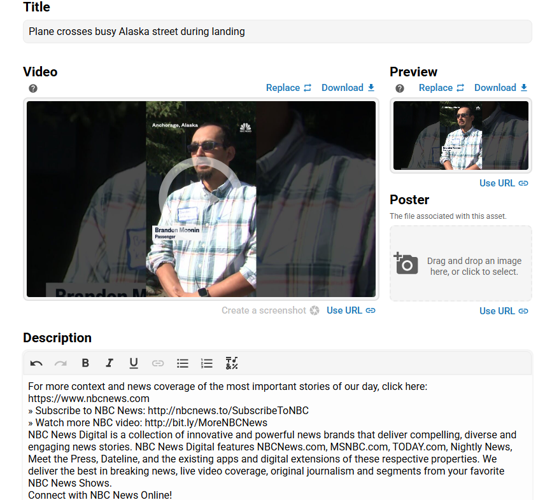
A new streamlined interface is now available for managing video assets in BLOX NXT, bringing titles, descriptions, dates, sections, keywords, captions, and thumbnails together in one place. It introduces drag-and-drop caption uploads, improved image handling with frame-by-frame selection, and a simplified workflow that reduces navigation and makes video management faster and more intuitive. (CMSADMIN-1238)
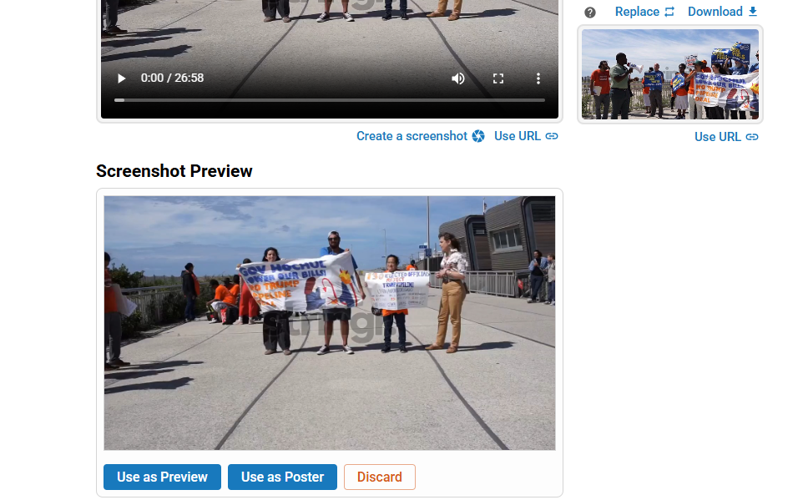
Admins can now capture a still frame from uploaded video files and instantly apply it as a poster or preview image in BLOX NXT. This enhancement improves on the legacy BLOX CMS workflow by making screenshot creation faster and more intuitive, with clear feedback when the feature is unavailable for remote-hosted videos (e.g., YouTube, Vimeo). Once captured, frames can be applied as poster or preview images, saved directly to the asset, or discarded—all within the new simplified, modern interface. (CMSADMIN-771)
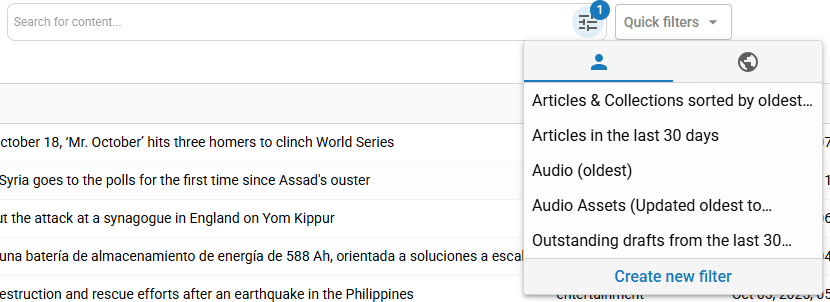
The “Saved Searches” experience has been replaced with a more intuitive Quick Filters system, now accessible directly from the Search Results page for Editorial Assets. You can apply saved filters instantly through the Quick Filters dropdown—just click and go. The dropdown automatically updates to display the name of your selected filter, and when a Quick Filter is chosen, its parameters are applied immediately and shown as filter chips. To create a new filter or update an existing one, use the “+ New Filter” option in the dropdown to open an updated modal, where you can save your current search parameters as a new filter or overwrite an existing one. (CMSADMIN-800)
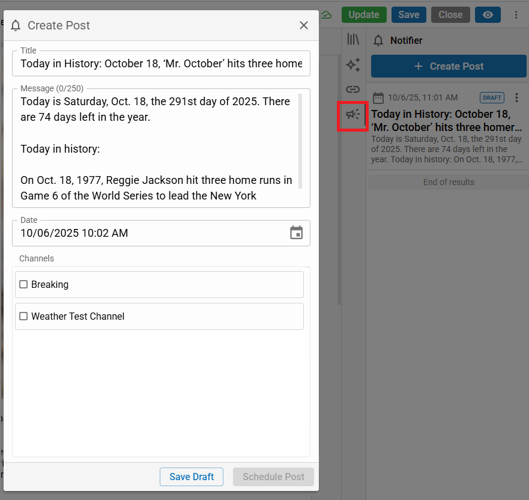
Editors can now create and schedule Notifier posts—such as Facebook alerts, emails, push notifications, and webhooks—directly from any article, video, image, or collection. A new megaphone icon in the Toolkit menu opens a Notifier panel showing all related posts (drafts and sent), with the ability to create new ones via a modal. Posts can be composed, targeted by channel, and scheduled for future delivery. Sent posts are view-only, while drafts remain editable. All preconfigured channels are pulled from your existing Notifier settings from legacy BLOX CMS. (CMSADMIN-1133)
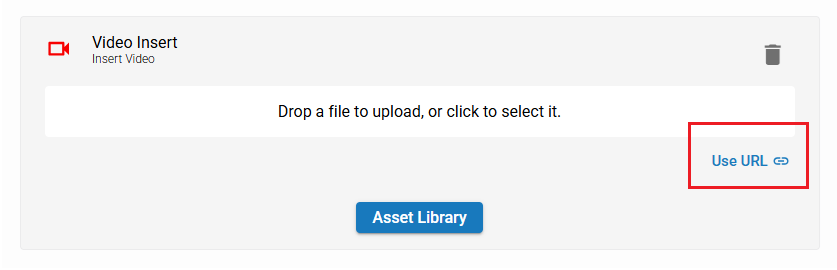
Video placeholders in the story editor now support adding videos by URL. This allows editors to quickly embed external video content like YouTube videos without needing to upload a file or create a separate video asset, streamlining the storytelling process. Existing drag-and-drop and Asset Library options remain available. (CMSADMIN-1151)
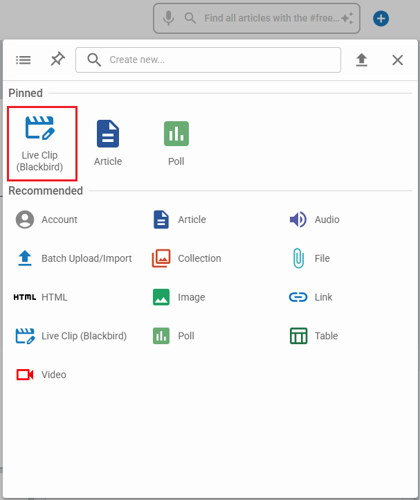
A new “Live Clip (Blackbird)” option has been added to the shortcut creation menu in BLOX NXT, giving newsroom staff and editors direct access to Blackbird’s live video clipping tools without leaving the NXT admin. Available only to partners with BLOX VMS, this integration streamlines workflows with one-click access, preserves existing authentication and permissions, and provides clear feedback if access isn’t configured. (CMSADMIN-1237)
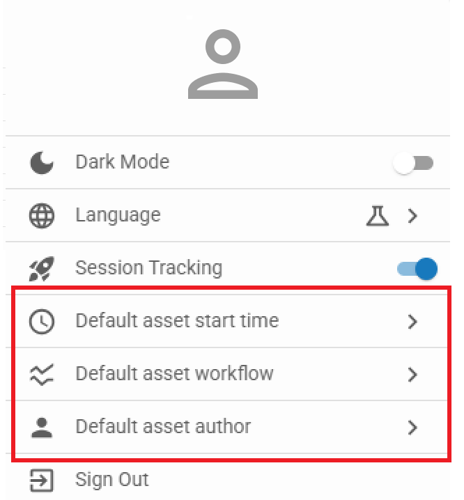
You can now set personal preferences for how new assets behave when you create them. Accessible from your user menu in the NXT header, these preferences include Default Start Time, Default Workflow, and Default Author.
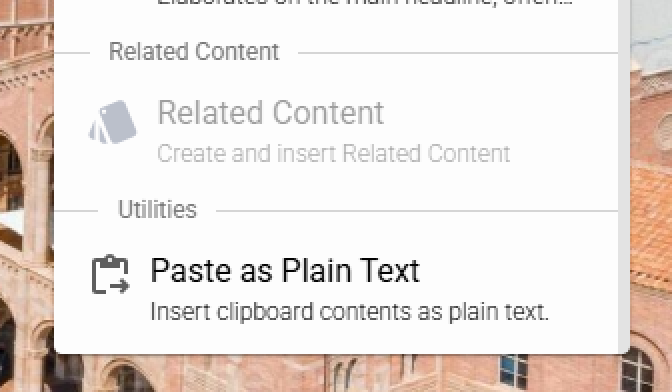
A new “Paste as Plain Text” option is now available from the Floating Action menu and Formatting Palette in the WYSIWYG editor. This lets editors paste copied content (like from emails or documents) without bringing in unwanted formatting. When selected, it strips styles like fonts, colors, and backgrounds, ensuring clean, consistent text in the article body. The first time you use this feature, your browser may prompt you to grant clipboard access. If clipboard access is denied or empty, you’ll receive an informational message.
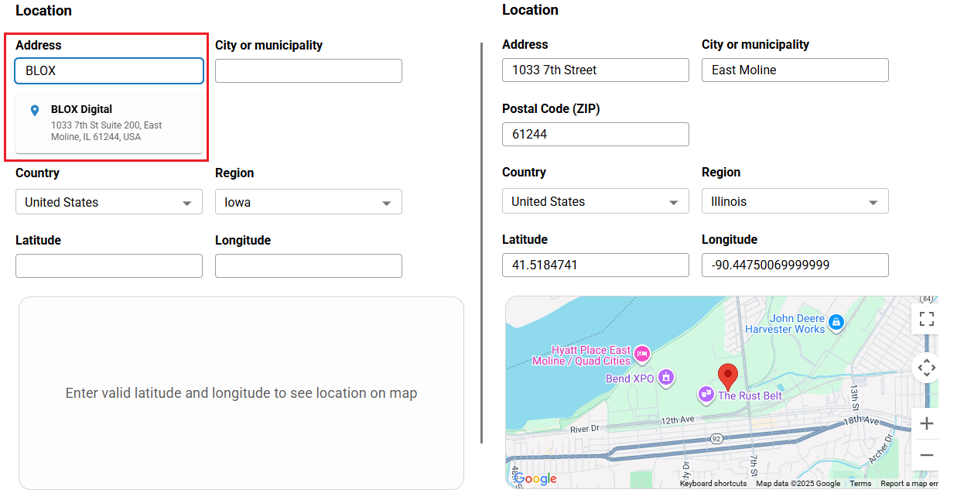
The Location section in the Metadata panel now supports automatic geolocation. When an address is entered, the system looks up and fills in latitude and longitude coordinates automatically—no need for manual entry. A dynamic map preview displays below the fields, centering on the coordinates with a marker for visual confirmation. The map updates as the location changes and disappears if cleared, making it easier to accurately tag geolocated content. (CMSADMIN-1487)
Admins can now easily exit a story using a “Close Story” button in the editing interface. If you have unsaved changes, you’ll be prompted before exiting. After closing, you’ll return to your previous search results. (CMSADMIN-1556)
More like this...
The article editor now includes full Find & Replace functionality. You can open it using Ctrl+F, with support for case-sensitive and whole word searches. The tool also provides next/previous navigation along with replace and replace all options. (CMSADMIN-696)
A new streamlined interface is now available for managing video assets in BLOX NXT, bringing titles, descriptions, dates, sections, keywords, captions, and thumbnails together in one place. It introduces drag-and-drop caption uploads, improved image handling with frame-by-frame selection, and a simplified workflow that reduces navigation and makes video management faster and more intuitive. (CMSADMIN-1238)
Admins can now capture a still frame from uploaded video files and instantly apply it as a poster or preview image in BLOX NXT. This enhancement improves on the legacy BLOX CMS workflow by making screenshot creation faster and more intuitive, with clear feedback when the feature is unavailable for remote-hosted videos (e.g., YouTube, Vimeo). Once captured, frames can be applied as poster or preview images, saved directly to the asset, or discarded—all within the new simplified, modern interface. (CMSADMIN-771)
The “Saved Searches” experience has been replaced with a more intuitive Quick Filters system, now accessible directly from the Search Results page for Editorial Assets. You can apply saved filters instantly through the Quick Filters dropdown—just click and go. The dropdown automatically updates to display the name of your selected filter, and when a Quick Filter is chosen, its parameters are applied immediately and shown as filter chips. To create a new filter or update an existing one, use the “+ New Filter” option in the dropdown to open an updated modal, where you can save your current search parameters as a new filter or overwrite an existing one. (CMSADMIN-800)
Editors can now create and schedule Notifier posts—such as Facebook alerts, emails, push notifications, and webhooks—directly from any article, video, image, or collection. A new megaphone icon in the Toolkit menu opens a Notifier panel showing all related posts (drafts and sent), with the ability to create new ones via a modal. Posts can be composed, targeted by channel, and scheduled for future delivery. Sent posts are view-only, while drafts remain editable. All preconfigured channels are pulled from your existing Notifier settings from legacy BLOX CMS. (CMSADMIN-1133)
Video placeholders in the story editor now support adding videos by URL. This allows editors to quickly embed external video content like YouTube videos without needing to upload a file or create a separate video asset, streamlining the storytelling process. Existing drag-and-drop and Asset Library options remain available. (CMSADMIN-1151)
A new “Live Clip (Blackbird)” option has been added to the shortcut creation menu in BLOX NXT, giving newsroom staff and editors direct access to Blackbird’s live video clipping tools without leaving the NXT admin. Available only to partners with BLOX VMS, this integration streamlines workflows with one-click access, preserves existing authentication and permissions, and provides clear feedback if access isn’t configured. (CMSADMIN-1237)
You can now set personal preferences for how new assets behave when you create them. Accessible from your user menu in the NXT header, these preferences include Default Start Time, Default Workflow, and Default Author.
A new “Paste as Plain Text” option is now available from the Floating Action menu and Formatting Palette in the WYSIWYG editor. This lets editors paste copied content (like from emails or documents) without bringing in unwanted formatting. When selected, it strips styles like fonts, colors, and backgrounds, ensuring clean, consistent text in the article body. The first time you use this feature, your browser may prompt you to grant clipboard access. If clipboard access is denied or empty, you’ll receive an informational message.
The Location section in the Metadata panel now supports automatic geolocation. When an address is entered, the system looks up and fills in latitude and longitude coordinates automatically—no need for manual entry. A dynamic map preview displays below the fields, centering on the coordinates with a marker for visual confirmation. The map updates as the location changes and disappears if cleared, making it easier to accurately tag geolocated content. (CMSADMIN-1487)
Admins can now easily exit a story using a “Close Story” button in the editing interface. If you have unsaved changes, you’ll be prompted before exiting. After closing, you’ll return to your previous search results. (CMSADMIN-1556)
More like this...
As featured on

In this major release of BLOX NXT (version 0.22.0), significant updates have been introduced across the Editorial, Community, and Data areas. Editors gain powerful new tools like Find & Replace in the article editor, frame capture for video posters, Quick Filters in search, notifier post creation directly from assets, video-by-URL embedding, and expanded video/image management.
On the community side, subscription and service management see easier editing, a redesigned rate editor, improved permissions, and export options, while new dashboards, filtering, and live indicators strengthen data insights. Numerous UI refinements, accessibility improvements, and bug fixes further streamline newsroom and CSR workflows.