
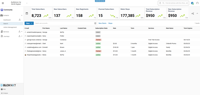
This overview describes the various areas of the Contact Search Interface within the Community Application, including the Application Navigation, Create Shortcut option, Key Metric Display, New Subscription / User Account options, Search Filter, Advanced Filters, Quick Filters, and Search Results.
The Contact Search displays consolidated data from Subscription, User Accounts, and Email Newsletters all in one place. By default results are grouped by E-mail.


The Contact Key Metric Display contains several Contact related Key Performance Indicators (KPI) including Total Subscribers, New Subscribers, New Registrants, Churned Subscribers, Meter Stops, Total Subscription Revenue, and New Subscription Revenue.

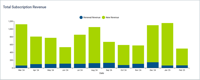
Continuing our promise to provide data where you work, the Contacts Dashboard contains several widgets and Key Performance Indicators (KPI) including Total Subscription Revenue, Service Rate ID, Conversions by Month, Top Assets by Conversion Leads, Audience+ Audience Sizes, Conversions by Access Rule, Total Users, Churn Rate, Meter Stop Rate, and Overall Paid Stop Conversion Rate. In addition, Total Subscribers, New Subscribers, New Registrants, Churned Subs, Meter Stops, Total Revenue, and New Revenue are displayed within the Contact Key Metric Display at the top of the Contacts Search.

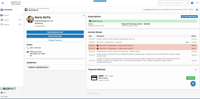
The Single Customer View shows all of the selected contact’s information in one place including user profile, logical subscriptions, transactions, password failures, payments, payment methods, audience segments, and linked accounts!
This overview describes the various areas of the Single Customer View, including the Application Navigation, Create Shortcut button, Breadcrumb Navigation, Lifetime Value, User Admin Settings, User Profile, Audiences, Linked Accounts, Subscriptions, the Activity Stream, and Payment Methods.


The Subscription Detail View displays the Lifetime Value of the subscriber, contains a snapshot of current Subscription Information, the preferred Payment Method, and Transaction Information over the lifetime of subscription.

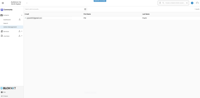
An Admin type user account has the ability to log into BLOX NXT and manage your website. Admin accounts can only be created by another admin account within BLOX NXT. The following is meant to provide an overview of Admin Management within the Community Application including Search Filter, Advanced Filters, and Search Results. It also provides directions on how to create an admin account and how to accept the admin invitation.


This overview details the steps of the Cancel Subscription Wizard starting with selecting a Cancel Reason, offering a Save Rate, Review, and Confirmation.

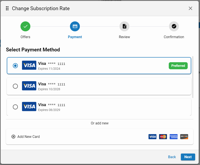
This overview details the steps of the Change Next Subscription Wizard staring with Next Rate Selection, Payment Method Confirmation, Review, and Confirmation.

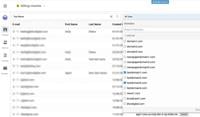
The Multi-Site Contact Search feature makes it easy to find user information across all your sites and domains from one central location. Access it directly from the Contacts Dashboard in Community to quickly locate the details you need without switching between multiple tools.

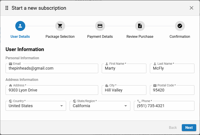
This overview details the steps of the New Subscription Wizard starting with providing User Details, making a Package Selection, selecting Payment Details, optionally adding a New Card, Purchase Review, and Confirmation.


