



blox nxt
Frequently asked questions related to the Content Management application.
Frequently asked questions related to the Content Management application.
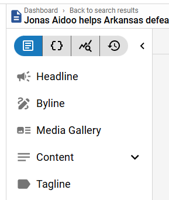
This overview provides descriptions for an article asset’s content fields, including Headline, Byline, Content (Body), Tagline, Hammer, Kicker, Subheadline, Media Gallery, and Additional Content fields within the Content Details Panel.

The Article Toolkit Panel is designed to enhance the content creation and management process. It offers quick access to several key features, allowing editors to efficiently find, insert inline, and manage related media via Relationships (‘link’ icon) and Asset Library (‘books’ icon) Tools respectively, diagnose article content quality via the Assistant (‘sparkle’ icon), and view and respond to internal comments via the Comments Tool (‘speech bubble’ icon).

Displays a set of video cards in a grid, with options to just display a poster or a full player.
See something that needs updating or additional clarification? Want assistance with a topic that isn’t listed here? Please let us know!
At BLOX Digital we are dedicated to providing you the information you need to be successful when you need it.
Visit our feedback page to log in, submit a support ticket, and track the progress of your open requests.